DonationCoder.com forum
 
Read-only archive. This is a static copy of the DonationCoder.com forum. Reading and searching work as before; logging in, posting and private messages do not.
Archive of 2026-10-21 · About this archive · Main site

Author Topic: How old is this file?  (Read 6,520 times)

nkormanik

  • Participant
  • Joined in 2010
  • *
  • Posts: 563
How old is this file?
« on: December 29, 2018, 12:26 AM »
Looking for a little snack program that does the following:

-- Place shortcut to it in SendTo list.

-- Send a file to it.

-- Up pops window saying how old the file is.

-- Days.  Hours.  Minutes.

Any help or thoughts appreciated!

Nicholas Kormanik


magician62

  • Supporting Member
  • Joined in 2011
  • **
  • Posts: 180
Re: How old is this file?
« Reply #1 on: December 29, 2018, 11:07 AM »
I tend to just properties a file to get a date. as I do the age bit in my head, and rarely care about Hours and Minutes

I can't code anything, but can prompt a couple of questions that may arise.

The important thing is how are you determining the age of the file?

Days since created?
Days since modified?

Date created is NOT always the older of the two? File copied form another location for example.

Why an I Magician62? Because Magician1 thru 61 were gone. :)

nkormanik

  • Participant
  • Joined in 2010
  • *
  • Posts: 563
Re: How old is this file?
« Reply #2 on: December 29, 2018, 11:23 AM »
The files are freshly created, less than 38 hours old, so far.  Creation Date and Modified Date appear to be the same.  Either one will do.

I've been searching on the Internet and no one out there seems to have come up with a solution, though it seems so easy -- Current Time minus (say) Creation Date.

No big deal.  Just wondered if someone here could whip it out.

4wd

  • Pedantic Old Bastard
  • Supporting Member
  • Joined in 2006
  • **
  • Posts: 5,652
    • Coding Snacks
Re: How old is this file?
« Reply #3 on: December 29, 2018, 12:30 PM »
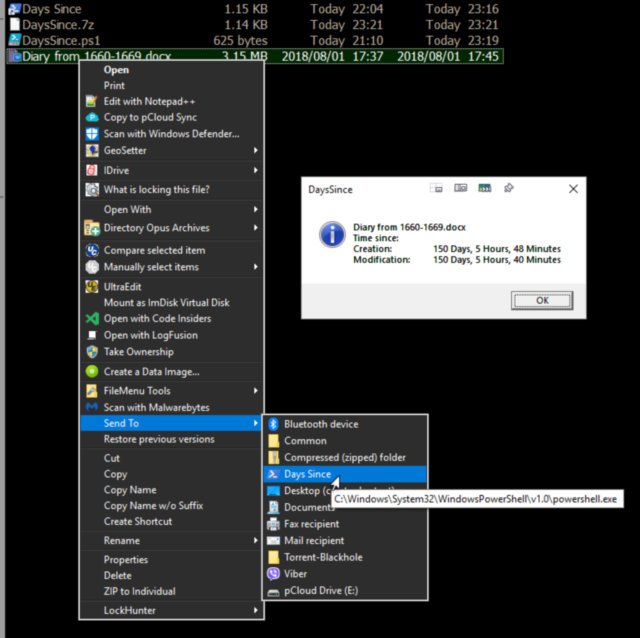
DaysSince.ps1

2018-12-29.jpg

Shortcut in the archive, (assuming Win10), drop it into C:\Users\<user>\appdata\roaming\microsoft\windows\sendto - you'll need to edit the target path to the PowerShell script if it's different from C:\PoSh (my test folder).

Shortcut target:
Code: (text)
C:\Windows\System32\WindowsPowerShell\v1.0\powershell.exe -WindowStyle Hidden -File C:\PoSh\DaysSince.ps1

Code: ( powershell)
<#
  DaysSince.ps1 <file>
#>

Param (
  $SourceFile
)

$fp = (Get-ItemProperty -Path $SourceFile)

$deltaM = (New-TimeSpan -Start $fp.LastWriteTime -End (Get-Date))
$deltaC = (New-TimeSpan -Start $fp.CreationTime -End (Get-Date))

$text = "$([io.path]::GetFileName($SourceFile))`r`nTime since:`r`nCreation:`t`t$($deltaC.Days) Days, $($deltaC.Hours) Hours, $($deltaC.Minutes) Minutes`r`n"
$text += "Modification:`t$($deltaM.Days) Days, $($deltaM.Hours) Hours, $($deltaM.Minutes) Minutes"

$wshell = New-Object -ComObject Wscript.Shell -ErrorAction Stop
$wshell.Popup($text, 0, "DaysSince", 64) | Out-Null

NOTE: I'm running PowerShell 5.x, I don't know if it will work on a lower version.

No doubt there'll be some Windows weirdness that will stop it from running, took ages to work out why it wasn't passing files with spaces in.

And no doubt you'll run afoul of PowerShell's stringent ExecutionPolicy setting, if that happens change the Shortcut Target to:
Code: (text)
C:\Windows\System32\WindowsPowerShell\v1.0\powershell.exe -ExecutionPolicy Bypass -WindowStyle Hidden -File C:\PoSh\DaysSince.ps1
"I will not follow where the path may lead, but I will go where there is no path, and I will leave a trail." - Muriel Strode, 1903
« Last Edit: December 29, 2018, 12:36 PM by 4wd »

Curt

  • Supporting Member
  • Joined in 2006
  • **
  • Posts: 7,565
Re: How old is this file?
« Reply #4 on: December 30, 2018, 12:53 PM »
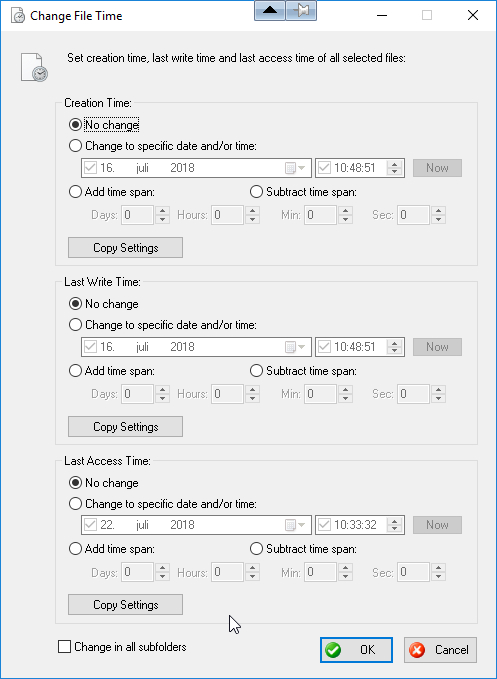
I have certain files in "Last Used..." order. If I want to know more about the various dates, concerning a file, I right-click it and click "FileMenu Tools..." > "Change File Time". Clicking it, does of course not mean I also would have to change anything. But it will tell me some important dates;


[attachthumb=#]

€10 https://www.lopesoft.com/index.php/en/products/filemenutools

nkormanik

  • Participant
  • Joined in 2010
  • *
  • Posts: 563
Re: How old is this file?
« Reply #5 on: December 31, 2018, 01:46 AM »
4wd, wow, amazing.  You nailed it.  Terrific job.

Hope this gem helps others out there.

Skwire, mission accomplished.

Happy New Year to all.

Original address: https://www.donationcoder.com/forum/index.php?topic=46974.0