


Searching the Internet I came across the following PowerShell script:
New Folder Date Time.ps1
$folderName = (Get-Date).tostring("yyyy-MM-dd hh-mm-ss")
New-Item -itemType Directory -Path . -Name $FolderName
Executin
IF this .ps1 file is in the current directory, and executed by PowerShell, an example of the result will be a new folder:
2018-10-17 07-28-52
Here is the challenge, however....
Create in the current folder (subdirectory) the above new folder, current date and time. From the context menu. And don't require that the executable script reside in the current folder -- executable script (or program??) should be in some other permanent location.
Seems odd that such does not already exist out there somewhere.
All thoughts, suggestions appreciated!
Nicholas Kormanik
New Folder Date Time.ps1
$folderName = (Get-Date).tostring("yyyy-MM-dd hh-mm-ss")
New-Item -itemType Directory -Path . -Name $FolderName
Executin
IF this .ps1 file is in the current directory, and executed by PowerShell, an example of the result will be a new folder:
2018-10-17 07-28-52
Here is the challenge, however....
Create in the current folder (subdirectory) the above new folder, current date and time. From the context menu. And don't require that the executable script reside in the current folder -- executable script (or program??) should be in some other permanent location.
Seems odd that such does not already exist out there somewhere.
All thoughts, suggestions appreciated!
Nicholas Kormanik


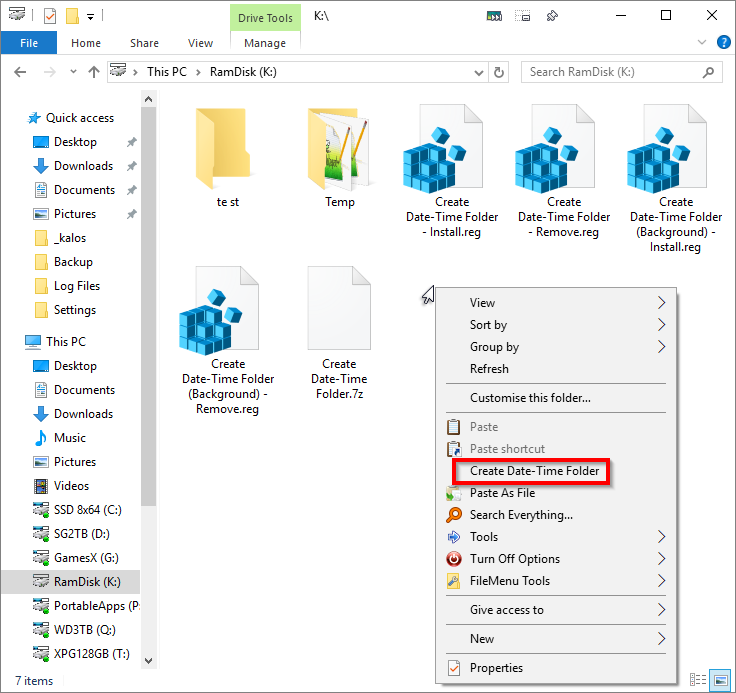
 Create Date-Time Folder.7z


