DonationCoder.com forum
 
Read-only archive. This is a static copy of the DonationCoder.com forum. Reading and searching work as before; logging in, posting and private messages do not.
Archive of 2026-10-21 · About this archive · Main site

Author Topic: DONE: Append/Concatenate/Merge text files, but prepend filenames  (Read 29,880 times)

nkormanik

  • Participant
  • Joined in 2010
  • *
  • Posts: 563
Any suggestions on the best way to append/concatenate/merge text files, and include filenames (and paths, even better) separating the files.

I've regularly simply used 'copy':

copy *.txt bigfile

But this, of course, does not include filenames between files.

Thoughts appreciated.

Thanks!

Nicholas Kormanik

c.gingerich

  • Supporting Member
  • Joined in 2011
  • **
  • Posts: 748
    • Participated in NANY Challenge Six Times
    • Coding Snacks
Re: DONE: Append/Concatenate/Merge text files, but prepend filenames
« Reply #1 on: October 03, 2018, 12:31 PM »
@nkormanik Yep I can whip up a quick app.  :Thmbsup:

4wd

  • Pedantic Old Bastard
  • Supporting Member
  • Joined in 2006
  • **
  • Posts: 5,652
    • Coding Snacks
Re: DONE: Append/Concatenate/Merge text files, but prepend filenames
« Reply #2 on: October 03, 2018, 12:48 PM »
Code: ( powershell)
Get-ChildItem ..\*.ps1 | ForEach-Object { Add-Content -Path 'output.txt' "`r`n----------`r`n$($_.FullName)`r`n----------"; Add-Content -Path 'output.txt' -Value (Get-Content $_.Fullname) }

Output:
Code: (text)
----------
Z:\test\Base64Encode.ps1
----------
$Content = Get-Content -Path K:\favicon.ico -Encoding Byte
$Base64 = [System.Convert]::ToBase64String($Content)
$Base64 | Out-File K:\encoded.txt

----------
Z:\test\concat.ps1
----------
Get-ChildItem ..\*.ps1 | ForEach-Object { Add-Content -Path 'output.txt' "`r`n----------`r`n$($_.FullName)`r`n----------"; Get-Content $_ | Out-File 'output.txt' -Append -Encoding utf8 }

----------
Z:\test\Detect-Computers.ps1
----------
Ping 192.168.0.255
arp -a | select-string 'dynamic' | foreach  {$_.line.trim().split(" ") | select -first 1 } | foreach {(Resolve-DnsName -Name $_ -ea 0).namehost}
(Test-Connection SABnzbd -Quiet -Count 1)
"I will not follow where the path may lead, but I will go where there is no path, and I will leave a trail." - Muriel Strode, 1903
« Last Edit: October 03, 2018, 11:33 PM by 4wd »

c.gingerich

  • Supporting Member
  • Joined in 2011
  • **
  • Posts: 748
    • Participated in NANY Challenge Six Times
    • Coding Snacks
Re: DONE: Append/Concatenate/Merge text files, but prepend filenames
« Reply #3 on: October 03, 2018, 12:51 PM »
@nkormanik

Give this a try. Extract and run MergeTXT.exe. Drag drop plain text files on to the dialog, set an output file, and click Go. You can optionally set the file name as the separator between text in the output file.

There currently is no way to reorder the files in the list other than how you drop them on the dialog and you can also click on the "File" header in the list to sort them A-Z or Z-A. If this works well for you then I'll add a way to reorder the files [buttons to move the file up or down in the list].

https://filedn.com/lx9UK6VkCuXBk4O2YliWIkY/MergeTXT.zip
« Last Edit: October 05, 2018, 03:13 AM by c.gingerich »

wraith808

  • Supporting Member
  • Joined in 2006
  • **
  • Posts: 11,205
    • Participated in NANY Challenge Fourteen Times
    • Coding Snacks
    • Writer
    • Hardware Hacker
Re: DONE: Append/Concatenate/Merge text files, but prepend filenames
« Reply #4 on: October 03, 2018, 08:29 PM »
Code: ( powershell)
Get-ChildItem ..\*.ps1 | ForEach-Object { Add-Content -Path 'output.txt' "----------`r`n$($_.FullName)`r`n----------`r`n"; Get-Content $_ | Out-File 'output.txt' -Append -Encoding utf8 }

Output:
Code: (text)
----------
Z:\test\Base64Encode.ps1
----------
$Content = Get-Content -Path K:\favicon.ico -Encoding Byte
$Base64 = [System.Convert]::ToBase64String($Content)
$Base64 | Out-File K:\encoded.txt

----------
Z:\test\concat.ps1
----------
Get-ChildItem ..\*.ps1 | ForEach-Object { Add-Content -Path 'output.txt' "`r`n----------`r`n$($_.FullName)`r`n----------"; Get-Content $_ | Out-File 'output.txt' -Append -Encoding utf8 }

----------
Z:\test\Detect-Computers.ps1
----------
Ping 192.168.0.255
arp -a | select-string 'dynamic' | foreach  {$_.line.trim().split(" ") | select -first 1 } | foreach {(Resolve-DnsName -Name $_ -ea 0).namehost}
(Test-Connection SABnzbd -Quiet -Count 1)


Google again?  You have me wanting to use powershell for more than I use it for...

4wd

  • Pedantic Old Bastard
  • Supporting Member
  • Joined in 2006
  • **
  • Posts: 5,652
    • Coding Snacks
Re: DONE: Append/Concatenate/Merge text files, but prepend filenames
« Reply #5 on: October 03, 2018, 10:30 PM »
Only to look up the Add-Content command, otherwise was just a mashup of other small scripts I've done.

Was trying to get Add-Content to work instead of Out-File since it takes care of character encoding depending on the input files without having to specify it like Out-File.

Couldn't seem to get the pipes right though.

I like PowerShell because it reminds me a lot of ARexx on  Amiga, you can write off the cuff small bits of code that leverage the system and other programs, run them instantly, and get reasonably non-cryptic error messages back when you screw up.
Plus it's part of the system, I don't need to install IDE, compiler, etc, etc.

Edit: DUH! Just found how it's done using Add-Content  :-[
Wonderful what happens when you have a good sleep ...
Code: ( powershell)
Add-Content -Path 'output.txt' -Value (Get-Content $_.Fullname)

Modified my original post

Can also throw a Sort in the pipe if a particular order is wanted, eg.

Get-ChildItem ..\*.ps1 | Sort CreationTime | ...
Get-ChildItem ..\*.ps1 | Sort -Descending Length | ...

etc etc
"I will not follow where the path may lead, but I will go where there is no path, and I will leave a trail." - Muriel Strode, 1903
« Last Edit: October 06, 2018, 01:02 PM by 4wd »

cranioscopical

  • Friend of the Site
  • Supporting Member
  • Joined in 2006
  • **
  • Posts: 4,776
    • Cody Award
    • Official Forum Clown
    • rotten turkey sandwich - Rotten Turkey Sandwich
Chris

wraith808

  • Supporting Member
  • Joined in 2006
  • **
  • Posts: 11,205
    • Participated in NANY Challenge Fourteen Times
    • Coding Snacks
    • Writer
    • Hardware Hacker
Re: DONE: Append/Concatenate/Merge text files, but prepend filenames
« Reply #7 on: October 04, 2018, 03:04 PM »
I like PowerShell because it reminds me a lot of ARexx on  Amiga, you can write off the cuff small bits of code that leverage the system and other programs, run them instantly, and get reasonably non-cryptic error messages back when you screw up.

I was going further back to the source in my memories, i.e. REXXw on OS/2

Plus it's part of the system, I don't need to install IDE, compiler, etc, etc.

Yeah, there is that too.  I use csc quite a bit for that reason too for simple things- no external dependencies.  The right tool for the job  :Thmbsup:

nkormanik

  • Participant
  • Joined in 2010
  • *
  • Posts: 563
Re: DONE: Append/Concatenate/Merge text files, but prepend filenames
« Reply #8 on: October 04, 2018, 11:33 PM »
4wd, wraith808, cranioscopical...  you guys are great.

Thanks for your help.

Skwire, another one done.

c.gingerich

  • Supporting Member
  • Joined in 2011
  • **
  • Posts: 748
    • Participated in NANY Challenge Six Times
    • Coding Snacks
Re: DONE: Append/Concatenate/Merge text files, but prepend filenames
« Reply #9 on: October 05, 2018, 03:11 AM »
Guess that’s a no on mine. Well I tried  ;)

I’ll delete the download.

wraith808

  • Supporting Member
  • Joined in 2006
  • **
  • Posts: 11,205
    • Participated in NANY Challenge Fourteen Times
    • Coding Snacks
    • Writer
    • Hardware Hacker
Re: DONE: Append/Concatenate/Merge text files, but prepend filenames
« Reply #10 on: October 05, 2018, 04:29 AM »
Guess that’s a no on mine. Well I tried  ;)

I’ll delete the download.

Always good to have alternatives in case needed.  He seems to go with the first solution, which makes sense.  All of the rest of them unless something is wrong with the first solution end up being noise, but not useless.

nkormanik

  • Participant
  • Joined in 2010
  • *
  • Posts: 563
Re: DONE: Append/Concatenate/Merge text files, but prepend filenames
« Reply #11 on: October 05, 2018, 07:33 AM »
c.gingerich, 4wd, wraith808, cranioscopical...  you guys are great.

(Who else did I miss??)

Thanks for your help.

Skwire, another one done.

4wd

  • Pedantic Old Bastard
  • Supporting Member
  • Joined in 2006
  • **
  • Posts: 5,652
    • Coding Snacks
Re: DONE: Append/Concatenate/Merge text files, but prepend filenames
« Reply #12 on: October 05, 2018, 11:26 PM »
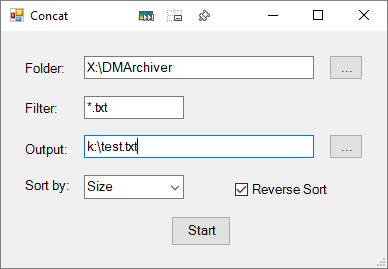
Plus you can add simple GUI's to Powershell scripts, (so much easier than AutoIt):

2018-10-06 09_09_07-Concat.png

For the last few Powershell GUIs I've been using PoshGUI to create them rather than screw around in Visual Studio.

Concat-GUI.ps1
Code: ( powershell)
<#
.NAME
    Concat-GUI.ps1
#>

Add-Type -AssemblyName System.Windows.Forms
[System.Windows.Forms.Application]::EnableVisualStyles()

#region begin GUI{ 

$Form                            = New-Object system.Windows.Forms.Form
$Form.ClientSize                 = '386,237'
$Form.text                       = "Concat"
$Form.TopMost                    = $false

$TextBox1                        = New-Object system.Windows.Forms.TextBox
$TextBox1.multiline              = $false
$TextBox1.width                  = 230
$TextBox1.height                 = 20
$TextBox1.location               = New-Object System.Drawing.Point(83,25)
$TextBox1.Font                   = 'Microsoft Sans Serif,10'

$Label1                          = New-Object system.Windows.Forms.Label
$Label1.text                     = "Folder:"
$Label1.AutoSize                 = $true
$Label1.width                    = 25
$Label1.height                   = 10
$Label1.location                 = New-Object System.Drawing.Point(22,29)
$Label1.Font                     = 'Microsoft Sans Serif,10'

$Button1                         = New-Object system.Windows.Forms.Button
$Button1.text                    = "..."
$Button1.width                   = 34
$Button1.height                  = 25
$Button1.location                = New-Object System.Drawing.Point(328,24)
$Button1.Font                    = 'Microsoft Sans Serif,10'

$TextBox2                        = New-Object system.Windows.Forms.TextBox
$TextBox2.multiline              = $false
$TextBox2.width                  = 100
$TextBox2.height                 = 20
$TextBox2.location               = New-Object System.Drawing.Point(83,65)
$TextBox2.Font                   = 'Microsoft Sans Serif,10'

$Label2                          = New-Object system.Windows.Forms.Label
$Label2.text                     = "Filter:"
$Label2.AutoSize                 = $true
$Label2.width                    = 25
$Label2.height                   = 10
$Label2.location                 = New-Object System.Drawing.Point(22,69)
$Label2.Font                     = 'Microsoft Sans Serif,10'

$TextBox3                        = New-Object system.Windows.Forms.TextBox
$TextBox3.multiline              = $false
$TextBox3.width                  = 230
$TextBox3.height                 = 20
$TextBox3.location               = New-Object System.Drawing.Point(83,104)
$TextBox3.Font                   = 'Microsoft Sans Serif,10'

$Button2                         = New-Object system.Windows.Forms.Button
$Button2.text                    = "..."
$Button2.width                   = 34
$Button2.height                  = 25
$Button2.location                = New-Object System.Drawing.Point(328,103)
$Button2.Font                    = 'Microsoft Sans Serif,10'

$Label3                          = New-Object system.Windows.Forms.Label
$Label3.text                     = "Output:"
$Label3.AutoSize                 = $true
$Label3.width                    = 25
$Label3.height                   = 10
$Label3.location                 = New-Object System.Drawing.Point(22,110)
$Label3.Font                     = 'Microsoft Sans Serif,10'

$CheckBox1                       = New-Object system.Windows.Forms.CheckBox
$CheckBox1.text                  = "Reverse Sort"
$CheckBox1.AutoSize              = $false
$CheckBox1.width                 = 113
$CheckBox1.height                = 20
$CheckBox1.location              = New-Object System.Drawing.Point(234,149)
$CheckBox1.Font                  = 'Microsoft Sans Serif,10'

$Button3                         = New-Object system.Windows.Forms.Button
$Button3.text                    = "Start"
$Button3.width                   = 60
$Button3.height                  = 30
$Button3.location                = New-Object System.Drawing.Point(170,185)
$Button3.Font                    = 'Microsoft Sans Serif,10'

$Label4                          = New-Object system.Windows.Forms.Label
$Label4.text                     = "Sort by:"
$Label4.AutoSize                 = $true
$Label4.width                    = 25
$Label4.height                   = 10
$Label4.location                 = New-Object System.Drawing.Point(22,146)
$Label4.Font                     = 'Microsoft Sans Serif,10'

$ComboBox1                       = New-Object system.Windows.Forms.ComboBox
$ComboBox1.text                  = ""
$ComboBox1.width                 = 100
$ComboBox1.height                = 20
@('Name','Size','Creation','Modification','Accessed') | ForEach-Object {[void] $ComboBox1.Items.Add($_)}
$ComboBox1.location              = New-Object System.Drawing.Point(83,144)
$ComboBox1.Font                  = 'Microsoft Sans Serif,10'
$ComboBox1.SelectedIndex         = 0

$Form.controls.AddRange(@($TextBox1,$Label1,$Button1,$TextBox2,$Label2,$TextBox3,$Button2,$Label3,$CheckBox1,$Button3,$Label4,$ComboBox1))

#region gui events {
$Button1.Add_Click({
  $objForm = New-Object System.Windows.Forms.FolderBrowserDialog
  $objForm.Description = "Select folder containing files"
  $objForm.SelectedPath = [System.Environment+SpecialFolder]'MyComputer'
  $objForm.ShowNewFolderButton = $false
  $result = $objForm.ShowDialog()
  if ($result -eq "OK") {
    $TextBox1.Text = $objForm.SelectedPath
  } else {
    $TextBox1.Text = ""
  }
})

$Button2.Add_Click({
$SaveChooser = New-Object -TypeName System.Windows.Forms.SaveFileDialog
$SaveChooser.ShowDialog()
$TextBox3.Text = $SaveChooser.FileName
})

$Button3.Add_Click({
  if ($TextBox2.Text -eq "") { $TextBox2.Text = '*.txt'}
  if (($TextBox1.Text -ne "") -and ($TextBox3.Text -ne "")) {
    Sort-Files
  }
})

#endregion events }

#endregion GUI }

#Write your logic code here

Function Sort-Files {
  $files = Get-ChildItem ($TextBox1.Text + '\' + $TextBox2.Text)
  if ($CheckBox1.Checked) {
    switch ($ComboBox1.SelectedItem) {
      'Name' { $sorted = $files | Sort-Object -Property Name -Descending }
      'Size' { $sorted = $files | Sort-Object -Property Length -Descending }
      'Creation' { $sorted = $files | Sort-Object -Property CreationTime -Descending }
      'Modification' { $sorted = $files | Sort-Object -Property LastWriteTime -Descending }
      'Accessed' { $sorted = $files | Sort-Object -Property LastAccessTime -Descending }
    }
  } else {
    switch ($ComboBox1.SelectedItem) {
      'Name' { $sorted = $files | Sort-Object -Property Name }
      'Size' { $sorted = $files | Sort-Object -Property Length }
      'Creation' { $sorted = $files | Sort-Object -Property CreationTime }
      'Modification' { $sorted = $files | Sort-Object -Property LastWriteTime }
      'Accessed' { $sorted = $files | Sort-Object -Property LastAccessTime }
    }
  }
  Merge-Files $sorted
}

Function Merge-Files {
  param (
    $objects
  )
  for ($I = 0; $i -lt $objects.Count; $i++) {
    Add-Content -Path $TextBox3.Text "`r`n----------`r`n$($objects[$i].Fullname)`r`n----------"
    Add-Content -Path $TextBox3.Text -Value (Get-Content $objects[$i])
  }
}

[void]$Form.ShowDialog()

Filter defaults to *.txt if it's empty when Start is pressed.

Create a shortcut to run it from with the Target as: %SystemRoot%\system32\WindowsPowerShell\v1.0\powershell.exe -noprofile -executionpolicy bypass -File "Concat-GUI.ps1"

Guess that’s a no on mine. Well I tried  ;)

I’ll delete the download.

No need to, the more the merrier ... I only do this for some mental exercise and I use little to no error checking in my scripts, (because I'm lazy :D ), so something someone else writes is more likely to be PEBKAC proof.
"I will not follow where the path may lead, but I will go where there is no path, and I will leave a trail." - Muriel Strode, 1903
« Last Edit: October 05, 2018, 11:40 PM by 4wd »

wraith808

  • Supporting Member
  • Joined in 2006
  • **
  • Posts: 11,205
    • Participated in NANY Challenge Fourteen Times
    • Coding Snacks
    • Writer
    • Hardware Hacker
Re: DONE: Append/Concatenate/Merge text files, but prepend filenames
« Reply #13 on: October 06, 2018, 12:48 AM »
That site is so cool!  Thanks for it!

4wd

  • Pedantic Old Bastard
  • Supporting Member
  • Joined in 2006
  • **
  • Posts: 5,652
    • Coding Snacks
Re: DONE: Append/Concatenate/Merge text files, but prepend filenames
« Reply #14 on: October 06, 2018, 01:46 AM »
That site is so cool!  Thanks for it!

You're welcome, can't get my GUIs to save, (after creating an account), using Save never seems to work ... maybe I'm just running too much anti-tracking/ad stuff in the browser, haven't spent the time to work it out yet.

I just end up using copy/paste to get the rough raw code into PoSh ISE and then fiddle around with the values to add/remove/move things.
"I will not follow where the path may lead, but I will go where there is no path, and I will leave a trail." - Muriel Strode, 1903

nkormanik

  • Participant
  • Joined in 2010
  • *
  • Posts: 563
Re: DONE: Append/Concatenate/Merge text files, but prepend filenames
« Reply #15 on: July 05, 2025, 01:36 AM »
In MergeTXT please allow for rearranging the order of the text files.

Wonderful program, but we need the ability to change file order.  Say, using Ctrl-Arrows????  (not just using the mouse.  that's too hard.)

Thanks!!!!

Original address: https://www.donationcoder.com/forum/index.php?topic=46480.0