DonationCoder.com forum
 
Read-only archive. This is a static copy of the DonationCoder.com forum. Reading and searching work as before; logging in, posting and private messages do not.
Archive of 2026-10-21 · About this archive · Main site

Author Topic: Geotagging your photos? gps4cam and other tools?  (Read 14,337 times)

mouser

  • First Author
  • Administrator
  • Joined in 2005
  • *****
  • Posts: 40,931
    • Gathering Badge
    • Plugin Coding Medal
    • Participated in NANY Challenge Seventeen Times
    • Cody Award
    • Coding Snacks
    • Volunteers/Staff
Geotagging your photos? gps4cam and other tools?
« on: June 25, 2018, 03:39 AM »
Does anyone have any experience with automatic geotagging of photos that they take?

Modern phones can probably do this quite easily, but mid-range dslr cameras seem to lack this feature -- you have to spend nearly a thousand dollars to get a good camera with built-in gps to geotag photos.

I have a friend who is interested in taking lots of photos and having them geo-tagged with gps location information.

One possible solution looks like combining a phone app with some post processing of photos, using a mobile app like gps4cam: http://gps4cam.com/

Anyone have any experience using software like this to add gps geotagging info to photos?

4wd

  • Pedantic Old Bastard
  • Supporting Member
  • Joined in 2006
  • **
  • Posts: 5,652
    • Coding Snacks
Re: Geotagging your photos? gps4cam and other tools?
« Reply #1 on: June 25, 2018, 06:03 AM »
Yes, I've done it for years.

I log my trips/drives/etc and export the tracks as GPX files, these are then imported into a program that matches the EXIF metadata against the GPS tracklog.

The track log:
I used to use a GPS datalogger, specifically the Holux M-1200E, the battery was good for about 12 hours and I set it to log every 3 seconds or 5 metres, whichever came first.
The program that came with it, (HOLUX ezTour for Logger), downloaded the tracklog from the device and displayed it, you could then add photos and it would plot them against the track.  You could then export that to HTML as a ready made web page, view it in Google Earth, etc.
I just exported the tracks as GPX data.

Now I just use my smartphone and the app GPS Logger set to log in GPX format, then I transfer the files to my computer.  (eg. Cruise 2014, Ukraine 2017 - both just using the smartphone for the tracklog)

I also use other means to save a tracklog, when I go 4wd'ing the software we use for mapping automatically plots and saves a tracklog and I usually have another smartphone logging also.

If you think it's overkill, it isn't, there are times, (especially 4wd'ing), when satellite reception is minimal, (mist enshrouded wet tree cover for example), so the more the merrier.

Geo-tagging:
On the computer I use Geosetter, (it's free):
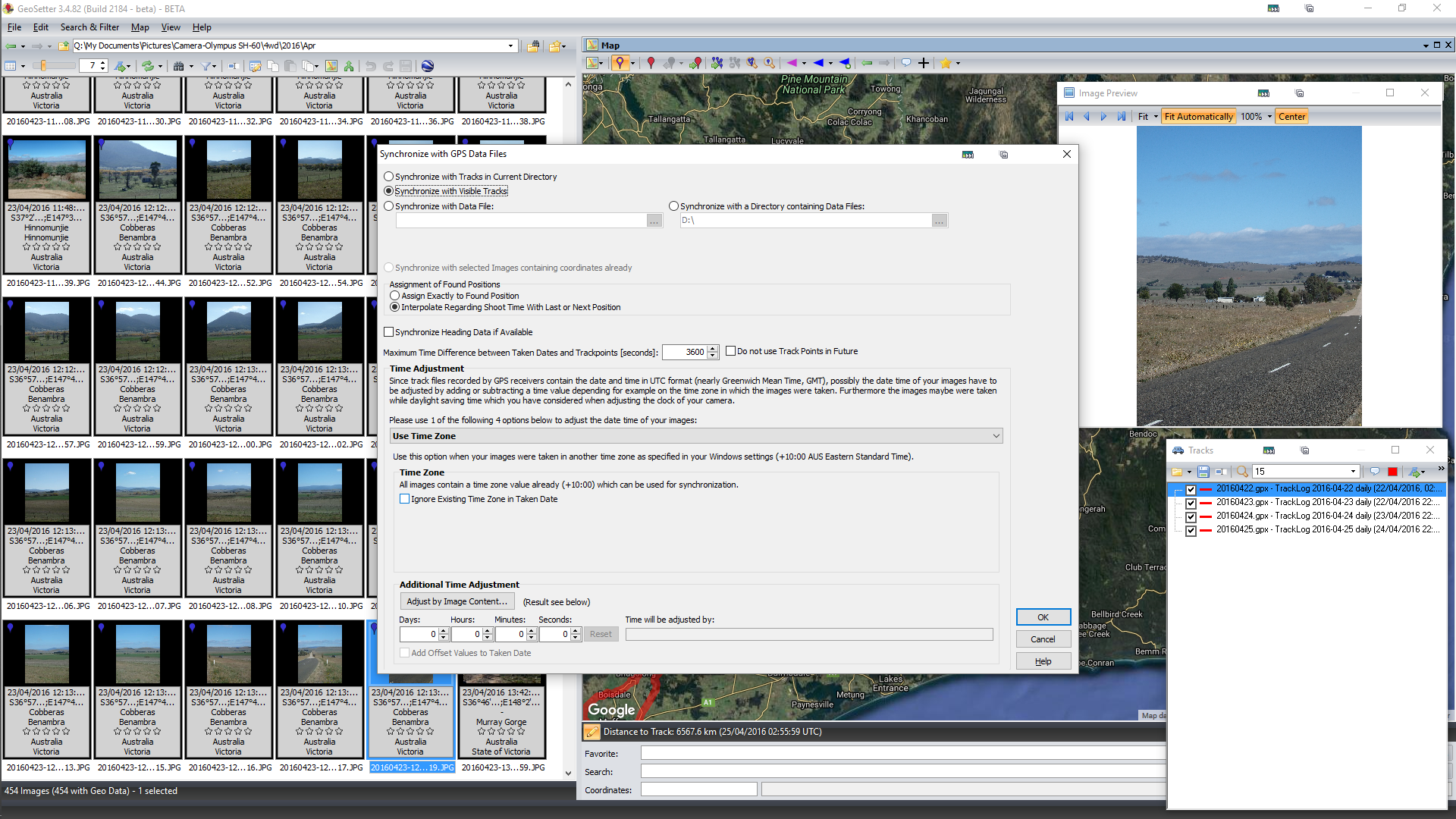
Browse a folder with images, (my example already has geo-tagged images but you'll get the idea).
Open a GPX tracklog(s) for those images, it'll display the track on the map.
2018-06-25 15_14_09-GeoSetter 3.4.82 (Build 2184 - beta) - BETA.png

Hit Control + G to bring up the interface to synchronize the photos to the track, adjust the timezone if you need to.
If the clock on the camera is/was wrong you can add a time adjustment if required, (eg. I've corrected for the battery being flat in a camera and the clock reading 2011-01-01 00:00:00 - about 5 years out of date in one case).
2018-06-25 15_23_43-Greenshot.png

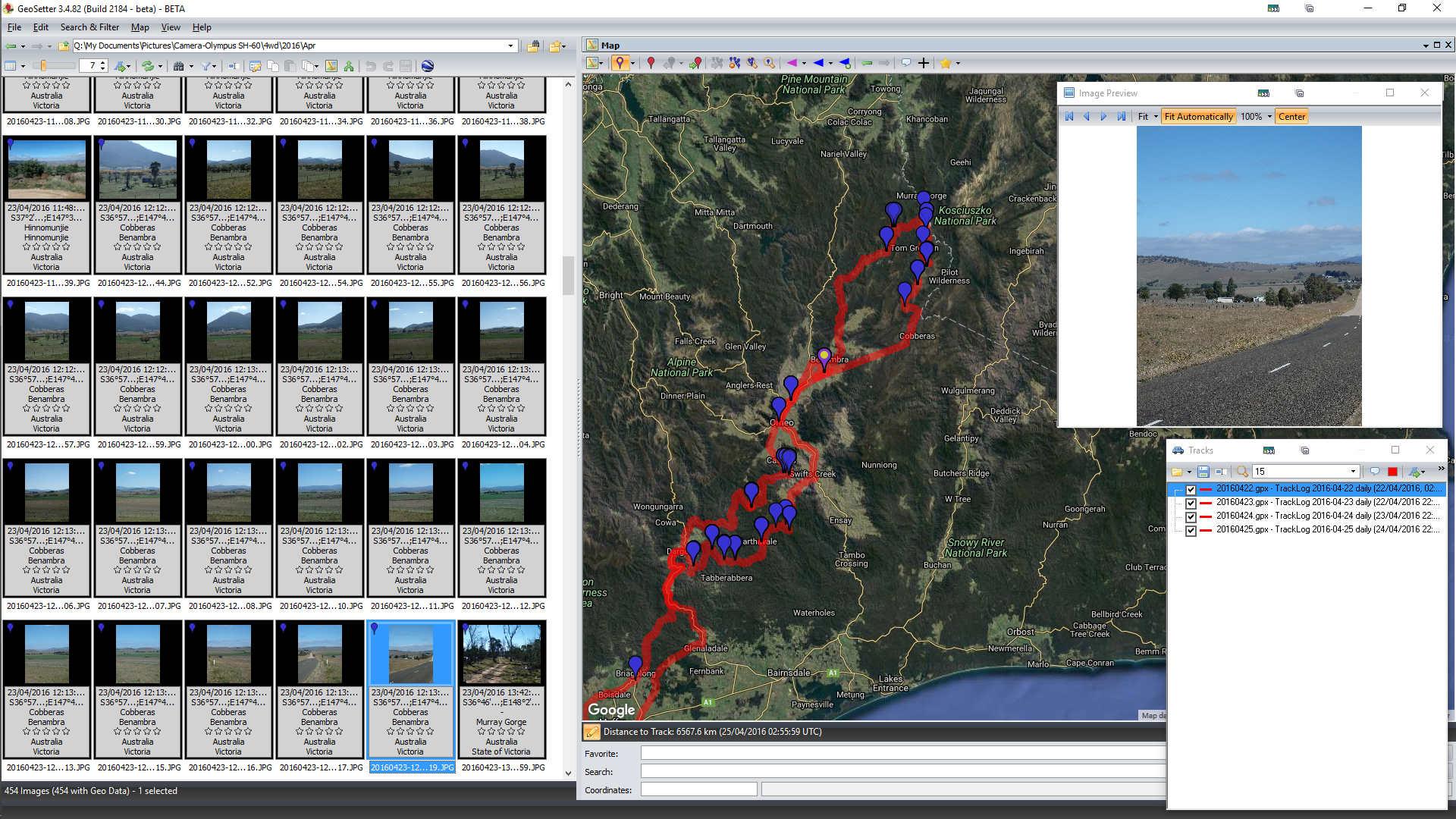
Hit OK and it'll plot the photos against the track.
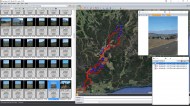
2018-06-25 15_22_55-Greenshot.png

You can keep repeating/adjusting until you have the photos where they should be and then save them, by default it renames the original to *.jpeg_original so nothing is overwritten

Geosetter can also do files that don't use internal metadata structures by writing an XMP file, eg. it can't write to MP4 metadata directly so it will create a companion XMP file.  It can do it for pretty much any file, just need to add the extension to recognised file types.

What happens when you forgot to log?
Google comes to your rescue providing you have an Android phone and have Location History turned on.

When I was in Ukraine last year I forgot to turn on the GPS Logger on the phone for the first ~200km one day which was a little annoying.

Log into Google, go to Maps and explore your Timeline:
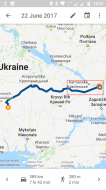
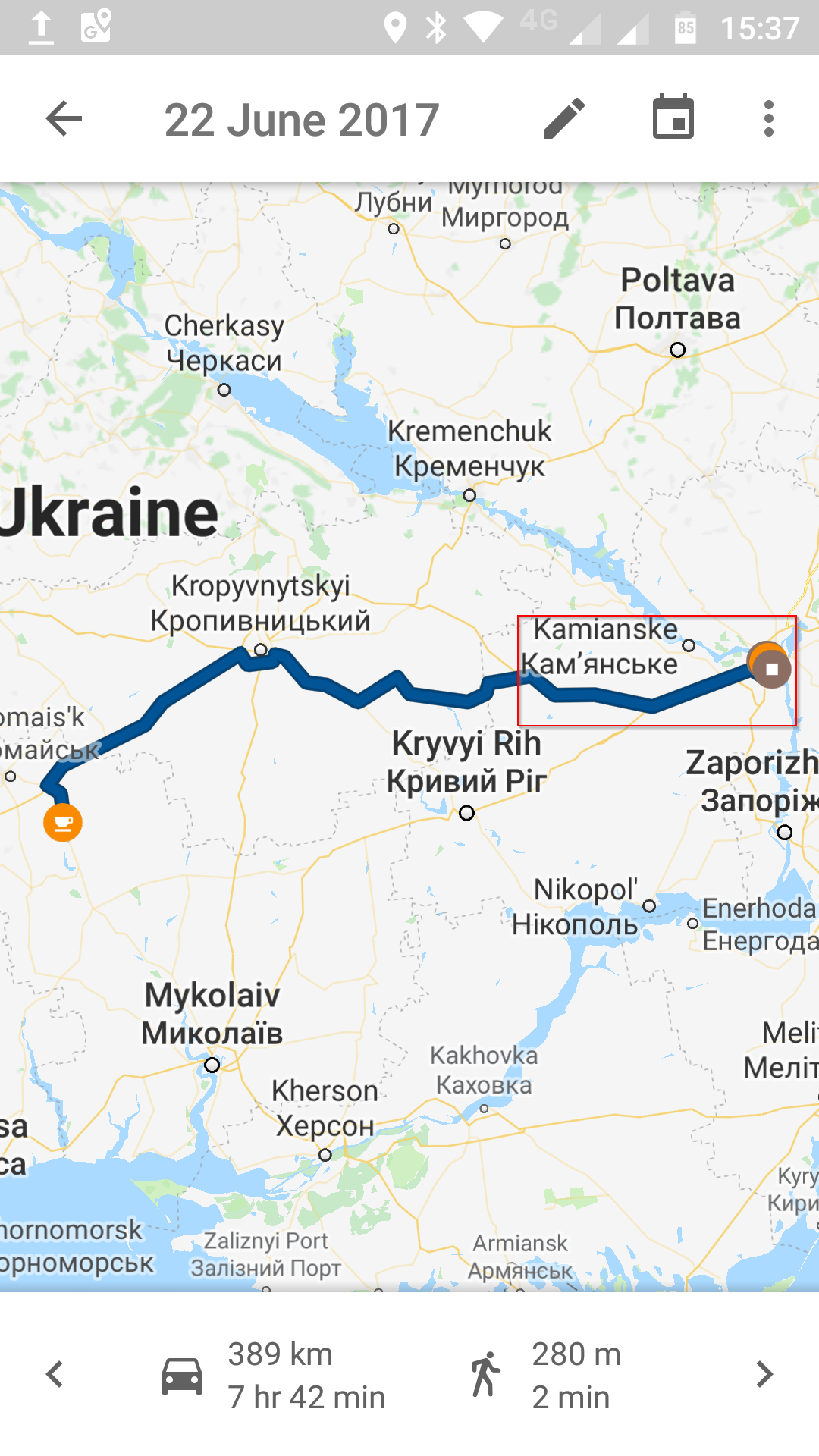
Screenshot_20180625-153755.png

The part in the square above was missing from my GPS tracklog.

The screenshot is from Maps on my phone, if you log in via a web browser you can do basic editing of your route along with adding points, etc.
You can then export that as a KML/KMZ track which you can convert to GPX using GPSBabel (program) or GPS Visualizer (website).
See below.

This all depends on how much you want to get into logging your itinerary, I like to know where I've been ;D

NOTE: If you're going to go this way, separate GPS logger and amalgamate the photos and tracklog using another program, I suggest you get into the habit of either checking the camera time every day or taking a photo of your watch before you take your first picture, (assuming your watch is correct - phone clock would probably be better).  It makes it a lot easier when it comes to syncing the photos with the tracklog if you know the time differential.


What else can you do with tracklogs?

Google Streetview timelapse of the route I took the first day in Ukraine which brings it back far better than all the photos I took, (8 hours, 498.8km in ~11.5 mins) (file size is ~224MB).  Especially the deterioration in the roads the further east I went.

NOTE: Couple of sections where it'll say "No image available" - I'm lazy and didn't bother cutting them out.

In case you're wondering, that took a few hours of data massaging and various other software to get the tracklog to the point where it would generally grab the correct image from Streetview.
"I will not follow where the path may lead, but I will go where there is no path, and I will leave a trail." - Muriel Strode, 1903
« Last Edit: June 26, 2018, 01:35 AM by 4wd »

Jibz

  • Cold Warrior
  • Developer
  • Joined in 2005
  • ***
  • Posts: 1,187
    • Programming School - Stage 1 Medal
    • Coding Snacks
    • Participated in NANY Challenge Four Times
Re: Geotagging your photos? gps4cam and other tools?
« Reply #2 on: June 25, 2018, 07:03 AM »
Sometimes I've simply had my phone in my pocket while out taking pictures, and then went to Google location history (think it's called timeline now), which automatically tracks your movements, and exported the data and imported it into Lightroom.

I haven't done that for about a year or two though, so I don't know if this is still possible.

Good idea about taking a picture of your clock!
"A problem, properly stated, is a problem on it's way to being solved" -Buckminster Fuller
"Multithreading is just one damn thing after, before, or simultaneous with another" -Andrei Alexandrescu

4wd

  • Pedantic Old Bastard
  • Supporting Member
  • Joined in 2006
  • **
  • Posts: 5,652
    • Coding Snacks
Re: Geotagging your photos? gps4cam and other tools?
« Reply #3 on: June 25, 2018, 07:13 AM »
Sometimes I've simply had my phone in my pocket while out taking pictures, and then went to Google location history (think it's called timeline now), which automatically tracks your movements, and exported the data and imported it into Lightroom.

I haven't done that for about a year or two though, so I don't know if this is still possible.

It is, I mentioned it above, but it's not as accurate as something that logs GPS co-ordinates, (program or device).

Not sure if you can export just part of your Timeline, when I was doing the timelapse I think I had to go to Google Takeout, export my whole Location History then use another program to convert the date range I wanted.
"I will not follow where the path may lead, but I will go where there is no path, and I will leave a trail." - Muriel Strode, 1903
« Last Edit: June 25, 2018, 07:36 AM by 4wd »

KodeZwerg

  • Honorary Member
  • Joined in 2018
  • **
  • Posts: 718
    • Participated in NANY Challenge Four Times
    • Coding Snacks
Re: Geotagging your photos? gps4cam and other tools?
« Reply #4 on: June 25, 2018, 07:55 AM »
For Delphi Coders, best thing is using CCR Exif v1.5.1 library.
If you need an application with its features i can try build one for you.

Jibz

  • Cold Warrior
  • Developer
  • Joined in 2005
  • ***
  • Posts: 1,187
    • Programming School - Stage 1 Medal
    • Coding Snacks
    • Participated in NANY Challenge Four Times
Re: Geotagging your photos? gps4cam and other tools?
« Reply #5 on: June 25, 2018, 06:24 PM »
Sometimes I've simply had my phone in my pocket while out taking pictures, and then went to Google location history (think it's called timeline now), which automatically tracks your movements, and exported the data and imported it into Lightroom.

I haven't done that for about a year or two though, so I don't know if this is still possible.

It is, I mentioned it above, but it's not as accurate as something that logs GPS co-ordinates, (program or device).

Oh sorry, I totally missed that!
"A problem, properly stated, is a problem on it's way to being solved" -Buckminster Fuller
"Multithreading is just one damn thing after, before, or simultaneous with another" -Andrei Alexandrescu

mouser

  • First Author
  • Administrator
  • Joined in 2005
  • *****
  • Posts: 40,931
    • Gathering Badge
    • Plugin Coding Medal
    • Participated in NANY Challenge Seventeen Times
    • Cody Award
    • Coding Snacks
    • Volunteers/Staff
Re: Geotagging your photos? gps4cam and other tools?
« Reply #6 on: June 25, 2018, 10:37 PM »
Thanks for your detailed description of your workflow, 4wd -- that's very helpful!  :Thmbsup:

4wd

  • Pedantic Old Bastard
  • Supporting Member
  • Joined in 2006
  • **
  • Posts: 5,652
    • Coding Snacks
Re: Geotagging your photos? gps4cam and other tools?
« Reply #7 on: June 26, 2018, 01:19 AM »
Re. Google Timeline - just looked back on what I had to do.


If you're not interested in logging GPS co-ords you can just use Timeline, log in via a browser and then you can use Snap to roads to smooth out the track, (the RAW data doesn't get deleted or modified unless you specifically tell it to).  Obviously only really good if you stick to roads, doesn't work for footpaths, tracks, etc.

If you want to have a look where you spend your time you can upload your Location History JSON file and get a heatmap: Location History Visualizer

2018-06-26 11_16_32-Location History Visualizer – Heatmap.jpg
"I will not follow where the path may lead, but I will go where there is no path, and I will leave a trail." - Muriel Strode, 1903
« Last Edit: June 26, 2018, 01:41 AM by 4wd »

Original address: https://www.donationcoder.com/forum/index.php?topic=45794.0