DonationCoder.com forum
 
Read-only archive. This is a static copy of the DonationCoder.com forum. Reading and searching work as before; logging in, posting and private messages do not.
Archive of 2026-10-21 · About this archive · Main site

Author Topic: taskbar/menu bar appearing on left of screen  (Read 6,661 times)

KatFisch999

  • Supporting Member
  • Joined in 2017
  • **
  • Posts: 2
taskbar/menu bar appearing on left of screen
« on: May 08, 2018, 10:03 PM »
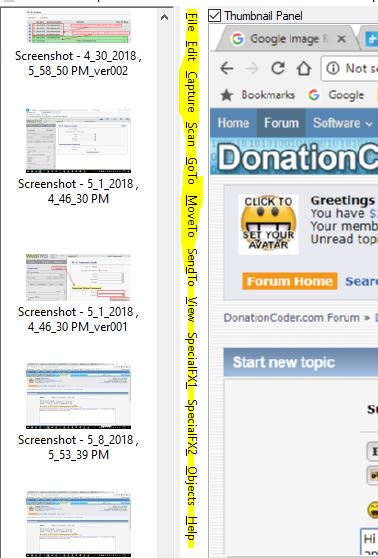
Hi there! I LOVE Screenshot Captor!!  Just having an issue with the taskbar (menu bar?  like "File/Edit/Capture...etc").  On my Desktop PC, it's been appearing on the left for some time, between the main screen and the screenshot panel.  On my laptop, it appears at the top, where I want it.  How can I get it to change so it appears at the top? 

On PC, I've got v. 4.21.1.  On laptop, I have 4.29.0 (latest), in case it makes a difference -- speaking of which, how do I upgrade the one on my PC to the latest version?
hamradio

  • Amateur Radio Guy
  • Charter Honorary Member
  • Joined in 2006
  • ***
  • Posts: 893
    • Plugin Coding Medal
    • Participated in NANY Challenge Fifteen Times
    • Cody Award
    • Coding Snacks
    • Volunteers/Staff
    • Hardware Hacker
Re: taskbar/menu bar appearing on left of screen
« Reply #1 on: May 08, 2018, 11:26 PM »
Hi there! I LOVE Screenshot Captor!!  Just having an issue with the taskbar (menu bar?  like "File/Edit/Capture...etc").  On my Desktop PC, it's been appearing on the left for some time, between the main screen and the screenshot panel.  On my laptop, it appears at the top, where I want it.  How can I get it to change so it appears at the top? 

On PC, I've got v. 4.21.1.  On laptop, I have 4.29.0 (latest), in case it makes a difference -- speaking of which, how do I upgrade the one on my PC to the latest version?

Just another Screenshot Captor user, but try clicking near the top of it and while holding mouse button down drag to the top before the title bar.  Seems to work for me to move it like that and back. :up:

mouser

  • First Author
  • Administrator
  • Joined in 2005
  • *****
  • Posts: 40,931
    • Gathering Badge
    • Plugin Coding Medal
    • Participated in NANY Challenge Seventeen Times
    • Cody Award
    • Coding Snacks
    • Volunteers/Staff
Re: taskbar/menu bar appearing on left of screen
« Reply #2 on: May 08, 2018, 11:54 PM »
Quote
speaking of which, how do I upgrade the one on my PC to the latest version
Just download and install latest version from official web page on top of existing version to upgrade: http://www.donationcoder.com/software/mouser/popular-apps/screenshot-captor

KatFisch999

  • Supporting Member
  • Joined in 2017
  • **
  • Posts: 2
Re: taskbar/menu bar appearing on left of screen
« Reply #3 on: May 09, 2018, 12:55 AM »
@hamradio - Thanks! I tried it and worked like a charm. My menubar is back at the top.  I must've inadvertently dragged it to the left.  thanks again.  :)
@mouser - thanks for the upgrade info.  I'll do that.

Original address: https://www.donationcoder.com/forum/index.php?topic=45510.0