DonationCoder.com forum
 
Read-only archive. This is a static copy of the DonationCoder.com forum. Reading and searching work as before; logging in, posting and private messages do not.
Archive of 2026-10-21 · About this archive · Main site

Author Topic: How to change a HotKey?  (Read 5,181 times)

andrewlen

  • Enjoy helping others, to help themselves...
  • Supporting Member
  • Joined in 2017
  • **
  • Posts: 2
How to change a HotKey?
« on: April 25, 2018, 07:18 AM »
Hi,

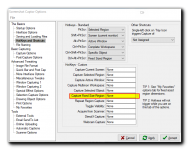
I can't seem to be able to figure out how to change a ScreenGrab hotkey so that when I press Shift + PrtScr it defaults to Capture Fixed Size Region which I have set as 888x500 which is a size I often need to use. Please see below.
HotKeys.png

Any tips / instructions on how I can do this please?

Thanks..

Andrew

tomos

  • Charter Member
  • Joined in 2006
  • ***
  • Posts: 11,970
    • Gathering Badge
    • Participated in NANY Challenge Once
Re: How to change a HotKey?
« Reply #1 on: April 25, 2018, 09:57 AM »
hi andrewlen

see the top half of your screenshot:
Shift+Prtscr is one of the listed 'fixed' hotkeys -- you can change it there in the dropdown list.

PS I am unable to get a screenshot of the hotkeys 'page' in options -- I can get shots of other pages -- di you have a problem getting that screenshot?
Tom

Original address: https://www.donationcoder.com/forum/index.php?topic=45463.0