DonationCoder.com forum
 
Read-only archive. This is a static copy of the DonationCoder.com forum. Reading and searching work as before; logging in, posting and private messages do not.
Archive of 2026-10-21 · About this archive · Main site

Author Topic: Double error  (Read 8,102 times)

rjbull

  • Charter Member
  • Joined in 2005
  • ***
  • Posts: 3,217
Double error
« on: April 08, 2018, 11:34 PM »
I just had a BSOD when CHS's main window was open.  On rebooting and trying to restart CHS, I got this error:

---------------------------
Error..
---------------------------
Error EX4 for db file C:\NoInst\ClipboardHelpAndSpell\Database/ClipboardHelpAndSpell : DBISAM Engine Error # 8961 Header information corrupt in the table 'ClipTable'
---------------------------
OK 
---------------------------

Clicked OK, then got this:

---------------------------
Clipboard Help+Spell
---------------------------
DBISAM Engine Error # 8961 Header information corrupt in the table 'ClipTable'
---------------------------
OK 
---------------------------

CHS is set as Trusted in the firewall (ZoneAlarm Free).  Is there any way back from this corruption, please?

mouser

  • First Author
  • Administrator
  • Joined in 2005
  • *****
  • Posts: 40,931
    • Gathering Badge
    • Plugin Coding Medal
    • Participated in NANY Challenge Seventeen Times
    • Cody Award
    • Coding Snacks
    • Volunteers/Staff
Re: Double error
« Reply #1 on: April 09, 2018, 12:39 AM »
There is a repair function. Go to options, then Backup/Maintenance tab, click "Verify,Repair.." button.
Then restart.

There is also a "Restore Database Backup" button if that fails; CHS keeps backups automatically.

rjbull

  • Charter Member
  • Joined in 2005
  • ***
  • Posts: 3,217
Re: Double error
« Reply #2 on: April 09, 2018, 08:15 PM »
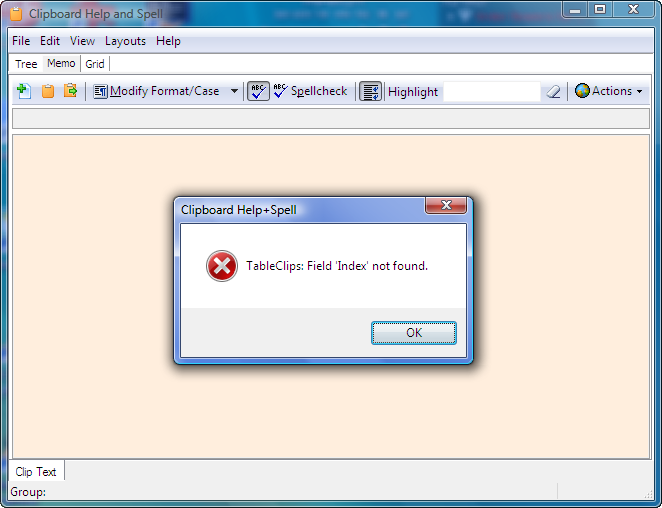
Neither worked...  I clicked OK to the errors, then loaded CHS main window.  When I tried either, I got this:
2018-04-09_202827.png
Same thing happened even when I went File > Exit, and I had to force-kill the program.  I then tried re-unzipping the archive over the top of the existing installation (it's installed as portable); no change.  However, I eventually 'solved' the problem by clearing out the database subdirectory completely and re-starting CHS, so it would start from scratch, then restoring from the most recent backup.  It now appears OK.  I lost the last few clips, but nothing vital, and CHS is now back in business here.

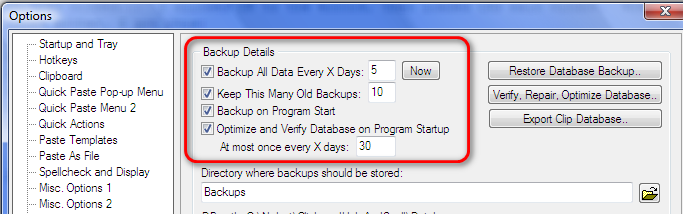
I (now) have the following backup options:
2018-04-09_210026.png
As I have Backup on Program Start checked, isn't Backup All Data Every X Days somewhat redundant?

BTW, when replying using either Quick-Reply or Quote, neither appears to offer a means of attaching an image (or other file). I had to use Reply, which doesn't include quotes.  Is that by design?

Ath

  • Supporting Member
  • Joined in 2006
  • **
  • Posts: 3,649
    • Participated in NANY Challenge Eleven Times
    • Coding Snacks
    • Linux User
    • Hardware Hacker
Re: Double error
« Reply #3 on: April 09, 2018, 08:28 PM »
BTW, when replying using either Quick-Reply or Quote, neither appears to offer a means of attaching an image (or other file). I had to use Reply, which doesn't include quotes.  Is that by design?
You can use Quote first, then click Preview to further edit your reply and add attachments as desired.
/Ton
Ath's software collection, Quote: "A problem well stated is a problem half-solved." (Charles Kettering)

rjbull

  • Charter Member
  • Joined in 2005
  • ***
  • Posts: 3,217
Re: Double error
« Reply #4 on: April 09, 2018, 08:58 PM »
BTW, when replying using either Quick-Reply or Quote, neither appears to offer a means of attaching an image (or other file). I had to use Reply, which doesn't include quotes.  Is that by design?
You can use Quote first, then click Preview to further edit your reply and add attachments as desired.
Thanks!  Though I'd rather it were a one-step process, like (I think) it used to be.

wraith808

  • Supporting Member
  • Joined in 2006
  • **
  • Posts: 11,205
    • Participated in NANY Challenge Fourteen Times
    • Coding Snacks
    • Writer
    • Hardware Hacker
Re: Double error
« Reply #5 on: April 10, 2018, 01:05 AM »
BTW, when replying using either Quick-Reply or Quote, neither appears to offer a means of attaching an image (or other file). I had to use Reply, which doesn't include quotes.  Is that by design?
You can use Quote first, then click Preview to further edit your reply and add attachments as desired.
Thanks!  Though I'd rather it were a one-step process, like (I think) it used to be.

If it was, it was a long time ago.  There were never attachment functions in the quick reply as long as I've been here.  There used to be an [ img ] button that allowed you to link offsite images., but mouser took that away a while ago.

mouser

  • First Author
  • Administrator
  • Joined in 2005
  • *****
  • Posts: 40,931
    • Gathering Badge
    • Plugin Coding Medal
    • Participated in NANY Challenge Seventeen Times
    • Cody Award
    • Coding Snacks
    • Volunteers/Staff
Re: Double error
« Reply #6 on: April 10, 2018, 01:36 AM »
This should go without saying, but before you do anything else, go make a copy of the entire CHS backup folder someplace, so that you don't end up overwriting good backups with corrupt data.

Original address: https://www.donationcoder.com/forum/index.php?topic=45334.0