DonationCoder.com forum
 
Read-only archive. This is a static copy of the DonationCoder.com forum. Reading and searching work as before; logging in, posting and private messages do not.
Archive of 2026-10-21 · About this archive · Main site

Author Topic: Update Timestamp of file based on time in filename  (Read 30,410 times)

dcwul62

  • Supporting Member
  • Joined in 2013
  • **
  • Posts: 336
Update Timestamp of file based on time in filename
« on: April 02, 2018, 09:25 AM »
I am looking for a way (script, or tool) that will update the timestamps of files based on the time in the filenames.
The time is always at the end of the filename, before the extensions.

Like: FilenameXYZ Bla-bla ddmmyyyy hhmmss.txt
or    FilenameXYZ Bla-bla yyyymmdd hhmmss.txt

I am already using a small script that updates the modified DATE, but not the modified TIME.

Have searched Internet for any tools, but regretfully can't find it.

Example:
ProgFileW10PShellModules.snippets-06-20141230 123456.txt  present date time : 15122003 141414
After updating date: the modified date reads 30-12-2014
but the time remains 14:14:14

I am looking for some tool, or so, that updates the time to 12:34:56

The default renamers can't do this.
I have no knowledge about programming.

If it is just 1 or just a few, then any ordinary attribute changer can handle that, but that is one by one, not in a batch.

Thanks!

Ath

  • Supporting Member
  • Joined in 2006
  • **
  • Posts: 3,649
    • Participated in NANY Challenge Eleven Times
    • Coding Snacks
    • Linux User
    • Hardware Hacker
Re: Update Timestamp of file based on time in filename
« Reply #1 on: April 02, 2018, 09:35 AM »
What tool/script do you already have for updating the dates?
/Ton
Ath's software collection, Quote: "A problem well stated is a problem half-solved." (Charles Kettering)

dcwul62

  • Supporting Member
  • Joined in 2013
  • **
  • Posts: 336
Re: Update Timestamp of file based on time in filename
« Reply #2 on: April 02, 2018, 10:13 AM »
It is a vbs script to be used within Opus

skwire

  • I eat Coding Snacks for breakfast...
  • Global Moderator
  • Joined in 2005
  • *****
  • Posts: 5,297
    • Participated in NANY Challenge Seventeen Times
    • Coding Snacks
    • Superboy Coder
    • Cody Award
    • Volunteers/Staff
    • Gathering Badge
Re: Update Timestamp of file based on time in filename
« Reply #3 on: April 02, 2018, 12:45 PM »
Can you post the VBS snippet, please?

dcwul62

  • Supporting Member
  • Joined in 2013
  • **
  • Posts: 336
Re: Update Timestamp of file based on time in filename
« Reply #4 on: April 02, 2018, 12:59 PM »
see pm

skwire

  • I eat Coding Snacks for breakfast...
  • Global Moderator
  • Joined in 2005
  • *****
  • Posts: 5,297
    • Participated in NANY Challenge Seventeen Times
    • Coding Snacks
    • Superboy Coder
    • Cody Award
    • Volunteers/Staff
    • Gathering Badge
Re: Update Timestamp of file based on time in filename
« Reply #5 on: April 02, 2018, 10:23 PM »
see pm

Hmmm...never got a PM; you sure you sent it to me?

dcwul62

  • Supporting Member
  • Joined in 2013
  • **
  • Posts: 336
Re: Update Timestamp of file based on time in filename
« Reply #6 on: April 03, 2018, 04:47 AM »
Sorry ...

I just now noticed: I accidentally clicked on the envelope-button, which is 'sending an email'.
Did you receive an email?

skwire

  • I eat Coding Snacks for breakfast...
  • Global Moderator
  • Joined in 2005
  • *****
  • Posts: 5,297
    • Participated in NANY Challenge Seventeen Times
    • Coding Snacks
    • Superboy Coder
    • Cody Award
    • Volunteers/Staff
    • Gathering Badge
Re: Update Timestamp of file based on time in filename
« Reply #7 on: April 03, 2018, 04:51 AM »
Sorry ...
I just now noticed: I accidentally clicked on the envelope-button, which is 'sending an email'.
Did you receive an email?

I did not.

4wd

  • Pedantic Old Bastard
  • Supporting Member
  • Joined in 2006
  • **
  • Posts: 5,652
    • Coding Snacks
Re: Update Timestamp of file based on time in filename
« Reply #8 on: April 03, 2018, 07:15 AM »
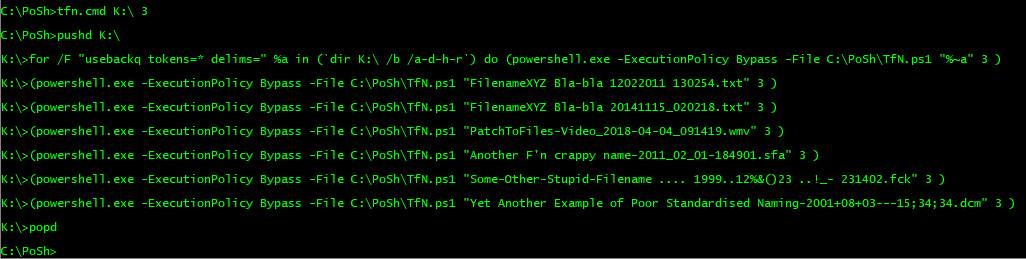
√ FilenameXYZ Bla-bla 12022011 130254.txt
√ FilenameXYZ Bla-bla 20141115_020218.txt
√ PatchToFiles-Video_2018-04-04_091419.wmv
√ Another F'n crappy name-2011_02_01-184901.sfa
√ Some-Other-Stupid-Filename .... 1999..12%&()23 ..!_- 231402.fck
√ Yet Another Example of Poor Standardised Naming-2001+08+03---15;34;34.dcm
√ Example of Poor Naming 32 - 03+03+2013---23;42;00.dcm


TfN.ps1

Code: ( powershell)
Param (
  [string]$file,
  [int32]$type = 2
)
# Types: 0 = Creation Time
#        1 = Last Access Time
#        2 = Modified Time
#        3 = All of them
 
$fileObject = Get-ChildItem -Path $file
$wanted = (($fileObject.BaseName | %{ -join $_[$_.Length..0] }) -Replace '(\D)', '').Substring(0,14)  | %{ -join $_[$_.Length..0] }
$pattern = 'yyyyMMddHHmmss'
If ($wanted.Substring(4, 2) -gt "12") { $pattern = 'ddMMyyyyHHmmss' }
$date = [DateTime]::ParseExact($wanted, $pattern, $null)
Switch ($type) {
  "0" {$fileObject.CreationTime = $date; break}
  "1" {$fileObject.LastAccessTime = $date; break}
  "2" {$fileObject.LastWriteTime = $date; break}
  default {
    $fileObject.CreationTime = $date
    $fileObject.LastAccessTime = $date
    $fileObject.LastWriteTime = $date
  }
}

TfN.ps1 <file> <type>

type = Read script

Example:
.\TfN.ps1 "ProgFileW10PShellModules.snippets-06-20141230 123720.txt" 0

2018-04-03 16_42_44-K__.png

2018-04-03 17_12_25-K__.png

TfN.cmd <dir> <type>
Code: (text)
pushd %1
for /f "usebackq tokens=* delims=" %%a in (`dir "%~1" /b /a-d-h-r`) do (
      powershell.exe -ExecutionPolicy Bypass -File C:\PoSh\TfN.ps1 "%%~a" %2
      )
popd

2018-04-05 14_22_32-C__WINDOWS_system32_cmd.exe.png

2018-04-05 14_22_58-K__.png
"I will not follow where the path may lead, but I will go where there is no path, and I will leave a trail." - Muriel Strode, 1903
« Last Edit: April 05, 2018, 05:31 AM by 4wd »

dcwul62

  • Supporting Member
  • Joined in 2013
  • **
  • Posts: 336
Re: Update Timestamp of file based on time in filename
« Reply #9 on: April 03, 2018, 07:47 AM »
Sorry ...
I just now noticed: I accidentally clicked on the envelope-button, which is 'sending an email'.
Did you receive an email?

I did not.

"Your message has been sent successfully."

please could you check again?

thanks a lot!

dcwul62

  • Supporting Member
  • Joined in 2013
  • **
  • Posts: 336
Re: Update Timestamp of file based on time in filename
« Reply #10 on: April 03, 2018, 08:19 AM »
Thanks 4WD.
I'll check it out. Right now I seem to have issues with executing .ps1 file (executionpolicy, whatever)

wraith808

  • Supporting Member
  • Joined in 2006
  • **
  • Posts: 11,205
    • Participated in NANY Challenge Fourteen Times
    • Coding Snacks
    • Writer
    • Hardware Hacker
Re: Update Timestamp of file based on time in filename
« Reply #11 on: April 03, 2018, 11:13 AM »
Thanks 4WD.
I'll check it out. Right now I seem to have issues with executing .ps1 file (executionpolicy, whatever)

You need to change the execution policy to run many powershell scripts

https://www.addictivetips.com/windows-tips/how-to-change-the-powershell-execution-policy/

highend01

  • Supporting Member
  • Joined in 2011
  • **
  • Posts: 188
Re: Update Timestamp of file based on time in filename
« Reply #12 on: April 03, 2018, 12:50 PM »
Alternatively, try this...

Written in PureBasic.
Accepts one parameter, the filename (put it in quotes if it contains spaces)!

It is a command line app, the return values are the following:
0 = Everything went fine, modified time should be set correctly
1 = You forgot to call it with a filename
2 = The filename does not exist!
3 = There isn't a space where it should be (between date and time in the filename)
4 = Either the date or the time doesn't have the expected length (8 chars for the date, 6 for the time)
5 = Setting the new modified date failed (could e.g. happen if you try to change a date for a file in a UAC protected directory, and the app was not called with admin permissions)

dcwul62

  • Supporting Member
  • Joined in 2013
  • **
  • Posts: 336
Re: Update Timestamp of file based on time in filename
« Reply #13 on: April 04, 2018, 07:23 AM »
Thanks.

The idea is to do this in a batch, i.e. for multiple files simultaneously.

For years I have this script that is doing exactly what I want.
It is working fine, with just 1 exception...
updating time, when the date format in the file is yyyymmdd
In case the date format is ddmmyyyy then it is okay.

So far I manually update the time of such files using the change date time attributes
within Opus. It is not a big issue, but I would like to have it in a script.

Have sent skwire the script by PM.

So, let's wait for his feedback.

Anyway, many thanks so far!
Truly appreciate your support.

PatchToFiles-Video_2018-04-04_091419.wmv (400.3 KB)


« Last Edit: April 04, 2018, 09:06 AM by mouser »

skwire

  • I eat Coding Snacks for breakfast...
  • Global Moderator
  • Joined in 2005
  • *****
  • Posts: 5,297
    • Participated in NANY Challenge Seventeen Times
    • Coding Snacks
    • Superboy Coder
    • Cody Award
    • Volunteers/Staff
    • Gathering Badge
Re: Update Timestamp of file based on time in filename
« Reply #14 on: April 04, 2018, 12:28 PM »
Have sent skwire the script by PM.

If possible, please post the script here so everybody can help.  :up:

highend01

  • Supporting Member
  • Joined in 2011
  • **
  • Posts: 188
Re: Update Timestamp of file based on time in filename
« Reply #15 on: April 04, 2018, 01:33 PM »
This one does it for all files in a folder (not recursively)...

Accepts one parameter, the foldername (put it in quotes if it contains spaces, full path required)!

It is a command line app, the return values are the following:
0 = Everything went fine, modified times should be set correctly
1 = You forgot to call it with a foldername (full path)
2 = The folder does not exist!
3 = Setting the new modified date failed (could e.g. happen if you try to change a date for a file in a UAC protected directory, and the app was not called with admin permissions)

Ofc this version just skips all files that do not fulfill the requirements...
« Last Edit: April 04, 2018, 01:39 PM by highend01 »

4wd

  • Pedantic Old Bastard
  • Supporting Member
  • Joined in 2006
  • **
  • Posts: 5,652
    • Coding Snacks
Re: Update Timestamp of file based on time in filename
« Reply #16 on: April 05, 2018, 01:00 AM »
...
updating time, when the date format in the file is yyyymmdd
In case the date format is ddmmyyyy then it is okay.

I have an idea, how about you standardise your filenames instead of having other people try and conform to your seemingly chaotic system?

It started off with:
yyyymmdd_hhmmss
ddmmyyyy_hhmmss

Now it appears that yyyy-mm-dd_hhmmss is also to be included, no doubt there's also dd-mm-yyyy_hhmmss plus who knows what other combinations.

Choose a format and do a rename of all the non-conforming files before running the script that sets the timestamps and then the whole process becomes simpler for everyone.

Updated
"I will not follow where the path may lead, but I will go where there is no path, and I will leave a trail." - Muriel Strode, 1903
« Last Edit: April 05, 2018, 04:03 AM by 4wd »

dcwul62

  • Supporting Member
  • Joined in 2013
  • **
  • Posts: 336
Re: Update Timestamp of file based on time in filename
« Reply #17 on: April 05, 2018, 05:56 AM »
I have a regex for almost every format. Opus vbs script containing all kinds of possibilities. (If this then that, etc.).
With  [-\s_]*  I cover 99% of the cases.
The only  exception is mentioned in my earlier post, specifically updating the time stamp only (date is updated)

Anyway, I suggest to drop the issue. It is not worth spending more time on.

Would like to thank you all for thinking along! Really appreciated.

Original address: https://www.donationcoder.com/forum/index.php?topic=45303.0