





The media player I prefer to use is Media Player Classic, and like many (probably all) players, you can save playlists (.mpcpl files). Also, when in MPC, you can edit the playlist by dragging one file at a time up and down the list and dropping it where you wish. However, if you have more the 1 or 2, it can be a very tedious task, especially if you have a long list. And if you're me, you have VERY long lists of songs and videos to play through. 
Is there, or has anyone ever considered creating, an editor for these MPCPL files? Although the file is a simple text file, the trick is that each item in the list takes up 2 (or more) lines. Plus, each item (in order) has to be numbered, from 1 on up before saving it. Lastly, each line in a set of lines for a media item has to all have the same number. And that's the problem. If I were to try to edit it in notepad, even if I moved only one media file entry, I'd need to re-number the entire list (which is a PitA).
So, can anyone create a program that will allow the editing of the file and move the 2 (or more) lines for each media item as a group, and renumber the entire thing when done and save it back?
For what it's worth, (in case you're not familiar with the playlist format, here is a example of an MPCPL file with 6 media items in it:
I've taken the liberty of adding blank lines between each media item to make it easier to see what constitutes each media item. However, the normal file would not have ANY blank lines.
Requirements (Ideally):
Works in Windows
Be able to cut/paste from one place in the list to another.
Have up/down arrow buttons to move item(s) up/down the list.
When saving at the end, it will renumber all items from 1 on up.
Because it needs to contain full path names, it should support Unicode.
Recommendation:
Either show 1 line for each media item, otherwise
Show all lines for each media item,
but when moving (or Cut/Paste), all items of a media item move with it.
Thanks to anyone who can help.
fdwojo
Is there, or has anyone ever considered creating, an editor for these MPCPL files? Although the file is a simple text file, the trick is that each item in the list takes up 2 (or more) lines. Plus, each item (in order) has to be numbered, from 1 on up before saving it. Lastly, each line in a set of lines for a media item has to all have the same number. And that's the problem. If I were to try to edit it in notepad, even if I moved only one media file entry, I'd need to re-number the entire list (which is a PitA).
So, can anyone create a program that will allow the editing of the file and move the 2 (or more) lines for each media item as a group, and renumber the entire thing when done and save it back?
For what it's worth, (in case you're not familiar with the playlist format, here is a example of an MPCPL file with 6 media items in it:
Code
MPCPLAYLIST

1,type,0
1,filename,C:\Users\fdwojo\Music\themesong.mp3

2,type,0
2,label,Extended Themesong #2
2,filename,C:\Users\fdwojo\Music\ts2_h264.mp3

3,type,0
3,label,Robot (1080p)
3,filename,C:\Users\fdwojo\Videos\Robot.avi

4,type,0
4,filename,C:\Users\fdwojo\Videos\Mass Effect Playthrough.mp4

5,type,0
5,filename,C:\Users\fdwojo\Videos\Far Cry Playthrough.mp4

6,type,0
6,filename,D:\Movies\Action Adventure\Indiana Jones #9.mp4
6,subtitle,D:\Movies\Action Adventure\Indiana Jones #9.srt
I've taken the liberty of adding blank lines between each media item to make it easier to see what constitutes each media item. However, the normal file would not have ANY blank lines.
Requirements (Ideally):
Works in Windows
Be able to cut/paste from one place in the list to another.
Have up/down arrow buttons to move item(s) up/down the list.
When saving at the end, it will renumber all items from 1 on up.
Because it needs to contain full path names, it should support Unicode.
Recommendation:
Either show 1 line for each media item, otherwise
Show all lines for each media item,
but when moving (or Cut/Paste), all items of a media item move with it.
Thanks to anyone who can help.
fdwojo





.mp4_Properties.png)

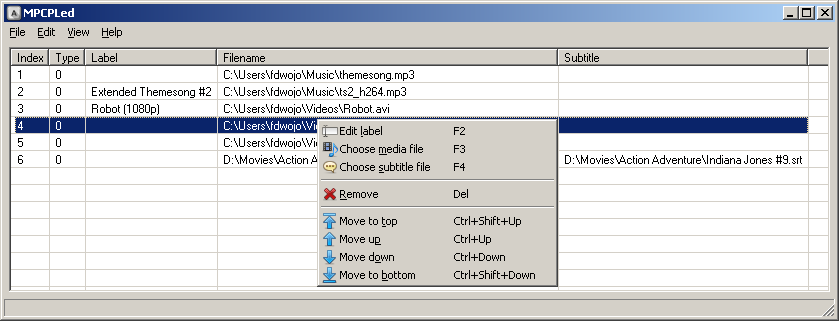
 Apologies. Please redownload the zip file and try now.