DonationCoder.com forum
 
Read-only archive. This is a static copy of the DonationCoder.com forum. Reading and searching work as before; logging in, posting and private messages do not.
Archive of 2026-10-21 · About this archive · Main site

Author Topic: Post-capture "undo" ?  (Read 4,413 times)

jax200

  • Supporting Member
  • Joined in 2016
  • **
  • Posts: 25
Post-capture "undo" ?
« on: March 27, 2018, 11:13 PM »
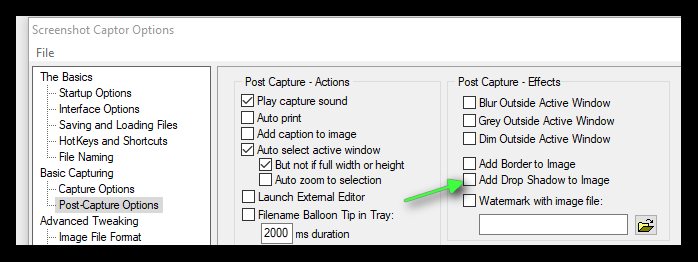
If I set a post-capture effect in Preferences such as "Add Drop Shadow to Image", how can I "undo" the shadow once the shot has been taken?

Toggling shadow just adds more shadow. Ctrl-Z doesn't work, so seems like its too late at that point.

If so, possible to make this post-capture option so it can be edited (eg, remove the shadow)?  Would be convenient if when taking shots, you want to undo w/o having to go back into Preferences and uncheck it.
mouser

  • First Author
  • Administrator
  • Joined in 2005
  • *****
  • Posts: 40,931
    • Gathering Badge
    • Plugin Coding Medal
    • Participated in NANY Challenge Seventeen Times
    • Cody Award
    • Coding Snacks
    • Volunteers/Staff
Re: Post-capture "undo" ?
« Reply #1 on: March 28, 2018, 03:21 AM »
You can do ctrl-Z to undo these post capture actions, just as you request.  As for why it might not be working for you, make sure you click in the image window before you do Ctrl+Z.
You should see the status bar showing you what it is doing.

jax200

  • Supporting Member
  • Joined in 2016
  • **
  • Posts: 25
Re: Post-capture "undo" ?
« Reply #2 on: March 30, 2018, 02:41 AM »
Thank you.  It works.  Apparently I had not highlighted it.

mouser

  • First Author
  • Administrator
  • Joined in 2005
  • *****
  • Posts: 40,931
    • Gathering Badge
    • Plugin Coding Medal
    • Participated in NANY Challenge Seventeen Times
    • Cody Award
    • Coding Snacks
    • Volunteers/Staff
Re: Post-capture "undo" ?
« Reply #3 on: March 30, 2018, 02:43 AM »
Yeah it's a confusing issue that has come up before.  I think it is because the focus may be in the thumbnail panel.
I actually should look to see if I can't fix this by having it autofocus the main window whenever the main form is restored..

Original address: https://www.donationcoder.com/forum/index.php?topic=45255.0