DonationCoder.com forum
 
Read-only archive. This is a static copy of the DonationCoder.com forum. Reading and searching work as before; logging in, posting and private messages do not.
Archive of 2026-10-21 · About this archive · Main site

Author Topic: Subfunction from Process Tamer  (Read 16,849 times)

ffbb

  • Participant
  • Joined in 2015
  • *
  • Posts: 13
Subfunction from Process Tamer
« on: March 23, 2018, 03:50 PM »
Hallo,

I'am interesting in a subfunction from Process Tamer. I need a function to read the CPU-Usage for only one single Process. I have tried WMIC but without success. I would be pleased about a hint.

Greetings,
ffbb

IainB

  • @Slartibartfarst
  • Supporting Member
  • Joined in 2008
  • **
  • Posts: 7,544
Re: Subfunction from Process Tamer
« Reply #1 on: March 23, 2018, 06:16 PM »
Try:
  • ProcessHacker (PH) - <https://processhacker.sourceforge.io/>; If you enter a search term in the search box (or press Ctrl+K and then enter the term), the process(es) whose name(s) contain that term will be the only processes displayed in the Resources view of the Processes, Services, Network, Disk panels (Tabs).
  • TaskManager (TM) - The standard version that comes with Windows 10 offers the ability to select one or more processes and observe their resource usage (e.g., CPU, Disk, Network, Memory) in a sampled view as moving coloured graphs in the Resource Monitor panel, as they move across a 60-second window.

ffbb

  • Participant
  • Joined in 2015
  • *
  • Posts: 13
Re: Subfunction from Process Tamer
« Reply #2 on: April 01, 2018, 07:04 PM »
Thanks but that's not what I'm looking for. I want to code my own routine with autohotkey. Operating system is XP.

wraith808

  • Supporting Member
  • Joined in 2006
  • **
  • Posts: 11,205
    • Participated in NANY Challenge Fourteen Times
    • Coding Snacks
    • Writer
    • Hardware Hacker
Re: Subfunction from Process Tamer
« Reply #3 on: April 02, 2018, 02:03 AM »
Thanks but that's not what I'm looking for. I want to code my own routine with autohotkey. Operating system is XP.

So you're wondering if there is an api for process tamer so that you can access it's gathered information externally?

ffbb

  • Participant
  • Joined in 2015
  • *
  • Posts: 13
Re: Subfunction from Process Tamer
« Reply #4 on: April 02, 2018, 07:59 AM »
That would be a solution. Another would be a call to WMIC. Unfortunately, I do not have sufficient knowledge so I need help.

Ath

  • Supporting Member
  • Joined in 2006
  • **
  • Posts: 3,649
    • Participated in NANY Challenge Eleven Times
    • Coding Snacks
    • Linux User
    • Hardware Hacker
Re: Subfunction from Process Tamer
« Reply #5 on: April 02, 2018, 09:07 AM »
Just to get you started, have a look at these pages:
AHK fetches stuff from WMI : Autohotkey forum
Query WMI for process attributes: Microsoft Social forum (Check the answer)

You'll have to call that repeatedly (few times per second ? ), so you'd probably best limit the 'select *' to something like 'select PercentProcessorTime from Win32_PerfFormattedData_PerfProc_Process where Name=<yourprocessname>'
('where' clause does support Name like 'firefox%' etc.)

Use NirSoft's Simple WMI View to determine the Name (or IDProcess) used by your process, and desired attributes to form a comma-separated list instead of just PercentProcessorTime (and improve response time).
NB: Using WMI from AHK through COM will perform (much) better than exporting to text file from SimpleWMIView and processing that text file...

Edit:
Use WMI Explorer (Free for non-commercial use) to test your queries.

Edit 2:
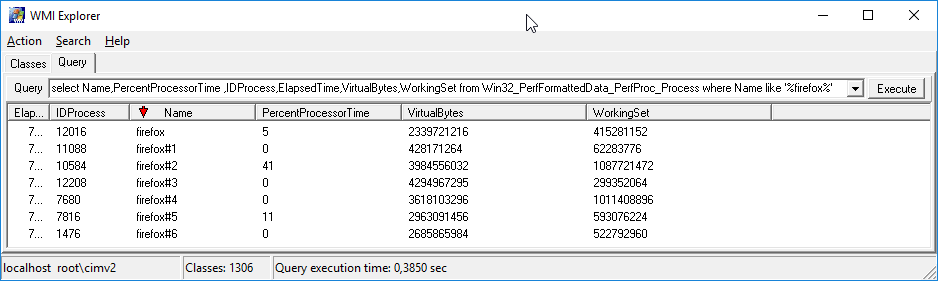
WMI Explorer with this query:
Code
select Name,PercentProcessorTime ,IDProcess,ElapsedTime,VirtualBytes,WorkingSet from Win32_PerfFormattedData_PerfProc_Process where Name like '%firefox%'
Screenshot - 2-04-2018 , 11_28_41.png
/Ton
Ath's software collection, Quote: "A problem well stated is a problem half-solved." (Charles Kettering)
« Last Edit: April 02, 2018, 09:33 AM by Ath »

ffbb

  • Participant
  • Joined in 2015
  • *
  • Posts: 13
Re: Subfunction from Process Tamer
« Reply #6 on: April 02, 2018, 10:22 AM »
Thank you, this helps me - very nice. But there is a problem with the property "PercentProcessorTime". Under W7 everything works but under XP is always displayed 0% for "PercentProcessorTime" ( Process Tamer works fine).

Ath

  • Supporting Member
  • Joined in 2006
  • **
  • Posts: 3,649
    • Participated in NANY Challenge Eleven Times
    • Coding Snacks
    • Linux User
    • Hardware Hacker
Re: Subfunction from Process Tamer
« Reply #7 on: April 02, 2018, 12:47 PM »
Well, I don't use XP any longer, so no clue, but you can use NirSoft's wmi view tool to try and find another, similar, attribute that works with XP. Also check the query using Win32_PerfRawData_PerfProc_Process instead of Win32_PerfFormattedData_PerfProc_Process, maybe that does hold data?
/Ton
Ath's software collection, Quote: "A problem well stated is a problem half-solved." (Charles Kettering)

ffbb

  • Participant
  • Joined in 2015
  • *
  • Posts: 13
Re: Subfunction from Process Tamer
« Reply #8 on: April 03, 2018, 06:41 PM »
Thank you. It works.

Ath

  • Supporting Member
  • Joined in 2006
  • **
  • Posts: 3,649
    • Participated in NANY Challenge Eleven Times
    • Coding Snacks
    • Linux User
    • Hardware Hacker
Re: Subfunction from Process Tamer
« Reply #9 on: April 03, 2018, 06:58 PM »
Would you mind publishing here what you eventually created out of all suggestions? Names can be changed to protect the innocent :tellme:
/Ton
Ath's software collection, Quote: "A problem well stated is a problem half-solved." (Charles Kettering)

ffbb

  • Participant
  • Joined in 2015
  • *
  • Posts: 13
Re: Subfunction from Process Tamer
« Reply #10 on: April 04, 2018, 07:46 AM »
Google translation, German - English.
I'm creating a trigger that shows when a Word document is fully loaded. I own a document archive with a lot of big Word documents (XP, Word2000). Even though the technology is now obsolete, I still use these documents and supplement them if necessary. One of the problems with this archive is accessing these documents. A short document opens in 1s and a long document with 200 pages and many pictures in 20s. But important is to jump directly to a specific passage of text after opening a document. There are many hyperlinks in my PC system that start such documents and then immediately jump to a specific passage of text. For large documents, this text access has often failed. Now I'm waiting for the process (winword) until no more CPU time is used. Then the Word document is ready loaded and the jump to the passage works perfectly.

Ath

  • Supporting Member
  • Joined in 2006
  • **
  • Posts: 3,649
    • Participated in NANY Challenge Eleven Times
    • Coding Snacks
    • Linux User
    • Hardware Hacker
Re: Subfunction from Process Tamer
« Reply #11 on: April 04, 2018, 09:08 PM »
Thnx.
/Ton
Ath's software collection, Quote: "A problem well stated is a problem half-solved." (Charles Kettering)

Original address: https://www.donationcoder.com/forum/index.php?topic=45223.0