DonationCoder.com forum
 
Read-only archive. This is a static copy of the DonationCoder.com forum. Reading and searching work as before; logging in, posting and private messages do not.
Archive of 2026-10-21 · About this archive · Main site

Author Topic: Renaming query: how to keep e.g. 1a, 1b when renumbering  (Read 12,940 times)

tomos

  • Charter Member
  • Joined in 2006
  • ***
  • Posts: 11,970
    • Gathering Badge
    • Participated in NANY Challenge Once
Renaming query: how to keep e.g. 1a, 1b when renumbering
« on: January 30, 2018, 04:14 PM »
Files (photos) are named numerically, but some are with 'a' & 'b' appended to indicate front & back of same photo.
I want to renumber them sequentially, but again the 'a's and 'b's  use the (new) number twice.

e.g. currently:

0822.jpg
0822a.jpg
0823.jpg

  • All files have leading zeros i.e. four digits in the number.
  • Occasionally files have text after the number, this always following an underscore e.g.

1234_text_added_here
=> there should be no spaces (I can ensure this if necessary by first replacing space with underscore)

As said I want to renumber them sequentially, but again the 'a's and 'b's use the same (new) number e.g. the above list would become

0001
0001a
0002

I would also like to be able to indicate the starting number to use.

I am using directory opus which allows regex (of which I know absolutely nothing).
Dopus's wildcard rename allows sequential renumbering, but I lose the 1a 1b (they would simply become 1a, 2b, etc.
[edit] I dont think dopus wildcard rename can cope with stripping the number & adding a new one -- I would use a different renamer, but I have sorted the files manually in Dopus -- so I'm left with the regex option or one of the scripts mentioned in next post -- at this stage I dont care about losing the 1, 1a, -- simple sequential renumbering would be fine [/edit]

TIA,
Tom
« Last Edit: January 30, 2018, 07:33 PM by tomos »

tomos

  • Charter Member
  • Joined in 2006
  • ***
  • Posts: 11,970
    • Gathering Badge
    • Participated in NANY Challenge Once
Re: Renaming query: how to keep e.g. 1a, 1b when renumbering
« Reply #1 on: January 30, 2018, 04:19 PM »
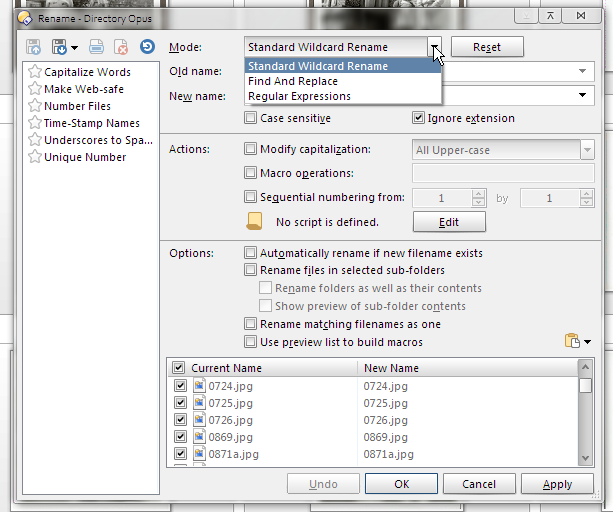
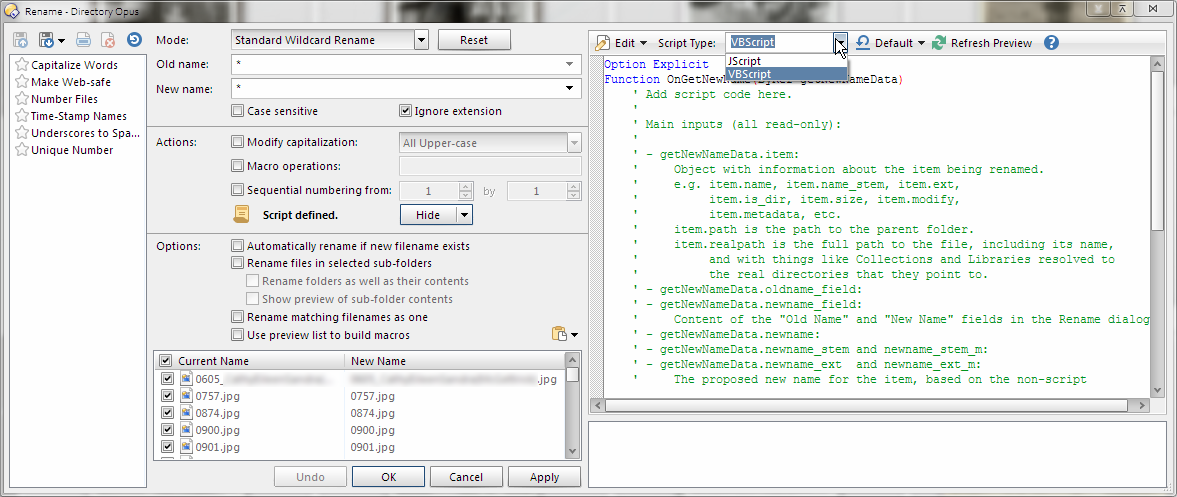
I see dopus also does Scripts:
  • VBA script
  • JScript

Screenshot - 2018-01-30 , 17_16_05.png

and the regular rename dialogue

Screenshot - 2018-01-30 , 17_03_13.png
Tom

rgdot

  • Supporting Member
  • Joined in 2009
  • **
  • Posts: 2,197
Re: Renaming query: how to keep e.g. 1a, 1b when renumbering
« Reply #2 on: January 30, 2018, 05:06 PM »
Dont have it currently to test but something like Bulk Rename Utility could be set to ignore/not touch after X positions, so after 4 in your case. Not sure if logic would work but it might.

tomos

  • Charter Member
  • Joined in 2006
  • ***
  • Posts: 11,970
    • Gathering Badge
    • Participated in NANY Challenge Once
Re: Renaming query: how to keep e.g. 1a, 1b when renumbering
« Reply #3 on: January 30, 2018, 05:54 PM »
Dont have it currently to test but something like Bulk Rename Utility could be set to ignore/not touch after X positions, so after 4 in your case. Not sure if logic would work but it might.

I can do that as well with dopus Wildcard rename -- but it then

AFAICS Bulk Rename doesnt recognise that
0810
0810a

should become e.g.
0001
0001a

but will rename them as

0001
0002a
Tom
« Last Edit: January 30, 2018, 07:29 PM by tomos »

Lintalist

  • Participant
  • Joined in 2015
  • *
  • Posts: 122
Re: Renaming query: how to keep e.g. 1a, 1b when renumbering
« Reply #4 on: January 30, 2018, 07:48 PM »
You can try this AHK script, a quick test shows it here. It will skip files if you only have a/b.

...
0824.jpg ; 0001
0825a.jpg ; will be skipped
0825b.jpg ; will be skipped
0826.jpg ; 0002
...

First it looks for files without a or b.jpg, then copy the files and while it does that tries to see if there are any matching a/b files and if so copy again using the same number.

I'm not a fan of renaming files in script so I've setup a source/target here and it copies so you can check manually before deciding if you want to delete the source files.

Code: ( autohotkey)
sourcefiles:=""
source:=A_ScriptDir "\source\"
target:=A_ScriptDir "\target\"

Loop, %source%*.jpg
	{
	 If !RegExMatch(A_LoopFileName,"i)a|b\.jpg") ; we don't to know *a.jpg and *b.jpg files now
		sourcefiles .= A_LoopFileName "`n"
	}

Sort, sourcefiles, D`n ;

sourcefiles:=trim(sourcefiles,"`n")

; MsgBox % sourcefiles

Loop, parse, sourcefiles, `n, `r
	{
	 SplitPath, A_LoopField, OutFileName, , , OutNameNoExt
	 counter:=SubStr("000" A_Index, -3)
	 FileCopy, %source%%OutFileName%, %target%%counter%.jpg
	 IfExist, %source%%OutNameNoExt%a.jpg
		FileCopy, %source%%OutNameNoExt%a.jpg, %target%%counter%a.jpg
	 IfExist, %source%%OutNameNoExt%b.jpg
		FileCopy, %source%%OutNameNoExt%b.jpg, %target%%counter%b.jpg
	 MsgBox %source%%OutNameNoExt%.jpg	
	}

tomos

  • Charter Member
  • Joined in 2006
  • ***
  • Posts: 11,970
    • Gathering Badge
    • Participated in NANY Challenge Once
Re: Renaming query: how to keep e.g. 1a, 1b when renumbering
« Reply #5 on: January 30, 2018, 08:14 PM »
Hi Lintalist
many thanks --
first, I dont know will this work in the sense I want it to follow a particular sort in the file manager (I'm afraid I didnt emphasise that aspect initially)

I saved above as AHK file, added correct paths:
Code: ( autohotkey)
source:=A_ScriptDir "G:\User\xxxx\Family\Scans\Final_Sorting\xyz\"
target:=A_ScriptDir "G:\User\xxxx\Family\Scans\Final_Sorting\"

and ran the script, and nothing happens.

I notice:
when I copy from your code from your post, there is a tab-width before each line --
wondering could this be causing it to fail ?
Tom

Lintalist

  • Participant
  • Joined in 2015
  • *
  • Posts: 122
Re: Renaming query: how to keep e.g. 1a, 1b when renumbering
« Reply #6 on: January 30, 2018, 08:32 PM »
This should do it
Code: ( autohotkey)
    source:="G:\User\xxxx\Family\Scans\Final_Sorting\xyz\"
target:="G:\User\xxxx\Family\Scans\Final_Sorting\"
A_ScriptDir is also a path, so the way you had it it would be C:\temp\G:\User\ or something like that (where c:\temp\ was the script folder). Tabs/space have no influence in the scripts. (unless something goes wrong when copying the code from the forum but I doubt it). BUT...

You can do it differently, in your filemanager sort them the way you want, I trust your filemanager has a way to copy the list of (selected) files to a file or clipboard (TC has, so Dopus must have it too). Save it to a file, say "source.txt"
Code: ( autohotkey)
sourcefiles:="" ; don't edit this, you can omit this or leave it empty. 

; source.txt is a list of files saved in the order you want them to be processed, sorted in your filemanager
; replace "source.txt" below with "full path to source.txt" sans quotes
FileRead, sourcefiles, source.txt 

source:="G:\User\xxxx\Family\Scans\Final_Sorting\xyz\"
target:="G:\User\xxxx\Family\Scans\Final_Sorting\"

sourcefiles:=trim(sourcefiles,"`n")

; remove ; before msgbox below to confirm it has the proper filenames
; MsgBox % sourcefiles

Loop, parse, sourcefiles, `n, `r
	{
	 If RegExMatch(A_LoopField,"i)a|b\.jpg") ; if we have a|b.jpg skip it
	 	continue
	 SplitPath, A_LoopField, OutFileName, , , OutNameNoExt
	 counter:=SubStr("000" A_Index, -3)
	 ; remove ; before msgbox below to "see" what it tries to find
	 ; MsgBox SourceFile: %source%%OutFileName%`nTargetFile: %target%%counter%.jpg
	 FileCopy, %source%%OutFileName%, %target%%counter%.jpg
	 IfExist, %source%%OutNameNoExt%a.jpg
		FileCopy, %source%%OutNameNoExt%a.jpg, %target%%counter%a.jpg
	 IfExist, %source%%OutNameNoExt%b.jpg
		FileCopy, %source%%OutNameNoExt%b.jpg, %target%%counter%b.jpg
	}
	

Fingers crossed :-)

Edit: Source.txt must be in the same folder as the script, if it is not adjust it to full path:

FileRead, sourcefiles, G:\User\xxxx\Family\Scans\Final_Sorting\xyz\source.txt


Edit2: source.txt is just a list of filenames, no path, added source:="" line back in the script
« Last Edit: January 30, 2018, 09:22 PM by Lintalist »

tomos

  • Charter Member
  • Joined in 2006
  • ***
  • Posts: 11,970
    • Gathering Badge
    • Participated in NANY Challenge Once
Re: Renaming query: how to keep e.g. 1a, 1b when renumbering
« Reply #7 on: January 30, 2018, 08:50 PM »
I added source folderpath to it as well as the target filepath -- or should I simply run the ahk file from the source folder?
EDIT// I also tried just adding path of source.txt to source - no joy there either //EDIT

I added a source.txt file to the source folder, with a list of files as sorted e.g.
0869.jpg
0871a.jpg
0880.jpg
0886.jpg
0889.jpg
0902.jpg

When I run the ahk script, nothing happens (I know it does get 'read', as I mistakenly didnt copy the last bracket and got an error message about that -- no more feedback once that was corrected)
Tom

Lintalist

  • Participant
  • Joined in 2015
  • *
  • Posts: 122
Re: Renaming query: how to keep e.g. 1a, 1b when renumbering
« Reply #8 on: January 30, 2018, 08:53 PM »
I'd deleted the source:= line I see, added it in the script above, the source.txt should like you have posted it as above e.g. just filenames, no paths.

Fingers crossed 2 :-)

tomos

  • Charter Member
  • Joined in 2006
  • ***
  • Posts: 11,970
    • Gathering Badge
    • Participated in NANY Challenge Once
Re: Renaming query: how to keep e.g. 1a, 1b when renumbering
« Reply #9 on: January 30, 2018, 09:06 PM »
Still not working:

I've added:

Code: ( autohotkey)
sourcefiles:="Full-path of source.txt"
 
; source.txt is a list of files saved in the order you want them to be processed, sorted in your filemanager
FileRead, sourcefiles, source.txt
 
source:="source folder path\"
target:="target folder path\"
Tom

Lintalist

  • Participant
  • Joined in 2015
  • *
  • Posts: 122
Re: Renaming query: how to keep e.g. 1a, 1b when renumbering
« Reply #10 on: January 30, 2018, 09:25 PM »
sourcefiles:="Full-path of source.txt" is not correct, but it doesn't matter. I updated the code above once more.

You can now try and "see" what the script "sees" remove the ; before one or both of the MsgBox lines so you can "check" if the source.txt  is read correct and if the source/targetfiles are correct. If you have many files pressing the MsgBox each time is tedious so try with a source.txt file with only a few files in it or cancel the script (scripts tray icon, right click, exit)

Finger Crossed 3 :-)

tomos

  • Charter Member
  • Joined in 2006
  • ***
  • Posts: 11,970
    • Gathering Badge
    • Participated in NANY Challenge Once
Re: Renaming query: how to keep e.g. 1a, 1b when renumbering
« Reply #11 on: January 30, 2018, 09:38 PM »
Yes !!
Success !
Initially didnt work, possibly cause location of source.txt was in a folder with spaces in the name (I did put path in "inverted commas").
Moved that and it worked fine.

And it followed the 0001 / 0001a / etc pattern
Thank you very much Lintalist :Thmbsup:

EDIT// I tried it without removing comment ";" for message box -- as said above, it worked fine out of the box.
Does strip out text, but there's so few of them I can re-add manually if I want
Tom

Lintalist

  • Participant
  • Joined in 2015
  • *
  • Posts: 122
Re: Renaming query: how to keep e.g. 1a, 1b when renumbering
« Reply #12 on: January 30, 2018, 09:57 PM »
Phew, glad to hear it worked ;D

tomos

  • Charter Member
  • Joined in 2006
  • ***
  • Posts: 11,970
    • Gathering Badge
    • Participated in NANY Challenge Once
Re: Renaming query: how to keep e.g. 1a, 1b when renumbering
« Reply #13 on: January 30, 2018, 09:59 PM »
;D

one last request (anytime -- I wont get to it for a few days):
can I start the counter for a second batch @ e.g. 0123
Looks like this could be the relevant line, but cannot think what to change:

counter:=SubStr("000" A_Index, -3)

Getting late here, I'm off -- many thanks again Lintalist :)
Tom

tomos

  • Charter Member
  • Joined in 2006
  • ***
  • Posts: 11,970
    • Gathering Badge
    • Participated in NANY Challenge Once
Re: Renaming query: how to keep e.g. 1a, 1b when renumbering
« Reply #14 on: January 30, 2018, 10:04 PM »
EDIT// I tried it without removing comment ";" for message box -- as said above, it worked fine out of the box.
Does strip out text, but there's so few of them I can re-add manually if I want
Correction:
it doesnt strip out the text -- it doesnt rename those files, and leaves that new number free e.g. the first file had text after the number, and the renamed files started with 0002 -- so I was able to manually rename the file (with the text) to fit in as 0001_text_here.jpg i.e. it works perfectly :up:
nite!
Tom

Lintalist

  • Participant
  • Joined in 2015
  • *
  • Posts: 122
Re: Renaming query: how to keep e.g. 1a, 1b when renumbering
« Reply #15 on: January 30, 2018, 10:20 PM »
try

counter:=SubStr("000" 123 + A_Index, -3)

tomos

  • Charter Member
  • Joined in 2006
  • ***
  • Posts: 11,970
    • Gathering Badge
    • Participated in NANY Challenge Once
Re: Renaming query: how to keep e.g. 1a, 1b when renumbering
« Reply #16 on: January 31, 2018, 10:36 AM »
try

counter:=SubStr("000" 123 + A_Index, -3)

did a quick test -- it works :up:
Note: in the example used, it starts with 0124
Tom

Original address: https://www.donationcoder.com/forum/index.php?topic=45004.0