DonationCoder.com forum
 
Read-only archive. This is a static copy of the DonationCoder.com forum. Reading and searching work as before; logging in, posting and private messages do not.
Archive of 2026-10-21 · About this archive · Main site

Last post Author Topic: remv: Rename files (and directories) with regular expressions  (Read 73,189 times)

Tuxman

  • OMG not him again!
  • Supporting Member
  • Joined in 2006
  • **
  • Posts: 2,522
    • Participated in NANY Challenge Seven Times
The fan of old-school tools strikes again.  8)
(NANY 2019, anyone?)

Do you know what's missing in both POSIX and Windows? Right: A sane way to rename files/directories with a regular expression.
The usual approach on POSIX systems is:

Code
ls * | sed -E 's/(.*)text(.*)to(.*)remove(.*)/mv & "$1$2$3$4"/' | sh

That is horrendously ugly and does not port well to Windows. Here is my slightly less horrendously ugly attempt to fix that:
https://code.rosaelefanten.org/remv

Enjoy.
I bet when Cheetahs race and one of them cheats, the other one goes "Man, you're such a Cheetah!" and they laugh & eat a zebra or whatever.
« Last Edit: June 01, 2022, 02:27 PM by Tuxman »

yarond

  • Supporting Member
  • Joined in 2011
  • **
  • Posts: 11
Re: remv: Rename files (and directories) with regular expressions
« Reply #1 on: January 07, 2019, 04:46 PM »
Nice idea, and certainly can be useful.

After a quick test on Win10, there are some problems:
  • When providing an invalid input pattern, but trying to provide an option parameter, the shown error text quotes the parameter as the input regex (e.g. "remv -n [a $1" returns error message "remv could not parse your input regex: -n")[/li]
  • Running valid regex without any options does nothing, running with -n (simulate) just writes some empty lines to console, running with -v (verbose) actually renames while also indeed being verbose. I haven't checked other options yet.
  • For replacement pattern $0 isn't valid, and treated as a literal (e.g. "remv -v .* pre$0" will rename file1.ext to "pre$0" instead of "prefile1.ext", and then will error that it can't rename "otherfile.ext" because "pre$0" already exists). Of course there's the workaround of explicitly putting the matching pattern in parenthesis, but it shouldn't be required and something like $0 should work for the entire pattern.
  • When renaming files in current directory (I didn't test any folder/directory/move handling so far) the verbose display (which as mentioned for now seems a must) lists each file as starting with ".\" before the name. That's... technically correct (the files are in the current folder), but not really expected (or helpful) when renaming files locally without any indication from the user that the location should be managed.  Worse, the ".\" at the beginning of the file name also matches the input regex. So doing something like "remv -v (.*?)(\..*$) $1 $2" fails for trying to rename the folder, to "a.\" (instead of trying to add a space before the first period in the file name) which results in an appropriate "operation not permitted"
  • This one is more of a feature request than a problem, but for file-name handling it's a very common/basic feature (and also partially related to the previous item): It should be possible to treat the file extension separately, with something like an optional parameter to specify whether it should/shouldn't be considered as a part of the regex. Otherwise this will just require a heck of a lot of "(.*)(\..*$)", or somesuch, in matching pattern and replacement group when wanting to rename files without modifying the extension

Tuxman

  • OMG not him again!
  • Supporting Member
  • Joined in 2006
  • **
  • Posts: 2,522
    • Participated in NANY Challenge Seven Times
Re: remv: Rename files (and directories) with regular expressions
« Reply #2 on: January 07, 2019, 04:56 PM »
1. Yes, thank you.
2.  :huh: I'll check that.
3. If you use invalid variables, that's not my fault.  :D
4. The possibility to include relative folder paths (to move whole structures) is actually a feature. How would you do that?
5. File extensions are technically not a separate part of a file name. Handling files with multiple endings (.tar.gz) could be tricky...

Note that I'll have to fix the Decision Sieve first anyway, so take the above comments as temporary ideas.  ;D
I bet when Cheetahs race and one of them cheats, the other one goes "Man, you're such a Cheetah!" and they laugh & eat a zebra or whatever.

yarond

  • Supporting Member
  • Joined in 2011
  • **
  • Posts: 11
Re: remv: Rename files (and directories) with regular expressions
« Reply #3 on: January 07, 2019, 05:54 PM »
Perfectly understandable. And thanks for the quick response.  :)

And of course what I present here are just my opinions, as much as I personally may think they're valid and correct one.

3. If the regex engine you're using doesn't support something like this, then of course not much you can do. But generally most (all?) user tools for search&replace that I can quickly think of (and regex code/development libraries) allow something like a "fake" backreference to the full match. Usually (in my experience) that's done by something like $0 or \0 (e.g. a capturing group for everything before the first actual capturing group) for tools that otherwise use $n or \n , . It's mostly a convenience thing, so not strictly necessary, but it's a very common one ("why do I explicitly need to indicate the group boundaries when this group is already very clearly defined, and is already a known individual entity to the engine?"). Though, again, yes, if it's not something that your regex engine handles, then it's technically correct, so this does downgrades to feature-request rather than bug.

4. Oh, I like that as a feature, for sure. But I think it should be done only if the user explicitly wants to use it, otherwise it should just be assumed.
If the user didn't explicitly provide the location, then it shouldn't match anything on the input regex. If working on "file.ext" in the current directory then it's called "file.ext", not ".\file.ext". If the user wants to move it somewhere then they don't replace .\(.*) with c:\somewhere\$1 , but rather (.*) with c:\somewhere\$1 . This should carry fine to sub-folders of the current folder.
If not using the current folder (or using sub-folders in the pattern) then the user needs to specify the path explicitly anyway, so no problems there. The ".\" should be a valid destination location (I didn't check if it is now), but shouldn't be matching on the input unless explicitly put there by the user.

5. Since it's posted here as a windows tool, file extensions are very much a separate part of a file name, both for the O/S and for the expectations of the very large majority of users. Files with ".tar.gz" are handled by programs that know how to open ".gz" files, which hopefully also know to notice that the base name ends with ".tar" and what it means (which for practical purposes I think anything that handles ".gz" is aware of). But as far as the O/S is concerned, when making file associations/icons/filters, that file has a ".gz" extension. And file renaming can often includes the desire to change the file name without touching the extension.

Tuxman

  • OMG not him again!
  • Supporting Member
  • Joined in 2006
  • **
  • Posts: 2,522
    • Participated in NANY Challenge Seven Times
Re: remv: Rename files (and directories) with regular expressions
« Reply #4 on: January 07, 2019, 08:25 PM »
To come back to 3.: I use the standard C++ regex header. Technically, $0 is supposed to work.  :huh:

1. is fixed (I removed the reference).  ;D
2. Head -> wall.
4. is actually already in, just skip the -r flag and remv will gladly ignore directories.
5. is fixed as well (new flag "-E").
I bet when Cheetahs race and one of them cheats, the other one goes "Man, you're such a Cheetah!" and they laugh & eat a zebra or whatever.

yarond

  • Supporting Member
  • Joined in 2011
  • **
  • Posts: 11
Re: remv: Rename files (and directories) with regular expressions
« Reply #5 on: January 07, 2019, 09:51 PM »
I checked the new version.

Regarding 4, that's not it. Even without the -r flag, the ".\" is still considered a part of the file name.

Example: Trying to clean file names (replace various separators, including decimal dots, with spaces) with a few files in the local directory:
Code
c:\tmp\test>remv -Evv "[-+._]" " "
 Processing '.\bla.txt'.
 Renaming     '.\bla.txt' to ' \bla.txt' ... error: operation not permitted
 Processing '.\file.with.dots.txt'.
 Renaming     '.\file.with.dots.txt' to ' \file with dots.txt' ... error: operation not permitted
 [STATS] Renamed 0 files (2 failed, 0 skipped).

expected: "bla.txt" left as-is since it doesn't match, "file.with.dots.txt" changed to "file with dots.txt" . But the ".\" at the start doesn't let this happen.

Example: adding a prefix to any file (behavior is the same if the "(.*)" is replaced with something to filter, it just of course happens with the relevant/matching files  ) :
Code
C:\tmp\test>remv -Evv (.*) "prefix-$1"
 Processing '.\bla.txt'.
 Renaming     '.\bla.txt' to 'prefix-.\bla.txt' ... error: operation not permitted
 Processing '.\file.with.dots.txt'.
 Renaming     '.\file.with.dots.txt' to 'prefix-.\file.with.dots.txt' ... error: operation not permitted
 [STATS] Renamed 0 files (2 failed, 0 skipped).

expected: file "bla.txt" will be renamed to "prefix-bla.txt", same with the other.


There's also another issue here (which would have interfered with the above even without modifying the ".\" ). It seems that it fails to rename anything when -E is used. It uses it correctly in what it shows as the expected file name, but fails to rename with the same "operation not permitted". This is once with -E and once without, same files, seemingly same wanted destination name:
Code
C:\tmp\test>remv -Evv (a) $1b
 Processing '.\bla-has-dot.txt'.
 Renaming     '.\bla-has-dot.txt' to '.\blab-habs-dot.txt' ... error: operation not permitted
 Processing '.\file.with.dots.txt'.
 [STATS] Renamed 0 files (1 failed, 1 skipped).

C:\tmp\test>remv -vv (a) $1b
 Processing '.\bla-has-dot.txt'.
 Renaming     '.\bla-has-dot.txt' to '.\blab-habs-dot.txt' ... Successfully renamed .\bla-has-dot.txt to .\blab-habs-dot.txt.
 Processing '.\file.with.dots.txt'.
 [STATS] Renamed 1 files (0 failed, 1 skipped).

Tuxman

  • OMG not him again!
  • Supporting Member
  • Joined in 2006
  • **
  • Posts: 2,522
    • Participated in NANY Challenge Seven Times
Re: remv: Rename files (and directories) with regular expressions
« Reply #6 on: January 07, 2019, 10:00 PM »
:huh:

You truly make me sad. I'm on it (but off tomorrow)...
I'll report back.
I bet when Cheetahs race and one of them cheats, the other one goes "Man, you're such a Cheetah!" and they laugh & eat a zebra or whatever.

Tuxman

  • OMG not him again!
  • Supporting Member
  • Joined in 2006
  • **
  • Posts: 2,522
    • Participated in NANY Challenge Seven Times
Re: remv: Rename files (and directories) with regular expressions
« Reply #7 on: January 07, 2019, 10:49 PM »
Now, now.

Code
> .\a -Evv "hpp" "npp"
 Processing '.\a.exe'.
 Processing '.\constants.hpp'.
 Processing '.\filestats.hpp'.
 Processing '.\help.hpp'.
 Processing '.\remv.cpp'.
 Processing '.\remv.hpp'.
 [STATS] Renamed 0 files (0 failed, 6 skipped).

Code
> .\a -vv "hpp" "npp"
 Processing '.\a.exe'.
 Processing '.\constants.hpp'.
 Renaming     '.\constants.hpp' to '.\.\constants.npp' ... Successfully renamed .\constants.hpp to .\.\constants.npp.
 Processing '.\filestats.hpp'.
 Renaming     '.\filestats.hpp' to '.\.\filestats.npp' ... Successfully renamed .\filestats.hpp to .\.\filestats.npp.
 Processing '.\help.hpp'.
 Renaming     '.\help.hpp' to '.\.\help.npp' ... Successfully renamed .\help.hpp to .\.\help.npp.
 Processing '.\remv.cpp'.
 Processing '.\remv.hpp'.
 Renaming     '.\remv.hpp' to '.\.\remv.npp' ... Successfully renamed .\remv.hpp to .\.\remv.npp.
 [STATS] Renamed 4 files (0 failed, 2 skipped).

Granted, the ".\.\" part looks inconvenient, but good enough.  ;D
I'll look into it on Wednesday again. Checking in, updating the RAR and leaving you alone for today/tomorrow. :)
I bet when Cheetahs race and one of them cheats, the other one goes "Man, you're such a Cheetah!" and they laugh & eat a zebra or whatever.

4wd

  • Pedantic Old Bastard
  • Supporting Member
  • Joined in 2006
  • **
  • Posts: 5,652
    • Coding Snacks
Re: remv: Rename files (and directories) with regular expressions
« Reply #8 on: January 08, 2019, 12:07 AM »
remv 1.1.1 from the OP.

Some observations, which might be attributable to my appalling lack of RegEx knowledge.

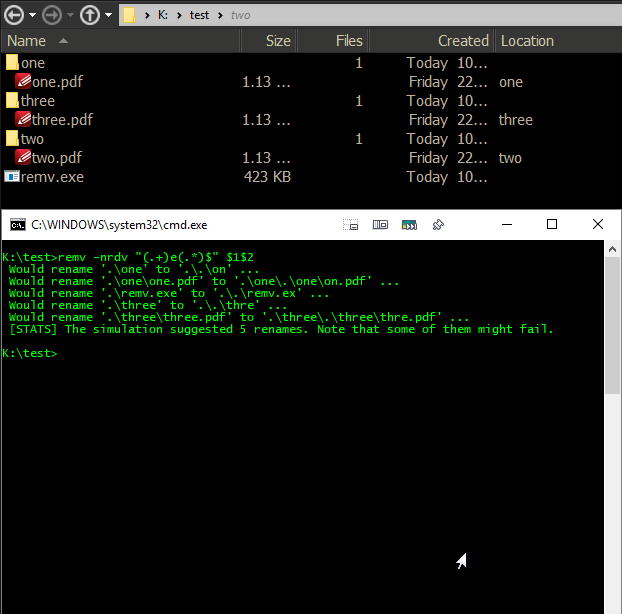
The test subjects in their original positions and a dry run:
2019-01-08 10_49_52-C__WINDOWS_system32_cmd.exe.png

2019-01-08 10_50_52-C__WINDOWS_system32_cmd.exe.png
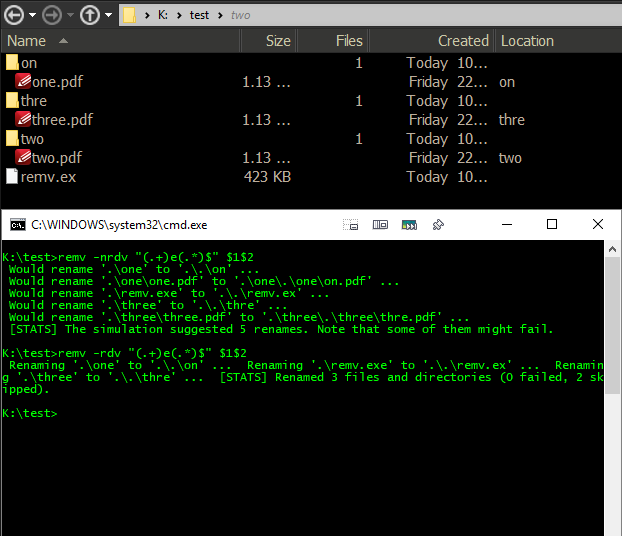
  1. Output is munged:
    • single line output
    • the whole .\.\ thing as well as '.\dir\.\dir\file'
  2. The executable has renamed itself, it would be better if it excluded itself from the operation, (no matter what name the executable has been given).
  3. More importantly, the file renaming failed and this, (as indicated by the output), is because the directories were renamed first thus any files within those directories were now non-existent.  I would suggest the renaming start at the lowest level and work up.

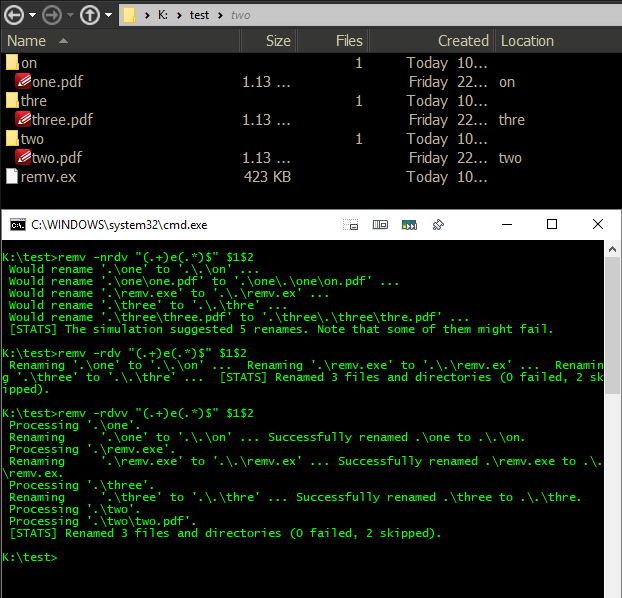
2019-01-08 10_51_47-C__WINDOWS_system32_cmd.exe.png
  1. Same results as above but the output is now multi-line.
  2. It would be better, (I think), if instead of saying Processing 'something' against items that don't match, it said Skipped 'something'.  It would help with quickly scanning the output to see what was skipped or having the output redirected to a file and searching that for Skipped.
"I will not follow where the path may lead, but I will go where there is no path, and I will leave a trail." - Muriel Strode, 1903
« Last Edit: January 08, 2019, 12:39 AM by 4wd »

Tuxman

  • OMG not him again!
  • Supporting Member
  • Joined in 2006
  • **
  • Posts: 2,522
    • Participated in NANY Challenge Seven Times
Re: remv: Rename files (and directories) with regular expressions
« Reply #9 on: January 09, 2019, 08:40 PM »
Why do I even publish software one year in advance if people don't test it before it's too late?  ;D

Not renaming the .exe would require to write one function per platform, as C++ does not have a cross-platform way to find the "current .exe path" as far as I know.  :huh:
Coming closer with version 1.2.0... (attaching above.)
I bet when Cheetahs race and one of them cheats, the other one goes "Man, you're such a Cheetah!" and they laugh & eat a zebra or whatever.

4wd

  • Pedantic Old Bastard
  • Supporting Member
  • Joined in 2006
  • **
  • Posts: 5,652
    • Coding Snacks
Re: remv: Rename files (and directories) with regular expressions
« Reply #10 on: January 09, 2019, 10:30 PM »
Why do I even publish software one year in advance if people don't test it before it's too late?  ;D

I was having a break from thinking last year  :)
"I will not follow where the path may lead, but I will go where there is no path, and I will leave a trail." - Muriel Strode, 1903

yarond

  • Supporting Member
  • Joined in 2011
  • **
  • Posts: 11
Re: remv: Rename files (and directories) with regular expressions
« Reply #11 on: January 10, 2019, 03:25 PM »
I don't think the program should exclude itself in any way. I'm fairly confident no other file renamer/mover does so.
Any file that actually fits the pattern, fits the pattern, and should be processed.
For most normal operation, that's a non-issue anyway, the program will most likely not be in the relevant directory. When it is, outside of specifically the case of testing the program, then if it fits the pattern it's very likely to be intentional, by someone trying to move/rename it specifically (someone placed it in its own directory), or a bunch of portable utilities it's placed with (someone placed it in a utils/bin/programs folder).

Jibz

  • Cold Warrior
  • Developer
  • Joined in 2005
  • ***
  • Posts: 1,187
    • Programming School - Stage 1 Medal
    • Coding Snacks
    • Participated in NANY Challenge Four Times
Re: remv: Rename files (and directories) with regular expressions
« Reply #12 on: January 10, 2019, 08:22 PM »
If you allow moving between folders as well as renaming you may get into some interesting issues.

One problem is that you are not guaranteed what order you get files and folders in, so one run could have a move fail because the target file exists, while another can succeed because the file with the target name was processed earlier and moved.

For instance if you have x/x/x/ containing x/foo and x/x/foo, and you move foo to x/foo recursively, then if you process x/foo before recursing into x/x/, it will fail, but if you recurse into x/x/ and move x/x/foo first, then moving x/foo will later succeed.

Even worse, C++ does not guarantee if any files or folders created after you create the directory iterator show up in it, so you could potentially have a rename bomb if you rename for instance f(o+)x to f$1$1x.
"A problem, properly stated, is a problem on it's way to being solved" -Buckminster Fuller
"Multithreading is just one damn thing after, before, or simultaneous with another" -Andrei Alexandrescu

Tuxman

  • OMG not him again!
  • Supporting Member
  • Joined in 2006
  • **
  • Posts: 2,522
    • Participated in NANY Challenge Seven Times
Re: remv: Rename files (and directories) with regular expressions
« Reply #13 on: January 10, 2019, 08:24 PM »
Version 1.2.0 should recurse backwards.  :-[
I bet when Cheetahs race and one of them cheats, the other one goes "Man, you're such a Cheetah!" and they laugh & eat a zebra or whatever.

yarond

  • Supporting Member
  • Joined in 2011
  • **
  • Posts: 11
Re: remv: Rename files (and directories) with regular expressions
« Reply #14 on: January 10, 2019, 09:04 PM »
If you allow moving between folders as well as renaming you may get into some interesting issues.

One problem is that you are not guaranteed what order you get files and folders in, so one run could have a move fail because the target file exists, while another can succeed because the file with the target name was processed earlier and moved.

For instance if you have x/x/x/ containing x/foo and x/x/foo, and you move foo to x/foo recursively, then if you process x/foo before recursing into x/x/, it will fail, but if you recurse into x/x/ and move x/x/foo first, then moving x/foo will later succeed.

Even worse, C++ does not guarantee if any files or folders created after you create the directory iterator show up in it, so you could potentially have a rename bomb if you rename for instance f(o+)x to f$1$1x.
There are a couple of things that can be done to help with these issues.
1. Don't rename on-the-fly. Prepare a full file-list first on one pass, then rename files on the list on a second pass. Should be relatively easy to do, and prevents a rename bomb since a newly created name won't be caught again.
2. Do the rename "virtually" first, on the names in the file-list, checking if the result is in the file list, and if so then delay that file to a subsequent pass, and only actually rename files that successfully went through the check. Possibly repeat, as long as in each pass something does get renamed. Complicates things, possibly significantly. But won't fail to rename a file to something that existed originally but should be renamed/moved anyway later (e.g. running your "f(o+)x" to "f$1$1x" on a folder with "fox" and "foox").

yarond

  • Supporting Member
  • Joined in 2011
  • **
  • Posts: 11
Re: remv: Rename files (and directories) with regular expressions
« Reply #15 on: January 10, 2019, 09:31 PM »
Hmmm... With 1.2.0 , -nvv shows skipped files, -nv doesn't show skipped files, but does add a newline for each one.
Quote
C:\tmp\test>remv -nv f(o+)x f$1$1x
Can't rename .\fox' to '.\foox' - file exists.
Would rename '.\foox' to '.\foooox' ...


[STATS] The simulation suggested 1 renames. Note that some of them might fail.

C:\tmp\test>remv -nvv f(o+)x f$1$1x
Can't rename .\fox' to '.\foox' - file exists.
Would rename    '.\foox' to '.\foooox' ...
Skipping        '.\file.with.dots.txt' ...
Skipping        '.\blab-habs-dot.txt' ...
Skipping        '.\b' ...
Skipping        '.\a' ...
[STATS] The simulation suggested 1 renames. Note that some of them might fail.
after deleting the other files:
Quote
C:\tmp\test>remv -nvv f(o+)x f$1$1x
Can't rename .\fox' to '.\foox' - file exists.
Would rename    '.\foox' to '.\foooox' ...
[STATS] The simulation suggested 1 renames. Note that some of them might fail.

C:\tmp\test>remv -nv f(o+)x f$1$1x
Can't rename .\fox' to '.\foox' - file exists.
Would rename '.\foox' to '.\foooox' ...
[STATS] The simulation suggested 1 renames. Note that some of them might fail.

Tuxman

  • OMG not him again!
  • Supporting Member
  • Joined in 2006
  • **
  • Posts: 2,522
    • Participated in NANY Challenge Seven Times
Re: remv: Rename files (and directories) with regular expressions
« Reply #16 on: January 10, 2019, 09:36 PM »
"-vv" shows more stats indeed. This is intended. :)
OK, the newline is ugly, granted...
I bet when Cheetahs race and one of them cheats, the other one goes "Man, you're such a Cheetah!" and they laugh & eat a zebra or whatever.

4wd

  • Pedantic Old Bastard
  • Supporting Member
  • Joined in 2006
  • **
  • Posts: 5,652
    • Coding Snacks
Re: remv: Rename files (and directories) with regular expressions
« Reply #17 on: January 10, 2019, 11:40 PM »
remv 1.2.0

OK, something seems to be wrong:

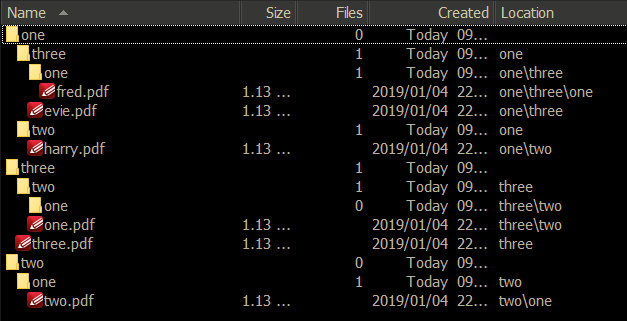
Initial structure:
2019-01-11 09_46_57-K__test.png

Code: (text)
K:\>remv -Ervvns o(.+)e(.+)$ d$1$2 test
 Would rename     'test\two\one\two.pdf' to 'test\twd\on\two.pdf' ...
 Skipping   'test\two\one'.
 Skipping   'test\two'.
 Skipping         'test\three\two\one.pdf' ...
 Skipping   'test\three\two\one'.
 Skipping   'test\three\two'.
 Skipping         'test\three\three.pdf' ...
 Skipping   'test\three'.
 Would rename     'test\one\two\harry.pdf' to 'test\dn\two\harry.pdf' ...
 Skipping   'test\one\two'.
 Would rename     'test\one\three\one\fred.pdf' to 'test\dne\three\one\frd.pdf' ...
 Skipping   'test\one\three\one'.
 Would rename     'test\one\three\evie.pdf' to 'test\dne\three\vie.pdf' ...
 Skipping   'test\one\three'.
 Skipping   'test\one'.
 [STATS] The simulation suggested 4 renames. Note that some of them might fail.

Taken from the top for the 'Would rename ...' lines, I would have thought given o(.+)e(.+)$ and ignoring extensions:
Would rename    'test\two\one\two.pdf' to 'test\twd\on\two.pdf' ...
'test\two\one\two.pdf' -> 'test\two\one\two.pdf'  - Skip it

Would rename    'test\one\two\harry.pdf' to 'test\dn\two\harry.pdf' ...
'test\one\two\harry.pdf' -> 'test\one\two\harry.pdf'  - Skip it

Would rename    'test\one\three\one\fred.pdf' to 'test\dne\three\one\frd.pdf' ...
'test\one\three\one\fred.pdf' -> 'test\one\three\one\fred.pdf' - Skip it

Would rename    'test\one\three\evie.pdf' to 'test\dne\three\vie.pdf' ...
'test\one\three\evie.pdf' -> 'test\one\three\evie.pdf' - Skip it

ie. None of them match the given criteria.

The actual result:
Code: (text)
K:\>remv -Ervvs o(.+)e(.+)$ d$1$2 test
 Renaming     'test\two\one\two.pdf' to 'test\twd\on\two.pdf' ... error: operation not permitted
 Skipping   'test\two\one'.
 Skipping   'test\two'.
 Skipping         'test\three\two\one.pdf' ...
 Skipping   'test\three\two\one'.
 Skipping   'test\three\two'.
 Skipping         'test\three\three.pdf' ...
 Skipping   'test\three'.
 Renaming     'test\one\two\harry.pdf' to 'test\dn\two\harry.pdf' ... error: operation not permitted
 Skipping   'test\one\two'.
 Renaming     'test\one\three\one\fred.pdf' to 'test\dne\three\one\frd.pdf' ... error: operation not permitted
 Skipping   'test\one\three\one'.
 Renaming     'test\one\three\evie.pdf' to 'test\dne\three\vie.pdf' ... error: operation not permitted
 Skipping   'test\one\three'.
 Skipping   'test\one'.
 [STATS] Renamed 0 files (4 failed, 11 skipped).

"I will not follow where the path may lead, but I will go where there is no path, and I will leave a trail." - Muriel Strode, 1903

Tuxman

  • OMG not him again!
  • Supporting Member
  • Joined in 2006
  • **
  • Posts: 2,522
    • Participated in NANY Challenge Seven Times
Re: remv: Rename files (and directories) with regular expressions
« Reply #18 on: January 11, 2019, 12:56 AM »
Hmm, that might be fixed with a simple call to create_directories before renaming, so the target directories will be created even if the original directories didn't match your regex. But that would lead to empty folders when the files from them have been moved.

I'm currently experimenting a bit:

Code
> .\a.exe -Erv "remv" "romv"
 Renaming       '.\remv.hpp' to '.\romv.hpp' ...
   error [rn]: operation not permitted
 Renaming       '.\remv.cpp' to '.\romv.cpp' ...
   error [rn]: operation not permitted
 [STATS] Renamed 0 files (2 failed, 4 skipped).

Code
> .\a.exe -rv "remv" "romv"
 Renaming       '.\remv.hpp' to '.\romv.hpp' ...
 Renaming       '.\remv.cpp' to '.\romv.cpp' ...
 [STATS] Renamed 2 files (0 failed, 4 skipped).

Something about the -E flag is fishy.  :huh:
I'll look into it tomorrow or on Monday (I'm visiting friends over the weekend). Attaching version 1.2.1 with a broken -E flag above for the time being.
I bet when Cheetahs race and one of them cheats, the other one goes "Man, you're such a Cheetah!" and they laugh & eat a zebra or whatever.

4wd

  • Pedantic Old Bastard
  • Supporting Member
  • Joined in 2006
  • **
  • Posts: 5,652
    • Coding Snacks
Re: remv: Rename files (and directories) with regular expressions
« Reply #19 on: January 11, 2019, 01:16 AM »
FWIW, this is a small PowerShell script I put together to check against what I was testing above:

Code: ( powershell)
# Folder to act on
$folder = 'K:\test-ps'
# Regex to match
$regexMatch = "o(.+)e(.+)$"
# Regex to replace
$regexReplace = "d`$1`$2" # Must remember to escape the back references DOH!
# Ignore extension
$ignoreExt = $true
# Grab the directory tree
$a = Get-ChildItem $folder -recurse
# Sort by folder depth
$b = ($a | Select-Object FullName, @{Name="FolderDepth";Expression={$_.DirectoryName.Split('\').Count}} | Sort-Object -Descending FolderDepth,FullName)
# Loop through each file/dir name seeing if it matches and output the result
for ($i = 0; $i -lt $b.Count; $i++) {
  # Output the last part of the path we're testing
  Write-Host (Split-Path $b[$i].FullName -Leaf) -NoNewline
  if ($ignoreExt) {
    # Ignoring extension
    # Grab the last part of the path (file/folder)
    $t1 = (Split-Path $b[$i].FullName -Leaf)
    # Grab name without extension and replace matches
    $newName = ([io.path]::GetFileNameWithoutExtension($t1) -replace $regexMatch, $regexReplace)
    # Output result
    Write-Host " -> $($newName)$([io.path]::GetExtension($t1))"
  } else {
    # Include extension
    # Grab the last part of the path (file/folder) and replace matches
    $newName = ((Split-Path $b[$i].FullName -Leaf) -replace $regexMatch, $regexReplace)
    # Output result
    Write-Host " -> $($newName)"
  }
}


Sample output
Code: (text)
PS Z:\test\_Coding Snacks> Z:\test\_Coding Snacks\remv-test.ps1
fred.pdf -> fred.pdf
two.pdf -> two.pdf
one.pdf -> one.pdf
harry.pdf -> harry.pdf
evie.pdf -> evie.pdf
three.pdf -> three.pdf
one -> one
two -> two
one -> one
two -> two
three -> three
two -> two
one -> one
three -> three
one -> one

No guarantee it's correct either  ;)
"I will not follow where the path may lead, but I will go where there is no path, and I will leave a trail." - Muriel Strode, 1903
« Last Edit: January 11, 2019, 01:44 AM by 4wd »

Tuxman

  • OMG not him again!
  • Supporting Member
  • Joined in 2006
  • **
  • Posts: 2,522
    • Participated in NANY Challenge Seven Times
Re: remv: Rename files (and directories) with regular expressions
« Reply #20 on: January 11, 2019, 01:20 AM »
Nice. I haven't really done much with the PowerShell yet.  :Thmbsup:
I bet when Cheetahs race and one of them cheats, the other one goes "Man, you're such a Cheetah!" and they laugh & eat a zebra or whatever.

4wd

  • Pedantic Old Bastard
  • Supporting Member
  • Joined in 2006
  • **
  • Posts: 5,652
    • Coding Snacks
Re: remv: Rename files (and directories) with regular expressions
« Reply #21 on: January 11, 2019, 01:38 AM »
Unfortunately, I kind of got the $regexReplace wrong :-[
Would have failed if $ignoreExt = $false

Need to directly input the Regex replacement string because of the way PowerShell handles references, (specifically using $ with ' or ") - adjusted script.

Probably a way around it but my brain isn't up to it atm.


Fixed, needed to escape the back references with `
"I will not follow where the path may lead, but I will go where there is no path, and I will leave a trail." - Muriel Strode, 1903
« Last Edit: January 11, 2019, 01:45 AM by 4wd »

yarond

  • Supporting Member
  • Joined in 2011
  • **
  • Posts: 11
Re: remv: Rename files (and directories) with regular expressions
« Reply #22 on: January 13, 2019, 05:11 PM »
Hmm, that might be fixed with a simple call to create_directories before renaming, so the target directories will be created even if the original directories didn't match your regex. But that would lead to empty folders when the files from them have been moved.
The program is already set to rename/move files, not directories by themselves.
So leaving empty directories behind is both the correct, and expected, behavior. Moving everything out of a directory doesn't necessarily mean that the directory should be deleted, empty directories are a valid entity.

If you want to, it's of course possible to add an optional parameter to check if any directory is being emptied during the run (keep track of location for any file that was moved, and after processing everything check if any of the locations are empty), and then delete them. But, again, while that could certainly be nice, I think it's not required, and it's perfectly fine and normal for empty directories to be left behind if the files inside them were moved elsewhere.

4wd

  • Pedantic Old Bastard
  • Supporting Member
  • Joined in 2006
  • **
  • Posts: 5,652
    • Coding Snacks
Re: remv: Rename files (and directories) with regular expressions
« Reply #23 on: January 13, 2019, 10:32 PM »
Hmm, that might be fixed with a simple call to create_directories before renaming, so the target directories will be created even if the original directories didn't match your regex.

BTW, I don't know if you noticed but it was suggesting directory name changes even though I hadn't specified the -d parameter.

Actually, looking at the results  again, I would say it's matching against the complete path instead of the individual components of that path.
"I will not follow where the path may lead, but I will go where there is no path, and I will leave a trail." - Muriel Strode, 1903
« Last Edit: January 13, 2019, 10:49 PM by 4wd »

Tuxman

  • OMG not him again!
  • Supporting Member
  • Joined in 2006
  • **
  • Posts: 2,522
    • Participated in NANY Challenge Seven Times
Re: remv: Rename files (and directories) with regular expressions
« Reply #24 on: January 14, 2019, 07:17 PM »
Yes, it does - so you can match subfolders.  :)

I don't know if you noticed but it was suggesting directory name changes even though I hadn't specified the -d parameter.

If they are a part of the path to a regular file, yes. You cannot rename a whole directory without a file in it though.
I could make the non-d call skip subfolders, but then -d would be the same thing as not using -r, or am I mistaken?
I bet when Cheetahs race and one of them cheats, the other one goes "Man, you're such a Cheetah!" and they laugh & eat a zebra or whatever.

Original address: https://www.donationcoder.com/forum/index.php?topic=44941.0