


NANY 2018 Entry Information
| Application Name | BaseImage |
| Version | 1.0 |
| Short Description | Small utility for easily creating base64 encoded images |
| Supported OSes | Windows 7 |
| Web Page | Online Documentation |
| Download Link | Download Baseimage |
| System Requirements | Only works on Windows |
| Version History | |
| Author | Link to Author's Profile page on Stack Exchange |
Description
This is a little gui to let you create base64 encoded images. You can drag-n-drop an image onto its window and then choose to either export to file or copy to the clipboard. You can copy just the base64 code, or an html img tag, or a full html page.
Features
- Generates base-64 encoded html img tags from a given image file
- Easy-to use, simple interface
- Drag-n-Drop
- Built-in demo
- Copy just the image tag or just the code
- Export to html file
- Export img tag to file
- Autonaming
- Use Custom HTML Template
- Tray Icon Support
Planned Features
Nothing yet.
Screenshots
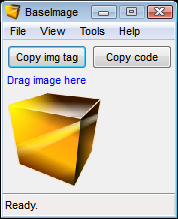
Please visit the documentation page for more images
Usage
Installation
Just extract the zip file to a folder and run the exectuable.
Using the Application
Run baseimage.exe and select Run Demo from the Tools Menu.
Or, drag your own image onto the window and select Export html to file from the File Menu (html files normally open in your browser). Then, in your browser, view source.
Uninstallation
Just exit the application and delete all the files.
Known Issues
No issues yet.





