DonationCoder.com forum
 
Read-only archive. This is a static copy of the DonationCoder.com forum. Reading and searching work as before; logging in, posting and private messages do not.
Archive of 2026-10-21 · About this archive · Main site

Author Topic: Access Violation at address 00480893  (Read 5,358 times)

kindageeky

  • Supporting Member
  • Joined in 2009
  • **
  • Posts: 2
Access Violation at address 00480893
« on: December 08, 2017, 04:33 PM »
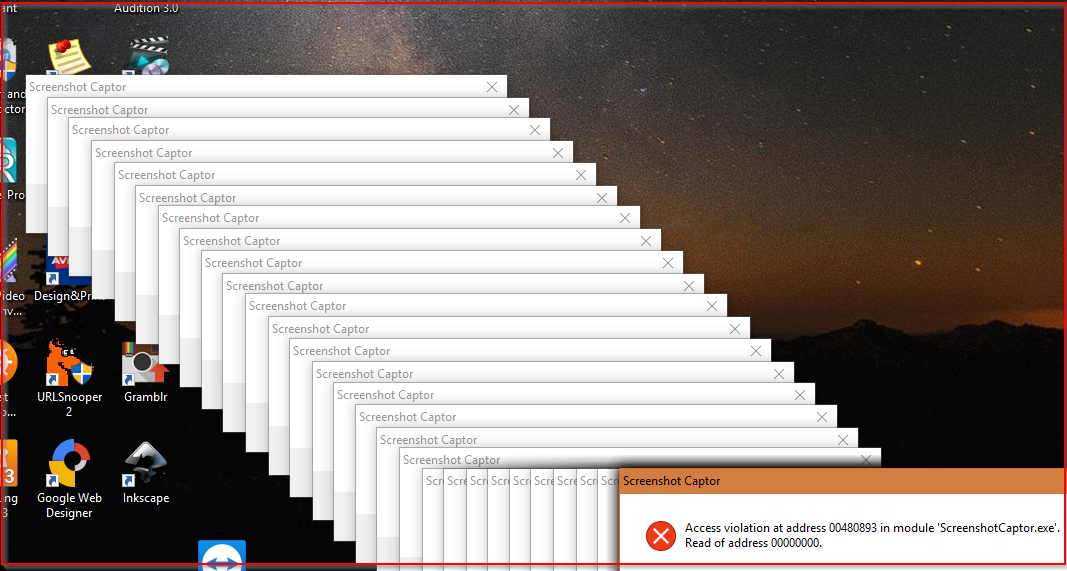
I have been getting this error for months. I was hoping the latest update would squash it, but it didn't.  Using Win 10 on a dual monitor setup. Every time I restart the computer I get this error. And it pops up over 25 times or more so I have a really aggravating amount of windows to close.

I searched the forum, but didn't get any results to show up since 2012, so I'm assuming I'm the only one with the issue.

I'd appreciate any guidance on how I can fix the error.

[attachthumb=#]
tomos

  • Charter Member
  • Joined in 2006
  • ***
  • Posts: 11,970
    • Gathering Badge
    • Participated in NANY Challenge Once
Re: Access Violation at address 00480893
« Reply #1 on: December 08, 2017, 05:07 PM »
a couple of questions:

  1. Is it portable or installed SC?
  2. If portable where is it -- could it be in a folder that it cannot write to?
  3. Did anything change 10 months ago when the problem started?
Tom

tomos

  • Charter Member
  • Joined in 2006
  • ***
  • Posts: 11,970
    • Gathering Badge
    • Participated in NANY Challenge Once
Re: Access Violation at address 00480893
« Reply #2 on: December 08, 2017, 06:14 PM »
Another thing could be the folder used for screenshots: whether that was changed; whether you have different types of files in that folder (seems to have been a problem in the past).
Tom

kindageeky

  • Supporting Member
  • Joined in 2009
  • **
  • Posts: 2
Re: Access Violation at address 00480893
« Reply #3 on: December 08, 2017, 06:32 PM »
It is installed. And yes I have changed the default save folder, which does contain multiple file types.

Can't think of anything particular that may have happened other than, I stopped being able to use the drawing features around that same time and had to edit in another application. But with the latest update, they are now working again.  :up:

mouser

  • First Author
  • Administrator
  • Joined in 2005
  • *****
  • Posts: 40,931
    • Gathering Badge
    • Plugin Coding Medal
    • Participated in NANY Challenge Seventeen Times
    • Cody Award
    • Coding Snacks
    • Volunteers/Staff
Re: Access Violation at address 00480893
« Reply #4 on: December 08, 2017, 09:04 PM »
Are you using the portable version of screenshot captor or the installer version?
You say the error happens on computer startup.  If you exit Screenshot Captor and restart it manually, do you not get the error? Or does it happen whenever you start screenshot captor?

The first thing you might try is to exit SC and delete the ScreenshotCaptor.ini file to reset any of your screenshot captor options and settings, and see if that fixes it.

If you didn't install SC normally (for example if you copied it over from another machine), you might try uninstalling or deleting it and reinstalling it.

Another thing to try is to use the portable version and see if that has the same problem -- if not then we know it has something to do with where/how it was installed.

Shades

  • Member
  • Joined in 2006
  • **
  • Posts: 2,954
Re: Access Violation at address 00480893
« Reply #5 on: December 08, 2017, 11:03 PM »
Very often that error is related to software not being able (or allowed) to write to its default/configured folder. In case of ScreenshotCaptor, is the user account you use allowed to write in the Screenshot folder or the folder where you configure the output of ScreenshotCaptor to be stored?

That is the first thing I would check.

The easy path is usually downhill...

Original address: https://www.donationcoder.com/forum/index.php?topic=44701.0