DonationCoder.com forum
 
Read-only archive. This is a static copy of the DonationCoder.com forum. Reading and searching work as before; logging in, posting and private messages do not.
Archive of 2026-10-21 · About this archive · Main site

Author Topic: Super Simple "Alarm Clock"  (Read 13,675 times)

nkormanik

  • Participant
  • Joined in 2010
  • *
  • Posts: 563
Super Simple "Alarm Clock"
« on: October 23, 2017, 05:48 AM »
Surprisingly coming up short.  Seems inexplicable, huh.

Suppose your friend writes you, "Call me at 2pm."

Let's say the time is now 11am.

For a timer I really like Skwire-suggested SnapTimer.  I use it all the time for this and that.  If I decide to use SnapTimer, I subtract, 2pm minus 11am.  Put 3 hours into the countdown timer.

Let's suppose that I get around to loading SnapTimer ten minutes later than 11am.  So..., 2pm minus..., uh, 11:10, let's see, that would be 2 hours and 50 minutes.  Oops, another minute has gone by, so, 2 hours, 49 minutes.  Countdown away.

In the present case, it would be better if I could directly input 2pm.  At 2pm some indicator comes up on screen.  Presto.

That would call for a very simple ALARM CLOCK.

Lots of alarm clocks out there.  And they are loaded with bells and whistles to the hilt.  Very unfriendly, all.

What would seem the easiest most efficient way of doing what needs to be done?  Double-click icon.  2pm.  Okay.  Done.

Thanks folks!

Nicholas Kormanik

Deozaan

  • Charter Member
  • Joined in 2006
  • ***
  • Posts: 9,827
    • Participated in NANY Challenge Eight Times
    • Cody Award
Re: Super Simple "Alarm Clock"
« Reply #1 on: October 23, 2017, 07:25 AM »
Easiest and most efficient way to do this?

Got an Android or iOS device?

"OK Google/Hey Siri, set alarm for 2PM." Done.

wraith808

  • Supporting Member
  • Joined in 2006
  • **
  • Posts: 11,205
    • Participated in NANY Challenge Fourteen Times
    • Coding Snacks
    • Writer
    • Hardware Hacker
Re: Super Simple "Alarm Clock"
« Reply #2 on: October 23, 2017, 12:12 PM »
Easiest and most efficient way to do this?

Got an Android or iOS device?

"OK Google/Hey Siri, set alarm for 2PM." Done.

Also, if you have a Google Home or Alexa (or Bixby).  You can do the same thing.  It's been the biggest revelation for me.

cranioscopical

  • Friend of the Site
  • Supporting Member
  • Joined in 2006
  • **
  • Posts: 4,776
    • Cody Award
    • Official Forum Clown
    • rotten turkey sandwich - Rotten Turkey Sandwich
Re: Super Simple "Alarm Clock"
« Reply #3 on: October 23, 2017, 10:32 PM »
Win 10 Cortana, too.
Chris

skrommel

  • Fastest code in the west
  • Developer
  • Joined in 2005
  • ***
  • Posts: 933
    • Participated in NANY Challenge Twice
    • Coding Snacks
Re: Super Simple "Alarm Clock"
« Reply #4 on: November 03, 2017, 12:45 AM »
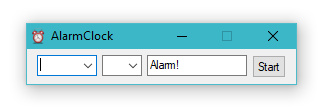
Try AlarmClock - just enter a time and a message to set an alarm! :)

A very simple alarm clock, I think it works with both 24 hour and am/pm system settings.

AlarmClock.jpg
« Last Edit: November 03, 2017, 08:34 PM by skrommel »

nkormanik

  • Participant
  • Joined in 2010
  • *
  • Posts: 563
Re: Super Simple "Alarm Clock"
« Reply #5 on: November 03, 2017, 07:17 AM »
Wow, skrommel, exactly as requested.  Perfect.  Best, quickest alarm I've seen.  Totally intuitive.  Wonderful job.

Thank you so much!

Skwire, another one done.

tomos

  • Charter Member
  • Joined in 2006
  • ***
  • Posts: 11,970
    • Gathering Badge
    • Participated in NANY Challenge Once
Re: Super Simple "Alarm Clock"
« Reply #6 on: November 03, 2017, 01:28 PM »
This of interest to me, but:

---------------------------
AlarmClock.ahk
---------------------------
Error:  Parameter #2 invalid.

Specifically: HKEY_USERS\.DEFAULT\Control Panel\International

Line#
009: Menu,Tray,NoStandard
010: Menu,Tray,Add,AlarmClock,SHOW
011: Menu,Tray,Add,&Exit,EXIT
012: Menu,Tray,Default,AlarmClock
013: Menu,Tray,Click,1
014: Menu,Tray,Tip,AlarmClock
016: use24 = 0
---> 017: RegRead,timeformat,HKEY_USERS\.DEFAULT\Control Panel\International,sTimeFormat

The program will exit.
---------------------------
OK 
---------------------------

Windows 7 x64
Clock set to yyyy-MM-dd
Tom

skrommel

  • Fastest code in the west
  • Developer
  • Joined in 2005
  • ***
  • Posts: 933
    • Participated in NANY Challenge Twice
    • Coding Snacks
Re: Super Simple "Alarm Clock"
« Reply #7 on: November 03, 2017, 08:03 PM »
Try now, @tomos, your AutoHotkey is too old! :)

tomos

  • Charter Member
  • Joined in 2006
  • ***
  • Posts: 11,970
    • Gathering Badge
    • Participated in NANY Challenge Once
Re: Super Simple "Alarm Clock"
« Reply #8 on: November 03, 2017, 08:14 PM »
Try now, @tomos, your AutoHotkey is too old! :)

ah, okay, should have thought of that :-[
will try it tomorrow :up:
Tom

Rockets

  • Supporting Member
  • Joined in 2011
  • **
  • Posts: 61
Re: Super Simple "Alarm Clock"
« Reply #9 on: August 07, 2018, 11:15 PM »
Is it possible to add one field mode? For Ex 1700 for 17:00

Original address: https://www.donationcoder.com/forum/index.php?topic=44500.0