DonationCoder.com forum
 
Read-only archive. This is a static copy of the DonationCoder.com forum. Reading and searching work as before; logging in, posting and private messages do not.
Archive of 2026-10-21 · About this archive · Main site

Author Topic: Text Dragon  (Read 19,927 times)

c.gingerich

  • Supporting Member
  • Joined in 2011
  • **
  • Posts: 748
    • Participated in NANY Challenge Six Times
    • Coding Snacks
Text Dragon
« on: October 10, 2017, 07:13 PM »
Text Dragon is an application that runs in the background and allows you to drag and drop text from one application to the edit box of another application. You can also drag and drop text to a Windows explorer window, or the desktop to create a TXT, HTML or PDF file (keeping the formatting).

Web page: http://vdsfreak.tumblr.com/post/166253006780/text-dragon

EDIT:
Update 2.2.1
- removed Ctrl+Ins hotkey

Updated to version 2.1
+ optional code menu to convert plain text to PHP, Javascript, or HTML code
+ experimental Screen capture feature. Drag from the image preview window to desktop, explorer window (save as image file) or on to another app that supports pasting images.
^ a few bug fixes.
« Last Edit: August 08, 2018, 01:16 PM by c.gingerich »

c.gingerich

  • Supporting Member
  • Joined in 2011
  • **
  • Posts: 748
    • Participated in NANY Challenge Six Times
    • Coding Snacks
Re: Text Dragon
« Reply #1 on: October 11, 2017, 11:18 PM »
Has anyone given this a try? I could use some feedback.  :)

Thanks

skwire

  • I eat Coding Snacks for breakfast...
  • Global Moderator
  • Joined in 2005
  • *****
  • Posts: 5,297
    • Participated in NANY Challenge Seventeen Times
    • Coding Snacks
    • Superboy Coder
    • Cody Award
    • Volunteers/Staff
    • Gathering Badge
Re: Text Dragon
« Reply #2 on: October 11, 2017, 11:43 PM »
I haven't tried but am curious how this affects the dragging and dropping of files (if at all).

c.gingerich

  • Supporting Member
  • Joined in 2011
  • **
  • Posts: 748
    • Participated in NANY Challenge Six Times
    • Coding Snacks
Re: Text Dragon
« Reply #3 on: October 11, 2017, 11:46 PM »
It does not affect drag drop of files that I have noticed.

skwire

  • I eat Coding Snacks for breakfast...
  • Global Moderator
  • Joined in 2005
  • *****
  • Posts: 5,297
    • Participated in NANY Challenge Seventeen Times
    • Coding Snacks
    • Superboy Coder
    • Cody Award
    • Volunteers/Staff
    • Gathering Badge
Re: Text Dragon
« Reply #4 on: October 11, 2017, 11:48 PM »
It does not affect drag drop of files that I have noticed.

Cool.  Good to know.  =]

IainB

  • @Slartibartfarst
  • Supporting Member
  • Joined in 2008
  • **
  • Posts: 7,544
Re: Text Dragon
« Reply #5 on: October 12, 2017, 12:47 AM »
@c.gingerich: do testers or ß-testers of the software get a lifetime unrestricted (device) licence for Text Dragon?

c.gingerich

  • Supporting Member
  • Joined in 2011
  • **
  • Posts: 748
    • Participated in NANY Challenge Six Times
    • Coding Snacks
Re: Text Dragon
« Reply #6 on: October 12, 2017, 03:45 PM »
New version available 2.1

+ optional code menu to convert plain text to PHP, Javascript, or HTML code
+ experimental Screen capture feature. Drag from the image preview window to desktop, explorer window (save as image file) or on to another app that supports pasting images.
^ a few bug fixes.

@IainB - Not normally.

cranioscopical

  • Friend of the Site
  • Supporting Member
  • Joined in 2006
  • **
  • Posts: 4,776
    • Cody Award
    • Official Forum Clown
    • rotten turkey sandwich - Rotten Turkey Sandwich
Re: Text Dragon
« Reply #7 on: October 12, 2017, 09:32 PM »
@Chris G,

I tried this on 2 machines and had some problems.
I get an "Untitled.rtf" file, along with the desired TestDragon-selected-format file, no matter which format I select.
There's a lot of stuff running on my machines and I wondered if something other than TextDragon was causing this. Now I think that is probably not the case as, after removing TextDragon, the drag ability is gone.

I'm a bit pressed for time at the moment but I'll dig around some more as soon as possible. Just wondered if the "Untitled.rtf" item meant anything to you.
Chris

Curt

  • Supporting Member
  • Joined in 2006
  • **
  • Posts: 7,565
Re: Text Dragon
« Reply #8 on: October 12, 2017, 09:38 PM »
Windows is thinking TextDragon to be suspiciously unknown, but of course you already know this.
I didn't manage to try version 1.5 before you already had version 2.1 uploaded.

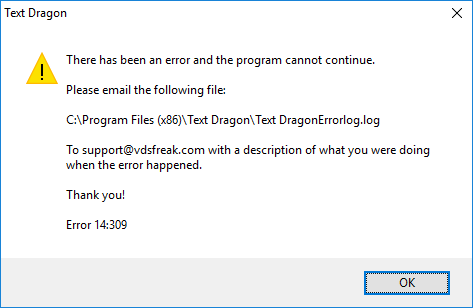
2.1 > Settings > "anything" (even nothing!) > OK => Error 14:309


[attach=#]


but there is no log file!

64-bit Win 10 Home Premium

cranioscopical

  • Friend of the Site
  • Supporting Member
  • Joined in 2006
  • **
  • Posts: 4,776
    • Cody Award
    • Official Forum Clown
    • rotten turkey sandwich - Rotten Turkey Sandwich
Re: Text Dragon
« Reply #9 on: October 12, 2017, 09:41 PM »
Just discovered that 2.2 throws an error as well; no log file.
Chris

c.gingerich

  • Supporting Member
  • Joined in 2011
  • **
  • Posts: 748
    • Participated in NANY Challenge Six Times
    • Coding Snacks
Re: Text Dragon
« Reply #10 on: October 12, 2017, 09:55 PM »
Ok. I’ll see if I can look into these tonight. I am going to be out of town tomorrow, but will get to this as soon as I can. Thanks for reporting these.

c.gingerich

  • Supporting Member
  • Joined in 2011
  • **
  • Posts: 748
    • Participated in NANY Challenge Six Times
    • Coding Snacks
Re: Text Dragon
« Reply #11 on: October 12, 2017, 11:42 PM »
@cranioscopical - TD does not create an 'untitled.rtf' file. It just creates TextDragon file, please let me know what you find out.

@Curt - Do you have another application that uses Ctrl+Insert as a hotkey? That is what the error is but I am unable to recreate it on any of my systems. I am using Win 10 64bit.

rgdot

  • Supporting Member
  • Joined in 2009
  • **
  • Posts: 2,197
Re: Text Dragon
« Reply #12 on: October 13, 2017, 01:11 AM »
Tested it to create RTF, HTML and PDF in explorer window, all no problem except creating PDF (three paragraphs text containing two images) took more than 10 seconds

Win10 64

cranioscopical

  • Friend of the Site
  • Supporting Member
  • Joined in 2006
  • **
  • Posts: 4,776
    • Cody Award
    • Official Forum Clown
    • rotten turkey sandwich - Rotten Turkey Sandwich
Re: Text Dragon
« Reply #13 on: October 13, 2017, 02:57 AM »
@cranioscopical - TD does not create an 'untitled.rtf' file. It just creates TextDragon file, please let me know what you find out.
I had a compiled Autohotkey GUI script of my own running.
That's the source of the Untitled.rtf
Chris

Curt

  • Supporting Member
  • Joined in 2006
  • **
  • Posts: 7,565
Re: Text Dragon
« Reply #14 on: October 22, 2017, 09:12 PM »
I am still not able to do any settings at all > OK => Error 14:309. NirSoft HotKeysList found nothing of relevance. The program itself is working, but no log file. 64-bit Win 10

Curt

  • Supporting Member
  • Joined in 2006
  • **
  • Posts: 7,565
Re: Text Dragon
« Reply #15 on: October 23, 2017, 05:13 PM »
New version available...

Private upload Text Dragon 2.2.1 (without any hotkey) is working fine for me. I don't know if it will be publicly available.

c.gingerich

  • Supporting Member
  • Joined in 2011
  • **
  • Posts: 748
    • Participated in NANY Challenge Six Times
    • Coding Snacks
Re: Text Dragon
« Reply #16 on: October 23, 2017, 05:46 PM »
New version 2.2.1 - Removed Ctrl+Ins hotkey as it was causing issues for some. Screen cap, when enabled, is now only invoked by the system try icon context menu.

cranioscopical

  • Friend of the Site
  • Supporting Member
  • Joined in 2006
  • **
  • Posts: 4,776
    • Cody Award
    • Official Forum Clown
    • rotten turkey sandwich - Rotten Turkey Sandwich
Re: Text Dragon
« Reply #17 on: October 23, 2017, 10:30 PM »
Just a comment about the concept. In my e-mail program I have to double click on a subject line in order to read the body.  Doing so changes to a different window.  When Textdragon is running, the "Message body" screen reverts to the "Subject line" screen before I have time to assimilate the email message.  I know that I can exclude the e-mail program, but an e-mail is just the sort of item from which one might wish to drag text occasionally.  I have tried changing the delay time but that doesn't overcome what is, for me, a problem.
Chris

c.gingerich

  • Supporting Member
  • Joined in 2011
  • **
  • Posts: 748
    • Participated in NANY Challenge Six Times
    • Coding Snacks
Re: Text Dragon
« Reply #18 on: October 24, 2017, 12:20 PM »
@cranioscopical - What email app do you use? I'll take a look and see what I can do.

cranioscopical

  • Friend of the Site
  • Supporting Member
  • Joined in 2006
  • **
  • Posts: 4,776
    • Cody Award
    • Official Forum Clown
    • rotten turkey sandwich - Rotten Turkey Sandwich
Re: Text Dragon
« Reply #19 on: October 24, 2017, 03:19 PM »
@cranioscopical - What email app do you use? I'll take a look and see what I can do.
That's a kind thought, thanks. It's Forté Agent, link here
Chris

Curt

  • Supporting Member
  • Joined in 2006
  • **
  • Posts: 7,565
Re: Text Dragon
« Reply #20 on: August 07, 2018, 08:24 PM »
There is no longer a homepage. Will Text Dragon continue to need a license key, then?

c.gingerich

  • Supporting Member
  • Joined in 2011
  • **
  • Posts: 748
    • Participated in NANY Challenge Six Times
    • Coding Snacks
Re: Text Dragon
« Reply #21 on: August 08, 2018, 01:17 PM »
Sorry @curt. Still have a page available http://vdsfreak.tumblr.com/post/166253006780/text-dragon

I have updated the link on the first post as well.

Original address: https://www.donationcoder.com/forum/index.php?topic=44457.0