DonationCoder.com forum
 
Read-only archive. This is a static copy of the DonationCoder.com forum. Reading and searching work as before; logging in, posting and private messages do not.
Archive of 2026-10-21 · About this archive · Main site

Last post Author Topic: Good programs for helping you manage what programs start with windows?  (Read 75,410 times)

mouser

  • First Author
  • Administrator
  • Joined in 2005
  • *****
  • Posts: 40,931
    • Gathering Badge
    • Plugin Coding Medal
    • Participated in NANY Challenge Seventeen Times
    • Cody Award
    • Coding Snacks
    • Volunteers/Staff
I know we've talked about this before, but a post here:
http://www.donationcoder.com/forum/index.php?action=profile;u=33550
got me wondering if there were any novice-friendly tools to really help you add a new program to run at startup, in a safe and simple way without having to be a pro windows user.

mouser

  • First Author
  • Administrator
  • Joined in 2005
  • *****
  • Posts: 40,931
    • Gathering Badge
    • Plugin Coding Medal
    • Participated in NANY Challenge Seventeen Times
    • Cody Award
    • Coding Snacks
    • Volunteers/Staff
just to refine this - the original poster was most interested in adding a new program to start with windows.

Josh

  • Charter Honorary Member
  • Joined in 2005
  • ***
  • Posts: 3,411
    • Gathering Badge
    • Official Forum Clown
    • Coding Snacks
    • Plugin Coding Medal
    • Volunteers/Staff
    • Military Service Badge - US Army
    • Furry Fandom Badge - Furry Fandom
    • Linux User
http://www.mlin.net/StartupCPL.shtml  In my opinion, the best startup management tool
Strength in Knowledge

kimmchii

  • Honorary Member
  • Joined in 2005
  • **
  • Posts: 360
1) use Starter

go to edit>new

2) create a new shortcut of the new program, then move it to this folder:
C:\Documents and Settings\username\Start Menu\Programs\Startup
If you find a good solution and become attached to it, the solution may become your next problem.
~Robert Anthony

jgpaiva

  • Artificial Idiocy
  • Global Moderator
  • Joined in 2006
  • *****
  • Posts: 4,727
    • Cody Award
    • Participated in NANY Challenge Once
    • Coding Snacks
    • Portugal Inhabitant
    • Linux User
msconfig!  ;D

Dennis the Menace

  • Charter Member
  • Joined in 2005
  • ***
  • Posts: 3
I use win patrol, very easy to use and also informs you of anything trying to put itself in your start-up list.
http://www.winpatrol.com/

app103

  • That scary taskbar girl
  • Global Moderator
  • Joined in 2006
  • *****
  • Posts: 5,888
    • Participated in NANY Challenge Six Times
    • Coding Snacks
    • Gathering Badge
    • Cody Award
    • Volunteers/Staff
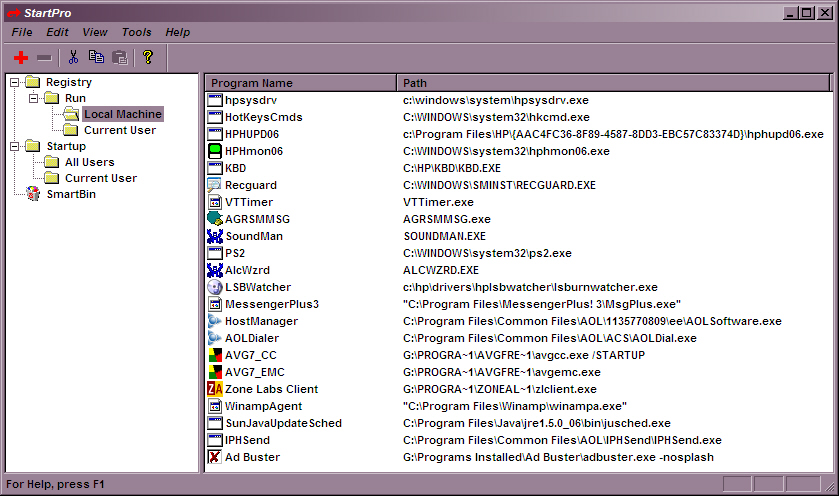
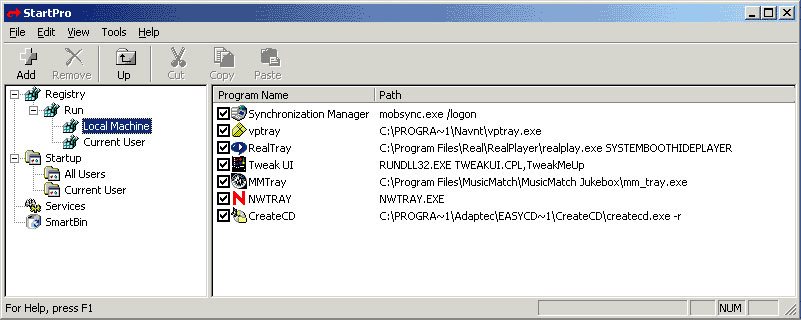
StartPro is something I have used for many years.

Really good for removing stuff too. It has it's own 'recycle bin' called the Smart Bin where it stores stuff you remove in case you made a mistake and want to put it back. It has a nice Explorer-like interface and very simple to use.

I have the old version 1.3 installed, which was freeware. The newer 2.0 is shareware.

I attached screenshots of both. The one for 2.0 I found on another website.

The 1.3 version has some features specific for Win9x...and the newer 2.0 has features specific for WinNT.

1.3 will run on both, though....just lacks the Services section, I think.

Carol Haynes

  • Waffles for England (patent pending)
  • Global Moderator
  • Joined in 2005
  • *****
  • Posts: 8,073
    • Cody Award
    • Furry Fandom Badge - Furry Fandom
I know it has been mentioned here before (but not in this thread)

Startup Delayer (http://www.r2.com.au/software.php?page=2&show=startdelay) gives control over the startup process - you can delete entries you don't want, add new entries and also time the startup of applications so that you can introduce a delay during startup if you have a lot of apps trying to load all at the same time.

zridling

  • Friend of the Site
  • Charter Member
  • Joined in 2005
  • ***
  • Posts: 3,299
How about SysInternals' Autoruns?
- zaine

tomos

  • Charter Member
  • Joined in 2006
  • ***
  • Posts: 11,970
    • Gathering Badge
    • Participated in NANY Challenge Once
or
http://www.winpatrol.com/download.html

WinPatrol (free version)

very easy & you can keep an eye on various other things as well
Tom

skywalka

  • Member
  • Joined in 2005
  • **
  • Posts: 254
I know it has been mentioned here before (but not in this thread)

Startup Delayer (http://www.r2.com.au/software.php?page=2&show=startdelay) gives control over the startup process - you can delete entries you don't want, add new entries and also time the startup of applications so that you can introduce a delay during startup if you have a lot of apps trying to load all at the same time.

I was dissapointed with the interface for this program.

I think a far more practical GUI would facilitate:
1.  Sorting the programs in the order that you want them to start.
2.  Adding a delay time that represents the period the system must wait before starting the next program.  This is because programs hog the CPU for varying periods.  You can measure (& change) the time it takes a program to finish starting & not worry about clashing with other programs in the startup list.

At the moment you must set delay that is timed from the time the system boots up.  If you add a program that you want to start earlier than existing entries, & you wish to keep your system responsive, you must now do this: Manually add the time that the new program takes to start to the entries that start after the new program.  Tedious!

Carol Haynes

  • Waffles for England (patent pending)
  • Global Moderator
  • Joined in 2005
  • *****
  • Posts: 8,073
    • Cody Award
    • Furry Fandom Badge - Furry Fandom
You can manually drag stuff on the time bar at the bottom (rather than entering times) which is a lot easier than manually entering times, though still a bit tedious. I agree that the UI could do with some work - I emailed the author with some suggestions months ago and got no response. Having said that you only really have to tweak things occasionally so it is a one off job - and it does work!

zirouy

  • Participant
  • Joined in 2006
  • *
  • Posts: 1
great!

skywalka

  • Member
  • Joined in 2005
  • **
  • Posts: 254
I emailed them too, when I posted here.  No reply for me either, yet.

Jimdoria

  • Charter Member
  • Joined in 2006
  • ***
  • Posts: 257
I've used Startup Delayer for years now. I do like it, although certain UI quirks bug me about it.

The biggest one is that during startup, there's a "cancel" button you can use at any time to abort the entire process, but no "skip" button that you could use to conditionally skip a single program and continue your bootup sequence with the next one.

I also use Mike Lin's (mlin.net) Startup Control Panel.
- Jimdoria ~@>@

There are two kinds of people in the world: Those who divide everybody into two kinds of people, and those who don't.

Ampa

  • I am cute ;)
  • Charter Member
  • Joined in 2005
  • ***
  • Posts: 592
A bit off topic (perhaps) as I am not sure it is a newbie tool... but I am very fond of Xecutor.

It is free for home / non-commercial use, and allows for scheduling and reordering of apps at startup. Can scan the registry and the startup folder for new additions.

masu

  • Member
  • Joined in 2006
  • **
  • Posts: 401
http://www.mlin.net/StartupCPL.shtml  In my opinion, the best startup management tool

I agree  :Thmbsup:
Find+Run Robot 2.90.01
Windows 7

Poolee

  • Charter Member
  • Joined in 2006
  • ***
  • Posts: 13
    • Participated in NANY Challenge Once
I was dissapointed with the interface for this program.

I think a far more practical GUI would facilitate:
1.  Sorting the programs in the order that you want them to start.
2.  Adding a delay time that represents the period the system must wait before starting the next program.  This is because programs hog the CPU for varying periods.  You can measure (& change) the time it takes a program to finish starting & not worry about clashing with other programs in the startup list.

At the moment you must set delay that is timed from the time the system boots up.  If you add a program that you want to start earlier than existing entries, & you wish to keep your system responsive, you must now do this: Manually add the time that the new program takes to start to the entries that start after the new program.  Tedious!

Hiya

Funnily enuf, a program like this was on my list of things to do.  If I may, can I borrow your comments as part of its design and functionality?  Though, with the current project I am working on, development won't start for another year or so.  During that time, I'm sure someone will beat me to it...   :P

Chur
Poolee

skywalka

  • Member
  • Joined in 2005
  • **
  • Posts: 254

Curt

  • Supporting Member
  • Joined in 2006
  • **
  • Posts: 7,565

I think a far more practical GUI would facilitate:
1.  Sorting the programs in the order that you want them to start.
2.  Adding a delay time that represents the period the system must wait before starting the next program.  This is because programs hog the CPU for varying periods.  You can measure (& change) the time it takes a program to finish starting & not worry about clashing with other programs in the startup list.
Nice description of the free program I use:
Jackass JoeJoe's StartRight  :-*
http://www.joejoesoft.com/vcms/113/ 

- but it could need a nicer look and even more features ...

Features:
- program executing ordering
- custom delays
- Auto-Tune delays based on CPU usage (optional)
- new item notification (optional)
- automatically disable all new programs (optional)
- pause or stop program execution (optional)
« Last Edit: January 04, 2007, 04:52 PM by Curt »

Darwin

  • Charter Member
  • Joined in 2005
  • ***
  • Posts: 6,985
    • Gathering Badge
Quote
Jackass JoeJoe's StartRight   
http://www.joejoesoft.com/vcms/113/

StartRight looks really interesting, but see http://tech.groups.yahoo.com/group/powertoolssoftware/message/15895 over at the Software Killer Apps forum for a discussion of when such applications are beneficial and at what point (in terms of hardware) they cease to be useful...
"Some people have a way with words, other people,... oh... have not way" - Steve Martin
« Last Edit: January 04, 2007, 05:44 PM by Darwin »

Deozaan

  • Charter Member
  • Joined in 2006
  • ***
  • Posts: 9,827
    • Participated in NANY Challenge Eight Times
    • Cody Award
just to refine this - the original poster was most interested in adding a new program to start with windows.

How much simpler can it be than to drag the shortcut to the StartUp folder in the start menu?

Curt

  • Supporting Member
  • Joined in 2006
  • **
  • Posts: 7,565
, but see http://tech.groups.yahoo.com/group/powertoolssoftware/message/15895 over at the Software Killer Apps forum for a discussion of when such applications are beneficial and at what point (in terms of hardware) they cease to be useful...
- interesting debate at SKA-forum, but I don't think StartRight was ever about making the PC upstart faster, but safer - and that is why I use it. Before, 3 or 4 programs would not display their icons in the sys-tray, because of too many programs fighting each other at Windows upstart, but StartRight fixed that problem.

jacquesrober

  • Supporting Member
  • Joined in 2006
  • **
  • Posts: 39
I am using  a program called "What's Running" http://www.download.com/What-s-Running/3000-2094_4-10256718.html The author' site seems to have a problem but the program can still be downloaded at Cnet.
What's running gives you info on everything that's running!!: processes, services, modules, ip connections, drivers, startup and gives you system info. It allows you to, stop, start, delete, disable, edit( process priority as an example). It is free for personal use and cost 25$ for commercial use. I wonder how they can collect if their web site is down..
I like it best after trying many others, I find it rather complete. And it has somewhat of an explorer interface.
Bye.
JR

Curt

  • Supporting Member
  • Joined in 2006
  • **
  • Posts: 7,565
What's running gives you info on everything that's running!!: processes, services, modules, ip connections, drivers, startup and gives you system info. It allows you to, stop, start, delete, disable, edit( process priority as an example).

WhatsRunning is most certainly a fine info center. I really like the modes 'Services' and 'Modules', you don't get these informations from many programs. And the 'Take a Snapshot' feature is brilliant  :up:

But as a startup manager it will not compete,  it is not even listing half of the programs! - which seems strange, because in the other modes WhatsRunning will list an awesome number of processes.

Original address: https://www.donationcoder.com/forum/index.php?topic=4420.0