DonationCoder.com forum
 
Read-only archive. This is a static copy of the DonationCoder.com forum. Reading and searching work as before; logging in, posting and private messages do not.
Archive of 2026-10-21 · About this archive · Main site

Author Topic: Adding to Comment/caption, then Ctrl+Alt+P - caption disappears...  (Read 8,977 times)

orbis

  • Supporting Member
  • Joined in 2017
  • **
  • Posts: 56
If I add a comment/caption, then Save Image and Show, then splice out a part of the image with Ctrl+Alt+P, the comment disappears, leaving a white space.

Obvs, I'm not splicing the part with the caption!

Am I doing something wrong?

Help appreciated. Thanks!

tomos

  • Charter Member
  • Joined in 2006
  • ***
  • Posts: 11,970
    • Gathering Badge
    • Participated in NANY Challenge Once
hi orbis,
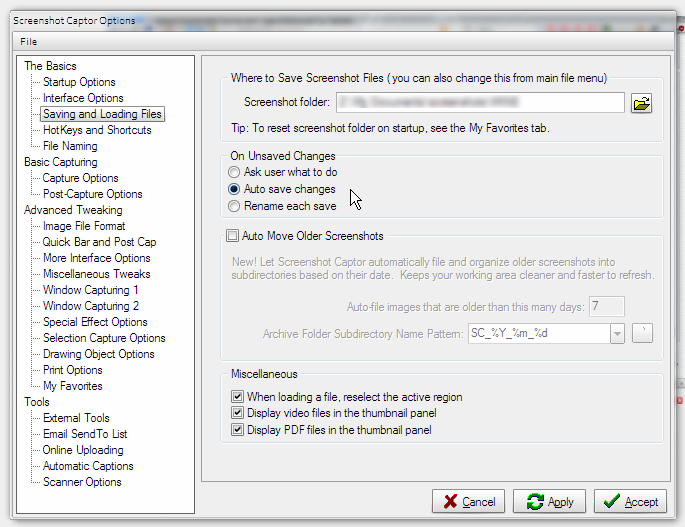
been using both added text and 'splice out' lately and haven't had this problem - but I dont save the image until I'm finished. (In options I have it set to auto-save when focus is moved to another image.)

[edit] removed flawed example I had attached - think it was user error: i.e. I cannot reproduce problem (and think white stripe was my applying text twice) [/edit]
Tom

orbis

  • Supporting Member
  • Joined in 2017
  • **
  • Posts: 56
Thanks for the reply, tomos.

How do you access that autosave setting, please? Can't seem to find it.

I have "show post capture dialog" set as after-capture preference, so that I can set any caption I like. The program seems to auto-save, and that clearly is not desirable with this little glitch. How, please, do I set it not to (auto-)save until I have added caption and spliced out any content?

Thanks!

tomos

  • Charter Member
  • Joined in 2006
  • ***
  • Posts: 11,970
    • Gathering Badge
    • Participated in NANY Challenge Once
I have "show post capture dialog" set as after-capture preference, so that I can set any caption I like.

ah okay, we're doing this in completely different ways. I'm just working within the SC window - select a thumbnail on the left, and work on it, add text, etc.

I've not really used the method you describe (so presume the problem is a bug with that), and amn't sure the auto-save option I mentioned would even be relevant there.
But in case:

Screenshot - 2017-06-13 , 20_42_47.png
Tom

orbis

  • Supporting Member
  • Joined in 2017
  • **
  • Posts: 56
That's really helpful. Thanks.

So: if I set it up to open main window after capture, and to autosave as per your screenshot, how do I go about adding a caption/comment (which may vary depending, and so can't be auto)? In the pop-up option, there's a box for that. I wonder how I do it with the main screen. The white box under the one called "Name" doesn't seem to add anything to the screenshot.

(And I love "amn't", btw, and shall use it more often!)

tomos

  • Charter Member
  • Joined in 2006
  • ***
  • Posts: 11,970
    • Gathering Badge
    • Participated in NANY Challenge Once
So: if I set it up to open main window after capture, and to autosave as per your screenshot, how do I go about adding a caption/comment [..] I wonder how I do it with the main screen.

late here, so just a quick reply:
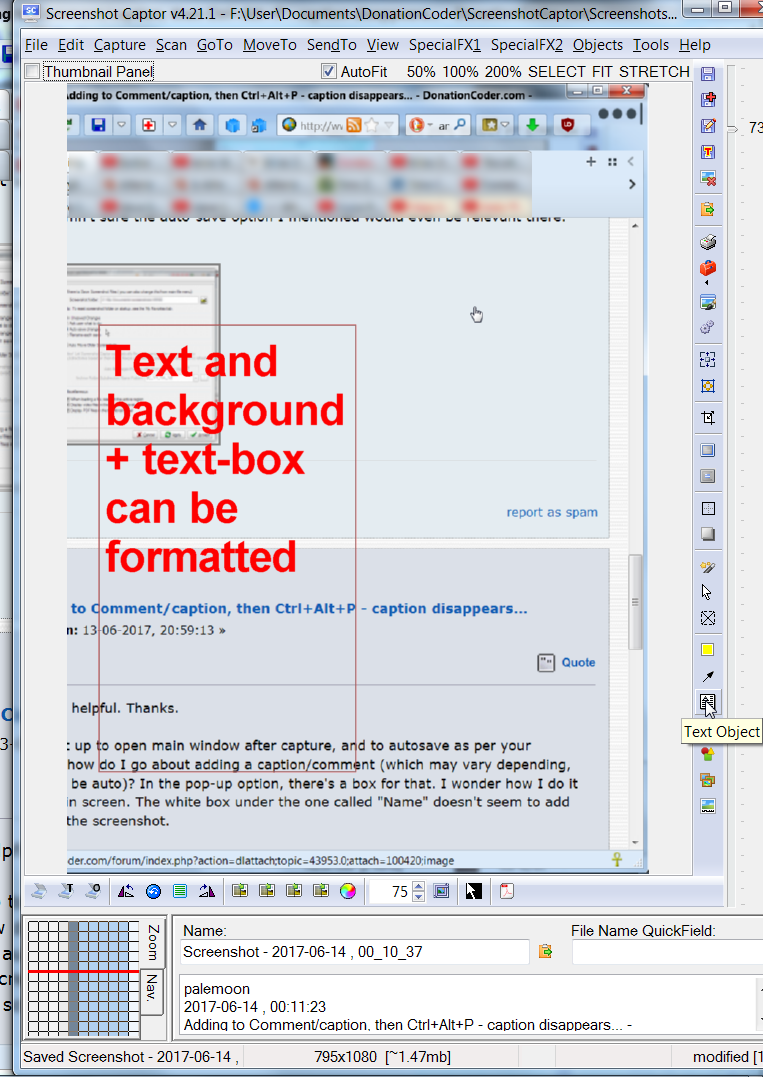
see the toolbar running down the right-hand-side, there's one there for text:
  • clicking icon will display a formatting panel down the right side
  • click-drag in image to create textbox
  • type - you can select text & change settings in the panel

As said, not sure how the other caption works, this one allows a lot of control, hopefully will cover your needs

Screenshot - 2017-06-14 , 00_11_24.png

And I love "amn't"
was actually a little surprised it set off the spellchecker (normally dont use one)
Tom

orbis

  • Supporting Member
  • Joined in 2017
  • **
  • Posts: 56
I'm very grateful As to "amn't", though it's off topic, you might like to have a look at http://www.worldwidewords.org/qa/qa-amn1.htm!

tomos

  • Charter Member
  • Joined in 2006
  • ***
  • Posts: 11,970
    • Gathering Badge
    • Participated in NANY Challenge Once
I'm very grateful As to "amn't", though it's off topic, you might like to have a look at http://www.worldwidewords.org/qa/qa-amn1.htm!

very interesting, I didnt know it was so localised in usage.
You now know roughly where I'm from :)
Tom

orbis

  • Supporting Member
  • Joined in 2017
  • **
  • Posts: 56
The thought had crossed my mind - but I did not want to presume!

BTW, if mouser reads these (and I am sure he does), I would still prefer (despite your skilled and worthy help!) working by using the pop-up, and I do think this disappearing caption/comment issue amounts to a bug.

mouser

  • First Author
  • Administrator
  • Joined in 2005
  • *****
  • Posts: 40,931
    • Gathering Badge
    • Plugin Coding Medal
    • Participated in NANY Challenge Seventeen Times
    • Cody Award
    • Coding Snacks
    • Volunteers/Staff
Quote
If I add a comment/caption, then Save Image and Show, then splice out a part of the image with Ctrl+Alt+P, the comment disappears, leaving a white space.

I'll look into it -- what is happening is that the caption is still "there" it's just now it's off screen. since the image shrunk.  The splicing operation does not move objects as it should after a splice.  I will try to fix that.

(you can confirm it's still there just off screen by using the "Edit -> Quick Expand Canvas" action a couple of times).

orbis

  • Supporting Member
  • Joined in 2017
  • **
  • Posts: 56
Many thanks. Your software is superb (as is that of others on the site) and in regular daily use.  :up:

mouser

  • First Author
  • Administrator
  • Joined in 2005
  • *****
  • Posts: 40,931
    • Gathering Badge
    • Plugin Coding Medal
    • Participated in NANY Challenge Seventeen Times
    • Cody Award
    • Coding Snacks
    • Volunteers/Staff
Thank you for saying so  :Thmbsup:

orbis

  • Supporting Member
  • Joined in 2017
  • **
  • Posts: 56
No hurry at all on this... Thanks!

Original address: https://www.donationcoder.com/forum/index.php?topic=43953.0