DonationCoder.com forum
 
Read-only archive. This is a static copy of the DonationCoder.com forum. Reading and searching work as before; logging in, posting and private messages do not.
Archive of 2026-10-21 · About this archive · Main site

Author Topic: Unreadeble text in Text Object  (Read 8,315 times)

james48

  • Like it working computer
  • Supporting Member
  • Joined in 2017
  • **
  • Posts: 50
Unreadeble text in Text Object
« on: June 13, 2017, 07:54 AM »
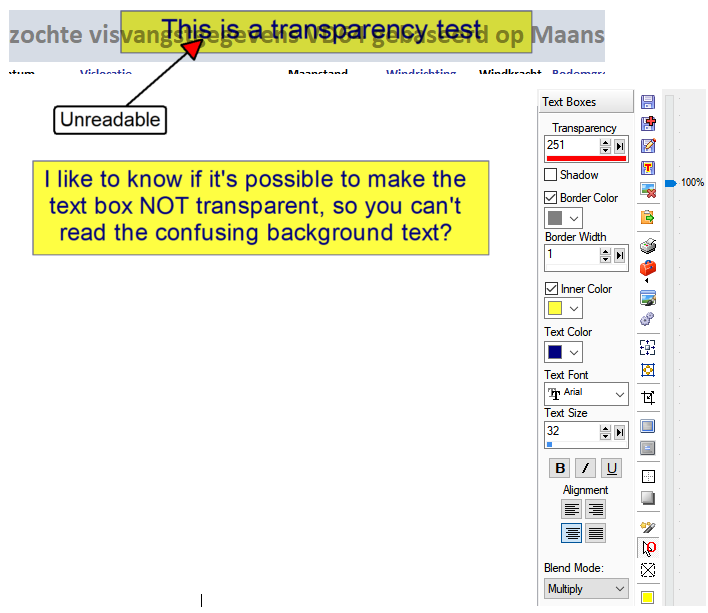
Hello, I like to know something about transparency in Text Object please.  :-[ (see attachment)
Unreadable text.png
Windows 10
ASUS ROG STRIX Z690-A GAMING
- Intel Core i9 13900KF - 3,0Ghz
- Corsair Vengeance 32GB(3600Mhz)
- Samsung 970 EVO Plus 1TB (M.2)
- DVD Brander (Extern)
- NVIDIA RTX 4070 Ti 12GB
- Onboard - 7.1 HD audio Realtek ALC4080  - NZXT Kraken X63
- Corsair AF120 2.0(Wit)
- Corsair RM1000x (1000Watt)

Curt

  • Supporting Member
  • Joined in 2006
  • **
  • Posts: 7,565
Re: Unreadeble text in Text Object
« Reply #1 on: June 13, 2017, 08:28 AM »
What program is this question about? Is it maybe mouser's Screenshot Captor?
----
mouser's programs: https://www.donationcoder.com/forum/index.php?board=3.0
Screenshot Captor: https://www.donationcoder.com/forum/index.php?board=34.0

mouser

  • First Author
  • Administrator
  • Joined in 2005
  • *****
  • Posts: 40,931
    • Gathering Badge
    • Plugin Coding Medal
    • Participated in NANY Challenge Seventeen Times
    • Cody Award
    • Coding Snacks
    • Volunteers/Staff
Re: Unreadeble text in Text Object
« Reply #2 on: June 13, 2017, 08:31 AM »
Hi James.

The answer is yes.
The solution is to modify the BLEND MODE.
Just change the BLEND mode to "Normal" instead of "Multiply".

james48

  • Like it working computer
  • Supporting Member
  • Joined in 2017
  • **
  • Posts: 50
Re: Unreadeble text in Text Object
« Reply #3 on: June 13, 2017, 01:25 PM »
Thank you very much Mouser, stupid from me I guess.  :o
It's still my favorite screen capture program!  :D

Regards,
James
Windows 10
ASUS ROG STRIX Z690-A GAMING
- Intel Core i9 13900KF - 3,0Ghz
- Corsair Vengeance 32GB(3600Mhz)
- Samsung 970 EVO Plus 1TB (M.2)
- DVD Brander (Extern)
- NVIDIA RTX 4070 Ti 12GB
- Onboard - 7.1 HD audio Realtek ALC4080  - NZXT Kraken X63
- Corsair AF120 2.0(Wit)
- Corsair RM1000x (1000Watt)

mouser

  • First Author
  • Administrator
  • Joined in 2005
  • *****
  • Posts: 40,931
    • Gathering Badge
    • Plugin Coding Medal
    • Participated in NANY Challenge Seventeen Times
    • Cody Award
    • Coding Snacks
    • Volunteers/Staff
Re: Unreadeble text in Text Object
« Reply #4 on: June 13, 2017, 01:27 PM »
Not stupid at all -- in fact I really need to add some help on that screen to guide people as I'm sure it's a common confusion.
Thanks for your patience with the program!

james48

  • Like it working computer
  • Supporting Member
  • Joined in 2017
  • **
  • Posts: 50
Re: Unreadeble text in Text Object
« Reply #5 on: June 13, 2017, 09:17 PM »
Thanks, this program is very useful to me. :D

James
Windows 10
ASUS ROG STRIX Z690-A GAMING
- Intel Core i9 13900KF - 3,0Ghz
- Corsair Vengeance 32GB(3600Mhz)
- Samsung 970 EVO Plus 1TB (M.2)
- DVD Brander (Extern)
- NVIDIA RTX 4070 Ti 12GB
- Onboard - 7.1 HD audio Realtek ALC4080  - NZXT Kraken X63
- Corsair AF120 2.0(Wit)
- Corsair RM1000x (1000Watt)

IainB

  • @Slartibartfarst
  • Supporting Member
  • Joined in 2008
  • **
  • Posts: 7,544
Re: Unreadeble text in Text Object
« Reply #6 on: June 15, 2017, 04:33 AM »
...Just change the BLEND mode to "Normal" instead of "Multiply".
_________________
...I really need to add some help on that screen to guide people as I'm sure it's a common confusion. ...
_________________

Yes, I sometimes wonder how many times SC users trip over this one. I had the exact same "problem" a while back when somehow the BLEND mode got changed (I have no idea how - certainly not deliberately by me). The thing is that the "fix" is a tad obscure. I'm not usually using SC every day, and am not familiar with all of its settings. Things like this are probably "user error" though, I suspect.

mouser

  • First Author
  • Administrator
  • Joined in 2005
  • *****
  • Posts: 40,931
    • Gathering Badge
    • Plugin Coding Medal
    • Participated in NANY Challenge Seventeen Times
    • Cody Award
    • Coding Snacks
    • Volunteers/Staff
Re: Unreadeble text in Text Object
« Reply #7 on: June 15, 2017, 05:11 AM »
I think just moving the blend mode to the top under the transparency setting and adding a line of explanation would solve the problem.

Original address: https://www.donationcoder.com/forum/index.php?topic=43950.0