DonationCoder.com forum
 
Read-only archive. This is a static copy of the DonationCoder.com forum. Reading and searching work as before; logging in, posting and private messages do not.
Archive of 2026-10-21 · About this archive · Main site

Author Topic: T-Clock Options/Time Format/Advanced clock format: Need to display two lines.  (Read 12,088 times)

pgchase

  • Participant
  • Joined in 2017
  • *
  • Posts: 3
T-Clock Options/Time Format/Advanced clock format:

HH:nn:ss yyyymmdd

Want HH:nn:ss to appear on line above yyyymmdd

In Time options there is a check box for New line, but don't know how to make a new line in Advanced clock format.

kunkel321

  • Supporting Member
  • Joined in 2009
  • **
  • Posts: 626
    • Participated in NANY Challenge Once
Haven't used T Clock in a while...  But I seem to remember something like "/n."  As in HH:nn:ss/nyyyymmdd

pgchase

  • Participant
  • Joined in 2017
  • *
  • Posts: 3
Thanks for your speedy reply. Sadly, that didn't work. "n" seems to represent the current minute, "/n" gave me an additional 33 since it was 33 minutes after the hour when I tried it. And "/n" including the quotes simply adds /n to the line.

Curt

  • Supporting Member
  • Joined in 2006
  • **
  • Posts: 7,565
Quote from: my clock
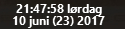
HH:nn:ss dddd\ndd mmmm (Wi) yyyy

will give: [attach=#]

Did you remember to put a check-mark [✔] in Advanced clock format? The options are different.

pgchase

  • Participant
  • Joined in 2017
  • *
  • Posts: 3
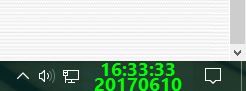
That was it. Thanks! Just had the slash going the wrong way.

HH:nn:ss\nyyyymmdd

Capture.JPG

Original address: https://www.donationcoder.com/forum/index.php?topic=43945.0