DonationCoder.com forum
 
Read-only archive. This is a static copy of the DonationCoder.com forum. Reading and searching work as before; logging in, posting and private messages do not.
Archive of 2026-10-21 · About this archive · Main site

Last post Author Topic: DONE: Icon in system tray to show when there in no internet connection  (Read 54,808 times)

shmuel1

  • Supporting Member
  • Joined in 2012
  • **
  • Posts: 48
Skype used to have a system tray icon that changed when there is no internet access. In the new Skype there is no skype icon in the system tray, so I can't easily tell when the internet is down.

I'd like a quick way to tell when the internet is down. I don't want a network speed indicator, just an icon that appears one way when there is internet access an another way when there is no internet access. I assume this utility would have to ping some location let's say every 15 seconds.

For extra credit you could be able to configure how often it pings and where it pings.

mouser

  • First Author
  • Administrator
  • Joined in 2005
  • *****
  • Posts: 40,931
    • Gathering Badge
    • Plugin Coding Medal
    • Participated in NANY Challenge Seventeen Times
    • Cody Award
    • Coding Snacks
    • Volunteers/Staff
I seem to remember someone already coding such a tool here... Just have to see if someone remembers?

shmuel1

  • Supporting Member
  • Joined in 2012
  • **
  • Posts: 48
I searched the site a bit and I can't find it.

Does anyone know of a utility that shows a different icon on the taskbar when there is no internet connection?

anandcoral

  • Honorary Member
  • Joined in 2009
  • **
  • Posts: 802
    • Participated in NANY Challenge Thirteen Times
I use "PingInfoView" http://www.nirsoft.net/utils/multiple_ping_tool.html, though not in tray, it shows red icon when no connection.

Regards,

Anand

Curt

  • Supporting Member
  • Joined in 2006
  • **
  • Posts: 7,565
Windows 10:
Settings > Taskbar > Select which icons appear on the taskbar > Network > On  Network.jpg no2017-05-29_141617.jpg


--------------------

http://www.digitalcitizen.life/how-set-which-icons-are-shown-windows-10s-notification-area
« Last Edit: May 29, 2017, 10:26 PM by Curt »

gmoises

  • Member
  • Joined in 2017
  • **
  • Posts: 2
AutoHotKey code:

Code: (autohotkey)
#NoEnv
#Persistent
#SingleInstance force
SendMode Input
SetWorkingDir %A_ScriptDir%

Thread, interrupt, 0
SetTimer, Reloj, 60000

Reloj:
	If ConnectedToInternet()
	{
		Menu, Tray, Icon, IEframe.dll, 40
		Menu, tray, tip, Connected
	}
	Else
	{
		Menu, Tray, Icon, IEframe.dll, 41
		Menu, tray, tip, Disconnected
	}
Return

ConnectedToInternet(flag=0x40) {
   Return DllCall("Wininet.dll\InternetGetConnectedState", "Str", flag,"Int",0) 
}
« Last Edit: May 30, 2017, 05:55 AM by Deozaan »

mouser

  • First Author
  • Administrator
  • Joined in 2005
  • *****
  • Posts: 40,931
    • Gathering Badge
    • Plugin Coding Medal
    • Participated in NANY Challenge Seventeen Times
    • Cody Award
    • Coding Snacks
    • Volunteers/Staff
Thanks for sharing that, gmoises  :up:

anandcoral

  • Honorary Member
  • Joined in 2009
  • **
  • Posts: 802
    • Participated in NANY Challenge Thirteen Times
Thanks for sharing that, gmoises  :up:
+1

Regards,

Anand

shmuel1

  • Supporting Member
  • Joined in 2012
  • **
  • Posts: 48
Doesn't the standard network icon just show if the network adapter is working?
If the problem is further down the line, like if the company's router is down or if my ISP is having problems, I don't think it shows anything different.

Settings > Taskbar > Select which icons appear on the taskbar > Network > On  [attachment 1 not found] [attachment 2 not found]
http://www.digitalcitizen.life/how-set-which-icons-are-shown-windows-10s-notification-area

shmuel1

  • Supporting Member
  • Joined in 2012
  • **
  • Posts: 48
Someone recommended FreePing, which is a light utility that will pop up when there is no connection to a specified site.

skwire

  • I eat Coding Snacks for breakfast...
  • Global Moderator
  • Joined in 2005
  • *****
  • Posts: 5,297
    • Participated in NANY Challenge Seventeen Times
    • Coding Snacks
    • Superboy Coder
    • Cody Award
    • Volunteers/Staff
    • Gathering Badge
@shmuel1: Did you try gmoises' AutoHotkey code?

shmuel1

  • Supporting Member
  • Joined in 2012
  • **
  • Posts: 48
I'm not into AutoHotKey. I am only into AutoIt.

skwire

  • I eat Coding Snacks for breakfast...
  • Global Moderator
  • Joined in 2005
  • *****
  • Posts: 5,297
    • Participated in NANY Challenge Seventeen Times
    • Coding Snacks
    • Superboy Coder
    • Cody Award
    • Volunteers/Staff
    • Gathering Badge
I'll write you a user-friendly version.  Stay tuned.

wraith808

  • Supporting Member
  • Joined in 2006
  • **
  • Posts: 11,205
    • Participated in NANY Challenge Fourteen Times
    • Coding Snacks
    • Writer
    • Hardware Hacker
I autoit syntax that different than AutoHotKey that it couldn't be adapted?

skwire

  • I eat Coding Snacks for breakfast...
  • Global Moderator
  • Joined in 2005
  • *****
  • Posts: 5,297
    • Participated in NANY Challenge Seventeen Times
    • Coding Snacks
    • Superboy Coder
    • Cody Award
    • Volunteers/Staff
    • Gathering Badge
I autoit syntax that different than AutoHotKey that it couldn't be adapted?

It's not that so much as the InternetGetConnectedState DLL call doesn't work if the problem is upstream of the person's computer.  I'm going to write a version that allows the user to ping an IP of their choosing as well as the check frequency.  The user will also be able to provide their own icons (if so desired).

Ath

  • Supporting Member
  • Joined in 2006
  • **
  • Posts: 3,649
    • Participated in NANY Challenge Eleven Times
    • Coding Snacks
    • Linux User
    • Hardware Hacker
I'm not into AutoHotKey. I am only into AutoIt.
But what is there that is stopping you of installing AHK? I'm not an AutoHotKey user myself, but more into AutoIt, but that won't stop me from using AHK tools when useful :-\
/Ton
Ath's software collection, Quote: "A problem well stated is a problem half-solved." (Charles Kettering)

skwire

  • I eat Coding Snacks for breakfast...
  • Global Moderator
  • Joined in 2005
  • *****
  • Posts: 5,297
    • Participated in NANY Challenge Seventeen Times
    • Coding Snacks
    • Superboy Coder
    • Cody Award
    • Volunteers/Staff
    • Gathering Badge
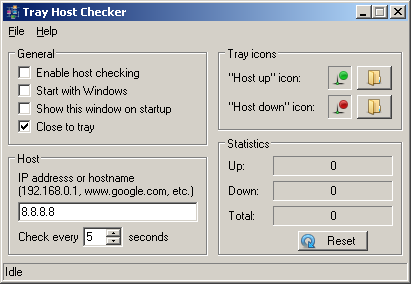
Apologies that this took so long.  Here's a screenshot:

2017-06-15_171603.png

Download here: http://skwire.dcmembers.com/apps/tray_host_checker/TrayHostChecker.zip

It's fully configurable -- hostname, interval, icons, etc.  Please let me know if this is what you had in mind.

shmuel1

  • Supporting Member
  • Joined in 2012
  • **
  • Posts: 48
That's perfect. Thanks.
Did you make that utility?

skwire

  • I eat Coding Snacks for breakfast...
  • Global Moderator
  • Joined in 2005
  • *****
  • Posts: 5,297
    • Participated in NANY Challenge Seventeen Times
    • Coding Snacks
    • Superboy Coder
    • Cody Award
    • Volunteers/Staff
    • Gathering Badge
That's perfect. Thanks.
Did you make that utility?

Yes, I wrote it for you.

shmuel1

  • Supporting Member
  • Joined in 2012
  • **
  • Posts: 48
Thanks. It's really nice.
I preferred larger icons, so I made the attached icons.

shmuel1

  • Supporting Member
  • Joined in 2012
  • **
  • Posts: 48
Can you add an option to keep the ping and error counters even when the program is closed, and a reset counters button?

I attached another set of icons. A bit smaller than the previous ones I sent. Feel free to distribute them as alternative icons, if you want.

techidave

  • Supporting Member
  • Joined in 2007
  • **
  • Posts: 1,046
I have not tried this app which looks really useful to me.  I need to try it on a problematic pc that I have.

skwire

  • I eat Coding Snacks for breakfast...
  • Global Moderator
  • Joined in 2005
  • *****
  • Posts: 5,297
    • Participated in NANY Challenge Seventeen Times
    • Coding Snacks
    • Superboy Coder
    • Cody Award
    • Volunteers/Staff
    • Gathering Badge
@shmuel1:  Thank you for the icons.  I'm glad the application is working for you.  ;)
@techidave: If you do try it out, let us know how you get on with it.  :Thmbsup:

shmuel1

  • Supporting Member
  • Joined in 2012
  • **
  • Posts: 48
I've been using it even since you made it. It works great.

anandcoral

  • Honorary Member
  • Joined in 2009
  • **
  • Posts: 802
    • Participated in NANY Challenge Thirteen Times
This may also be useful to you, as it gives off a sound on no internet.

https://www.ghacks.net/2017/06/29/bping-is-ping-with-sound/

Code
play a sound if there is no response, simply add the -d parameter to the command

Regards,

Anand

Original address: https://www.donationcoder.com/forum/index.php?topic=43891.0