DonationCoder.com forum
 
Read-only archive. This is a static copy of the DonationCoder.com forum. Reading and searching work as before; logging in, posting and private messages do not.
Archive of 2026-10-21 · About this archive · Main site

Author Topic: Where to Put Plugins  (Read 8,385 times)

slc7

  • Participant
  • Joined in 2017
  • *
  • Posts: 41
Where to Put Plugins
« on: May 14, 2017, 02:31 AM »
Hello, :)

I am trying to find out where to put a plugin.

I couldnt find a plugin folder.

I downloaded the plugins from here and there are so many but where exactly do i put these plugins

thank you
s

mouser

  • First Author
  • Administrator
  • Joined in 2005
  • *****
  • Posts: 40,931
    • Gathering Badge
    • Plugin Coding Medal
    • Participated in NANY Challenge Seventeen Times
    • Cody Award
    • Coding Snacks
    • Volunteers/Staff
Re: Where to Put Plugins
« Reply #1 on: May 14, 2017, 10:38 AM »
There should be a folder: "C:\Program Files (x86)\FindAndRunRobot\Plugins".

slc7

  • Participant
  • Joined in 2017
  • *
  • Posts: 41
Re: Where to Put Plugins
« Reply #2 on: May 15, 2017, 02:56 PM »
Hello M,
I found the plug in folder,
But now I have the problem that none of these plug-ins show up on find and run robot.

How do I activate these plug-ins?

I searched on Google but I couldn't find any tutorial on how to do this.

mouser

  • First Author
  • Administrator
  • Joined in 2005
  • *****
  • Posts: 40,931
    • Gathering Badge
    • Plugin Coding Medal
    • Participated in NANY Challenge Seventeen Times
    • Cody Award
    • Coding Snacks
    • Volunteers/Staff
Re: Where to Put Plugins
« Reply #3 on: May 15, 2017, 04:55 PM »
They should be active automatically.
You can see if a plugin is running and what keyword to use to trigger it by going to the "External Tools and Plugins" tab of options and then click on the "Click to Examine and Configure Plugins".

slc7

  • Participant
  • Joined in 2017
  • *
  • Posts: 41
Re: Where to Put Plugins
« Reply #4 on: May 15, 2017, 10:05 PM »
Hello M,
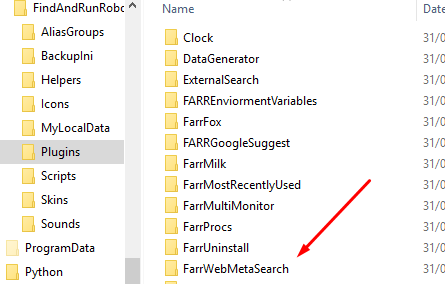
As you can see the Folder

plug in  in  program files 86

When I go to the settings as you told me the plug-in pages in FARR  scan and reload  the pages no plug-ins show


I don't know how to activate the websearch plugin

slc7

  • Participant
  • Joined in 2017
  • *
  • Posts: 41
Re: Where to Put Plugins
« Reply #5 on: June 07, 2017, 10:54 PM »
I wasnt able to work out how to make the plugin activate yet

Ath

  • Supporting Member
  • Joined in 2006
  • **
  • Posts: 3,649
    • Participated in NANY Challenge Eleven Times
    • Coding Snacks
    • Linux User
    • Hardware Hacker
Re: Where to Put Plugins
« Reply #6 on: June 08, 2017, 06:27 AM »
I wasnt able to work out how to make the plugin activate yet
Did you put the actual plugin application dll into that directory? A clean install of FARR already has that folder there, and contains a .dcupdate and .ico file, but not the real plugin. It's just a place-holder. You have to download any plugin separately and place the files from the zip-file in the corresponding directory :o
/Ton
Ath's software collection, Quote: "A problem well stated is a problem half-solved." (Charles Kettering)

slc7

  • Participant
  • Joined in 2017
  • *
  • Posts: 41
Re: Where to Put Plugins
« Reply #7 on: June 10, 2017, 06:44 PM »
Hello ATH,

so i have to download a plugin and copy the dll into the plugin folder

I assumed the plugin was already there because of the folder being there.

Ok i shall do some tests and report back on the activation

slc7

  • Participant
  • Joined in 2017
  • *
  • Posts: 41
Re: Where to Put Plugins
« Reply #8 on: June 18, 2017, 09:59 PM »
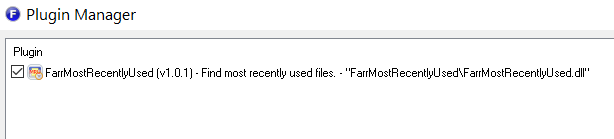
I copied a complete folder to the plugin folder in 86

and finally a plugin showed up


:)


So i think i know how it works now

Original address: https://www.donationcoder.com/forum/index.php?topic=43841.0