


Did you know you can add the "Portable Extension Warlock - Launcher (PEW_Launch.exe by default) as an icon when it is displayed as a toolbar (not a menu) and have it function has a drop zone for files without needing to use my PEW_DropZone.exe?
Sample of the LaunchBar Commander setup tab
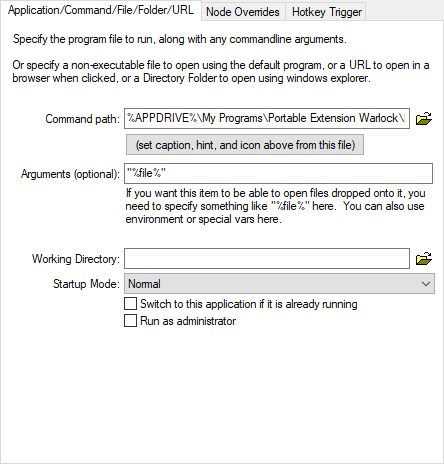
Portable Extension Warlock can be found here.
Before/After adding the launcher remember to configure it with the PortableExtensionWarlock.exe configuration editor to point to your portable programs. Then you can drag and drop to the icon in LaunchBar Commander for portable file extensions skipping the one's used by the system if the extension is found in my program.
Disclaimer: I am the author of Portable Extension Warlock which was did as part of NANY 2012 and can also be found here.
Sample of the LaunchBar Commander setup tab
Portable Extension Warlock can be found here.
Before/After adding the launcher remember to configure it with the PortableExtensionWarlock.exe configuration editor to point to your portable programs. Then you can drag and drop to the icon in LaunchBar Commander for portable file extensions skipping the one's used by the system if the extension is found in my program.
Disclaimer: I am the author of Portable Extension Warlock which was did as part of NANY 2012 and can also be found here.