
Delete one space between letters in distorted text lines .
The target is select the text we want to transform and apply the measure.
Best Regards
The target is select the text we want to transform and apply the measure.
Best Regards

 Topic: T h i s i s a v e r y s h o r t s c r i p t - This is a very short script (Read 18,518 times)


As I told you already, nobody can know which space to delete and which not.
#T:: ; Windows+T hotkey.  Change as desired.
{
    ; T h i s  i s  a  v e r y  s h o r t  s c r i p t  ; Sample of distorted text.
    ;        ^^   ^^ ^^       ^^         ^^             ; Double spaces where single spaces should be.

    Clipboard := "" ; Empty the clipboard.
    Send, ^c        ; Copy selected text to the clipboard.
    ClipWait, 2     ; Wait for text to be put on the clipboard.

    ; Transform text.
    myString := Clipboard
    myString := StrReplace( myString, "  ", "§" ) ; Replace all double-spaces with a temporary section (§) character.
    myString := StrReplace( myString, " ", "" )   ; Collapse remaining spaces.
    myString := StrReplace( myString, "§", " " )  ; Replace temporary section (§) characters with a single space.

    Clipboard := myString ; Copy new string back to the clipboard.
}
Return
- Select the text you want to modify.
- Do a search for " "
- Do a replace for ""
- Done.


As I told you already, nobody can know which space to delete and which not.
I know the answer. But I keep trying : I want other answer !!!!!
Couldn't this be done with "Find and Replace"?It's a good answer just because I can select the precise text I need to transform.
- Select the text you want to modify.
- Do a search for " "
- Do a replace for ""
- Done.

Yes. That is exactly my case in this moment.As I told you already, nobody can know which space to delete and which not.
Actually, so long as distorted text has extra spaces between ALL characters (which includes the space character), you can make this work. Every real space will have two spaces instead of one so you can do it like this:Code: ( autohotkey)#T:: ; Windows+T hotkey. Change as desired. { ; T h i s i s a v e r y s h o r t s c r i p t ; Sample of distorted text. ; ^^ ^^ ^^ ^^ ^^ ; Double spaces where single spaces should be. Clipboard := "" ; Empty the clipboard. Send, ^c ; Copy selected text to the clipboard. ClipWait, 2 ; Wait for text to be put on the clipboard. ; Transform text. myString := Clipboard myString := StrReplace( myString, " ", "§" ) ; Replace all double-spaces with a temporary section (§) character. myString := StrReplace( myString, " ", "" ) ; Collapse remaining spaces. myString := StrReplace( myString, "§", " " ) ; Replace temporary section (§) characters with a single space. Clipboard := myString ; Copy new string back to the clipboard. } Return
Contro, give the above AHK code a try and see if it works for you. Again, this will only work if each real space is actually two spaces when your text is distorted.
Assuming the scenario skwire mentioned and you're using an editor that allows Search/Replace in selected text (and RegEx expressions) you could use:Running to try.
Search: ( )(\S)
Replace: \2
Just make sure you only run through once otherwise it will remove all spaces on the second pass ... but then that's what Undo is for
Although, you could just select each spaced out word and run the RegEx replace.
As I told you already, nobody can know which space to delete and which not.

In pspad ?????Assuming the scenario skwire mentioned and you're using an editor that allows Search/Replace in selected text (and RegEx expressions) you could use:Running to try.
Search: ( )(\S)
Replace: \2
Just make sure you only run through once otherwise it will remove all spaces on the second pass ... but then that's what Undo is for
Although, you could just select each spaced out word and run the RegEx replace.
May be the best in short works and better the ahk script for intensive changes if necessary.
I am doing something wrong. The hotkey don't obey me. I change T for U, but my problem continues.Yes. That is exactly my case in this moment.As I told you already, nobody can know which space to delete and which not.
Actually, so long as distorted text has extra spaces between ALL characters (which includes the space character), you can make this work. Every real space will have two spaces instead of one so you can do it like this:Code: ( autohotkey)#T:: ; Windows+T hotkey. Change as desired. { ; T h i s i s a v e r y s h o r t s c r i p t ; Sample of distorted text. ; ^^ ^^ ^^ ^^ ^^ ; Double spaces where single spaces should be. Clipboard := "" ; Empty the clipboard. Send, ^c ; Copy selected text to the clipboard. ClipWait, 2 ; Wait for text to be put on the clipboard. ; Transform text. myString := Clipboard myString := StrReplace( myString, " ", "§" ) ; Replace all double-spaces with a temporary section (§) character. myString := StrReplace( myString, " ", "" ) ; Collapse remaining spaces. myString := StrReplace( myString, "§", " " ) ; Replace temporary section (§) characters with a single space. Clipboard := myString ; Copy new string back to the clipboard. } Return
Contro, give the above AHK code a try and see if it works for you. Again, this will only work if each real space is actually two spaces when your text is distorted.
I will try and comment

In pspad ?????Assuming the scenario skwire mentioned and you're using an editor that allows Search/Replace in selected text (and RegEx expressions) you could use:Running to try.
Search: ( )(\S)
Replace: \2
Just make sure you only run through once otherwise it will remove all spaces on the second pass ... but then that's what Undo is for
Although, you could just select each spaced out word and run the RegEx replace.
May be the best in short works and better the ahk script for intensive changes if necessary.
I think is with notepad++
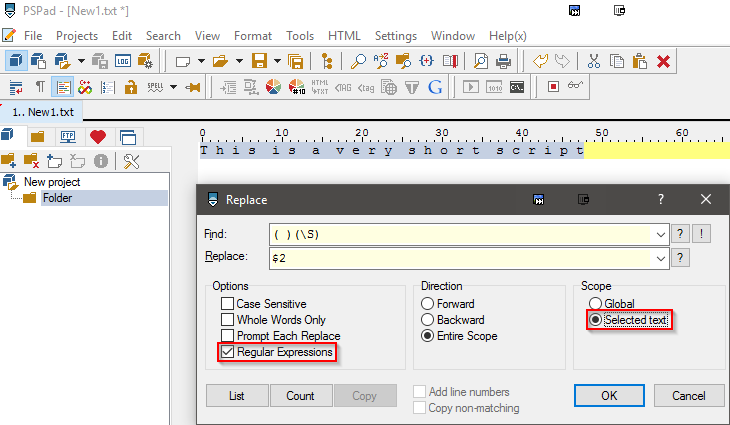
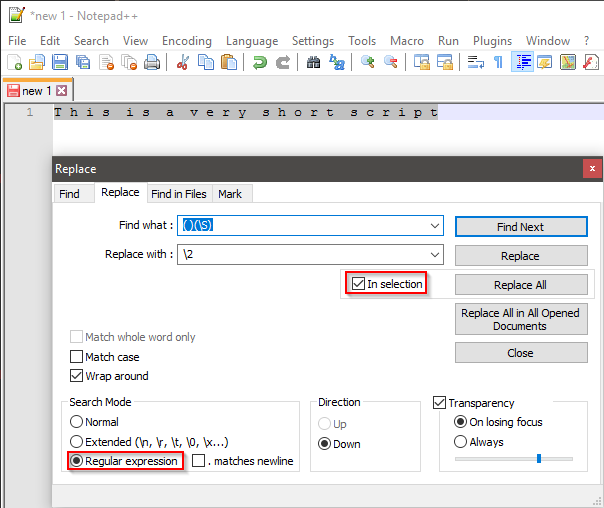


Notepad++Notepad++ will work just fine when using $2 for the replacement, the \2 seems to be (also) available because of a different regex library used in Notepad++ from PSPad. (PSPad won't work with \2 though).
Search: ( )(\S)
Replace: \2
PSPad
Search: ( )(\S)
Replace: $2

@Contro: You still gave no answer on the question wether the original spaces between the words are there or not...
Actually, so long as distorted text has extra spaces between ALL characters (which includes the space character), you can make this work. Every real space will have two spaces instead of one so you can do it like this:
...
Contro, give the above AHK code a try and see if it works for you. Again, this will only work if each real space is actually two spaces when your text is distorted.
Yes. That is exactly my case in this moment.
I think he did:Well, in many cases his answer is hanging somewhere in the shades, this one still isn't quite to the point to me though I'd seen that response.
Yes. For me is solved.
Owwww. I have to answer you. Now it's late here. I put the url in my desktop. Promise to try to answer.Yes. For me is solved.
And how did you solve your issue?
Which tool did you used? Which command... e.t.c ?
And, were there double spaces between the single words?
Original address: https://www.donationcoder.com/forum/index.php?topic=43594.0