DonationCoder.com forum
 
Read-only archive. This is a static copy of the DonationCoder.com forum. Reading and searching work as before; logging in, posting and private messages do not.
Archive of 2026-10-21 · About this archive · Main site

Author Topic: NANY 2017 Release: Drive Letters Tool  (Read 19,970 times)

skwire

  • I eat Coding Snacks for breakfast...
  • Global Moderator
  • Joined in 2005
  • *****
  • Posts: 5,297
    • Participated in NANY Challenge Seventeen Times
    • Coding Snacks
    • Superboy Coder
    • Cody Award
    • Volunteers/Staff
    • Gathering Badge
NANY 2017 Release: Drive Letters Tool
« on: January 01, 2017, 05:19 AM »
NANY 2017 Entry Information

Application Name Drive Letters Tool
Supported OSes Windows 7/10 (Probably works, but not tested, on Windows XP/8/Vista)
Web Page Website
Download Link Download
Author Jody Holmes (Skwire Empire)

Description
Change the way drive letters are displayed in Windows Explorer and other Windows dialogs.

Screenshots
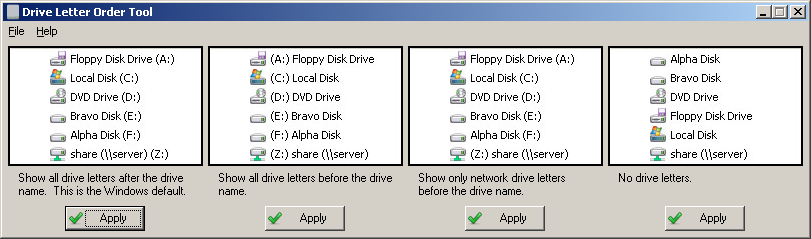
main.png

Usage
Installation
Download the zip file and extract its contents into a new folder.  Run DriveLettersTool.exe to start the application.  Choose your option, click the appropriate Apply button, log off, and log back on.  Alternately, you can reboot.

Uninstallation
Exit the application and delete the folder you unzipped it to.  Keep in mind that the setting this app uses is in the registry so deleting the app doesn't set the view back to what it was.  If you want a different view, run the app and set your desired view before deleting the app.

« Last Edit: January 02, 2017, 04:35 PM by skwire »

camerb

  • Member
  • Joined in 2016
  • **
  • Posts: 13
    • Participated in NANY Challenge Four Times
Re: NANY 2017 Release: Drive Letters Tool
« Reply #1 on: January 01, 2017, 07:41 AM »
Though it is simple, this one seems especially cool. Nice job Skwire!

skwire

  • I eat Coding Snacks for breakfast...
  • Global Moderator
  • Joined in 2005
  • *****
  • Posts: 5,297
    • Participated in NANY Challenge Seventeen Times
    • Coding Snacks
    • Superboy Coder
    • Cody Award
    • Volunteers/Staff
    • Gathering Badge
Re: NANY 2017 Release: Drive Letters Tool
« Reply #2 on: January 01, 2017, 09:00 PM »
Thanks, camerb.  Nice to see a submission from you as well!  :Thmbsup:

camerb

  • Member
  • Joined in 2016
  • **
  • Posts: 13
    • Participated in NANY Challenge Four Times
Re: NANY 2017 Release: Drive Letters Tool
« Reply #3 on: January 02, 2017, 07:15 PM »
I'm glad I finally made a submission, I've been meaning to for years. Hoping that this way I can start the new year off right!

Deozaan

  • Charter Member
  • Joined in 2006
  • ***
  • Posts: 9,827
    • Participated in NANY Challenge Eight Times
    • Cody Award
Re: NANY 2017 Release: Drive Letters Tool
« Reply #4 on: January 09, 2017, 05:06 AM »
I like it! Thanks! :Thmbsup:

yossid

  • Participant
  • Joined in 2010
  • *
  • Posts: 1
Re: NANY 2017 Release: Drive Letters Tool
« Reply #5 on: January 09, 2019, 04:12 PM »
Drive Letters Tool is terrific; adds control that Windows 10 should have included in the first place.

Now I'm looking for a way to display all drive letters in the Windows 10 File Explorer dropdown, the way Windows Explorer used to do. does anyone know if/how that can be accomplished?

TIA

skwire

  • I eat Coding Snacks for breakfast...
  • Global Moderator
  • Joined in 2005
  • *****
  • Posts: 5,297
    • Participated in NANY Challenge Seventeen Times
    • Coding Snacks
    • Superboy Coder
    • Cody Award
    • Volunteers/Staff
    • Gathering Badge
Re: NANY 2017 Release: Drive Letters Tool
« Reply #6 on: January 09, 2019, 05:58 PM »
Drive Letters Tool is terrific; adds control that Windows 10 should have included in the first place.

Right on.  I'm glad to hear it still works in Windows 10.

Now I'm looking for a way to display all drive letters in the Windows 10 File Explorer dropdown, the way Windows Explorer used to do. does anyone know if/how that can be accomplished?

Since I don't have Windows 10, I'm not sure what you're referencing.  Can you provide a screenshot?

Original address: https://www.donationcoder.com/forum/index.php?topic=43348.0