


NANY 2017 Entry Information
| Application Name | Amortize |
| Version | 1.0 |
| Short Description | Freeware calculator for payment amounts, number of payments, total interest paid for various types of loans |
| Supported OSes | Windows |
| Web Page | N/A |
| Download Link | http://jackromanowicz.com/downloads |
| System Requirements |
|
| Version History |
|
| Author | Jack Romanowicz |
Description
While researching a re-financing of our house, I got annoyed with the loan calculators I found on the web, so I wrote one I liked better.
Now you can easily find out how much you can save by re-financing and how long it will take to pay off all those Xmas purchases on the Visa card.
Features
Given an initial balance and an annual interest rate:
- For an installment loan:
- Calculate payment amount.
- For a revolving loan:
- Given the amount of a constant periodic payment, calculate the number of payments to payoff. Allow payment specification as a percentage of the balance or a fixed amount.
- For all:
- Create a table showing the interest, principal and remaining balance amount for each payment.Download the payment table in CSV format.Display total interest and total paid.
Planned Features
Any requested features that make sense to me.
Screenshots
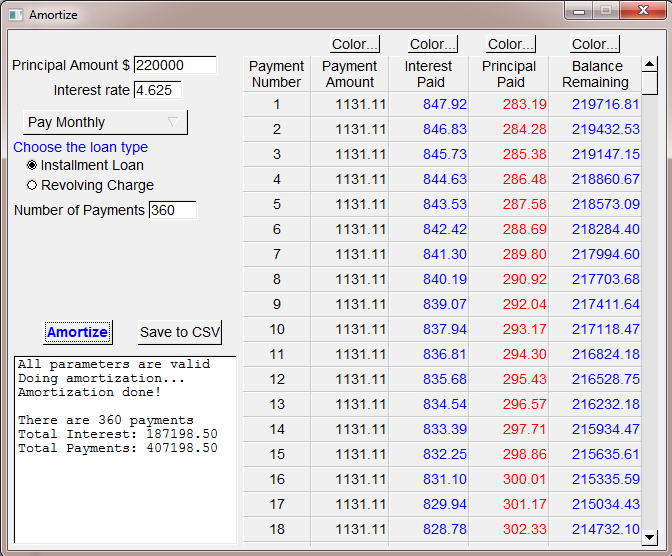
Usage
Installation
Zero installation. Simply double click the file or place it in a folder in your path and type "Amortize" (assuming you haven't re-named the file) at a command prompt.
Using the Application
If it's not self-explanatory, I've failed and you should let me know how.
Uninstallation
Delete the Amortize.exe (again, assuming you haven't re-named it) file.
Tips
If you are refinancing, try 15 and 20 year mortgage terms as well. You may be surprised, as the interest rates for those loans are lower. You may also be surprised how much you save by paying an extra $10/month on a loan of any size.
Known Issues
It's not very pretty, but you can choose your own payment table colors. (It doesn't remember them, though)



 , at
, at 


