ScreenCapture.zip (1.1 MB)
Description
I have used Screen Capture , by mouser , for a long time.
Excellent program.
I have used many other before that.
How ever non gave me any hidden screen.
My program , although a wile on my site , has added functions
for Donationcoder fans to handle more things and bug fix.
Screen capture by handle can catch graphics you cannot
catch with an ordinary Screen capture program.
Since all components on page of a program use handles
a button (key) , for example , on a program can be saved as bitmap.
To catch this same button with a "normal screen capture" one
has to use an area function and use kind of an image edit program
to modify.
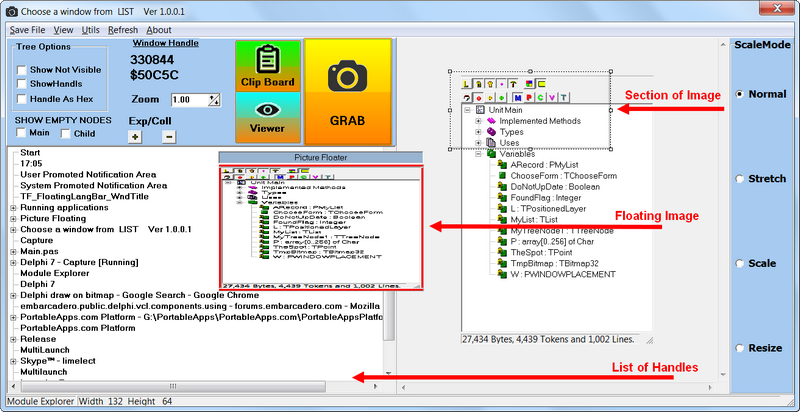
In this program the button is caught NETO ,by handle , and shown
as is, no need to use an image program to manipulate.
Features
Screen capture by handle.
Planned Features
non
Screenshots
Usage
Installation
UnZip the zip file into a directory
Using the Application
Help included
Uninstallation
Just delete
Tips
See the Help file
Known Issues
non
NANY 2017 Entry Information
| Application Name | Screen Capture By handle |
| Version | 1.0.0.1 |
| Short Description | Catch hidden screen by its handle |
| Supported OSes | All , but checked with window 7 |
| Web Page | www.limelect.com |
| Download Link | ScreenCapture.zip (1.1 MB) |
| System Requirements |
|
| Version History |
|
| Author | www.limelect.com |
Description
I have used Screen Capture , by mouser , for a long time.
Excellent program.
I have used many other before that.
How ever non gave me any hidden screen.
My program , although a wile on my site , has added functions
for Donationcoder fans to handle more things and bug fix.
Screen capture by handle can catch graphics you cannot
catch with an ordinary Screen capture program.
Since all components on page of a program use handles
a button (key) , for example , on a program can be saved as bitmap.
To catch this same button with a "normal screen capture" one
has to use an area function and use kind of an image edit program
to modify.
In this program the button is caught NETO ,by handle , and shown
as is, no need to use an image program to manipulate.
Features
Screen capture by handle.
Planned Features
non
Screenshots
Usage
Installation
UnZip the zip file into a directory
Using the Application
Help included
Uninstallation
Just delete
Tips
See the Help file
Known Issues
non