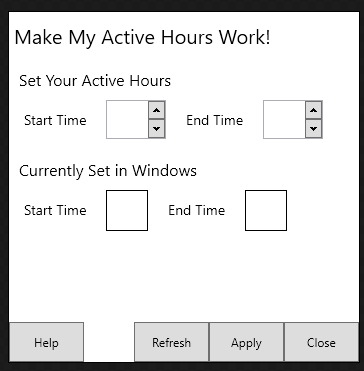
It's pretty easy... as long as you don't fall into the old habits of trying to explicitly position things, but rather use layout.
For example, my tool for NANY (I need to get more time to get back on this)
<Window x:Class="MMAHW.ActiveHoursView"
        xmlns="http://schemas.microsoft.com/winfx/2006/xaml/presentation"
        xmlns:x="http://schemas.microsoft.com/winfx/2006/xaml"
        xmlns:wpfTool="clr-namespace:Xceed.Wpf.Toolkit;assembly=Xceed.Wpf.Toolkit"
        Title="MMAHW!" Height="350" Width="350"
        WindowStyle="None"
        AllowsTransparency="True"
        ResizeMode="NoResize">
    <DockPanel LastChildFill="True">
        <StackPanel DockPanel.Dock="Top">
            <TextBlock FontSize="20" Padding="5,10,0,10">Make My Active Hours Work!</TextBlock>
        </StackPanel>
        <StackPanel DockPanel.Dock="Top" >
            <TextBlock Padding="10,10,0,10" FontSize="16">Set Your Active Hours</TextBlock>
        </StackPanel>
        <StackPanel DockPanel.Dock="Top" Orientation="Horizontal">

            <TextBlock FontSize="14" Padding="15,10,20,10">Start Time</TextBlock>
            <wpfTool:DateTimeUpDown FontSize="14" Format="Custom" FormatString="HH" Value="{Binding ViewModel.Model.UserActiveHoursBegin}" Width="60"/>
            <TextBlock FontSize="14" Padding="20,10,20,10">End Time</TextBlock>
            <wpfTool:DateTimeUpDown FontSize="14" Format="Custom" FormatString="HH" Value="{Binding ViewModel.Model.UserActiveHoursEnd}" Width="60" />
        </StackPanel>
        <DockPanel DockPanel.Dock="Bottom" LastChildFill="False">
            <Button DockPanel.Dock="Right" Height="40" Width="75">Close</Button>
            <Button DockPanel.Dock="Right" Height="40" Width="75">Apply</Button>
            <Button DockPanel.Dock="Right" Height="40" Width="75">Refresh</Button>
            <Button DockPanel.Dock="Left" Height="40" Width="75">Help</Button>
        </DockPanel>

        <StackPanel DockPanel.Dock="Top">
            <TextBlock Padding="10,20,0,10" FontSize="16">Currently Set in Windows</TextBlock>
            <StackPanel Orientation="Horizontal">
                <TextBlock FontSize="14" Padding="15,10,20,10">Start Time</TextBlock>
                <Border BorderThickness="1" BorderBrush="Black">
                    <TextBlock FontSize="14" Padding="20,10,20,10" Text="{Binding ViewModel.Model.RegActiveHoursBegin}" />
                </Border>
                <TextBlock FontSize="14" Padding="20,10,20,10">End Time</TextBlock>
                <Border BorderThickness="1" BorderBrush="Black">
                    <TextBlock FontSize="14" Padding="20,10,20,10" Text="{Binding ViewModel.Model.RegActiveHoursEnd}" />
                </Border>
            </StackPanel>
        </StackPanel>
    </DockPanel>
</Window>
Which results in this:
I use dockpanels to deal with the cases where I'm trying to position containers, and stackpanels to stack things either horizontally or vertically. And padding to set the space between elements. If I really want to make it look nice, I use styles in order to change the controls. Notice that there are no coordinates or anything like that in there. For most simple projects (and some not-so-simple ones) this is more than enough. And, though this seems like more to learn, when you get it, it's a *lot* faster than dealing with the designer. Most of it's handled by intellisense rather than typing.