DonationCoder.com forum
 
Read-only archive. This is a static copy of the DonationCoder.com forum. Reading and searching work as before; logging in, posting and private messages do not.
Archive of 2026-10-21 · About this archive · Main site

Author Topic: windows xp how do I lock the desktop icon locations?  (Read 9,232 times)

holt

  • Member
  • Joined in 2015
  • **
  • Posts: 398
windows xp how do I lock the desktop icon locations?
« on: November 15, 2016, 08:07 AM »
In Windows XP, is there a way to fix all the icon locations so they won't auto-reposition themselves?

Curt

  • Supporting Member
  • Joined in 2006
  • **
  • Posts: 7,565
Re: windows xp how do I lock the desktop icon locations?
« Reply #1 on: November 15, 2016, 08:54 AM »
shareware $16 Desktop Icon Toy - "Save Desktop Icon Position, Lock Desktop Icon" - http://www.idesksoft.com/

Deozaan

  • Charter Member
  • Joined in 2006
  • ***
  • Posts: 9,827
    • Participated in NANY Challenge Eight Times
    • Cody Award
Re: windows xp how do I lock the desktop icon locations?
« Reply #2 on: November 15, 2016, 06:15 PM »
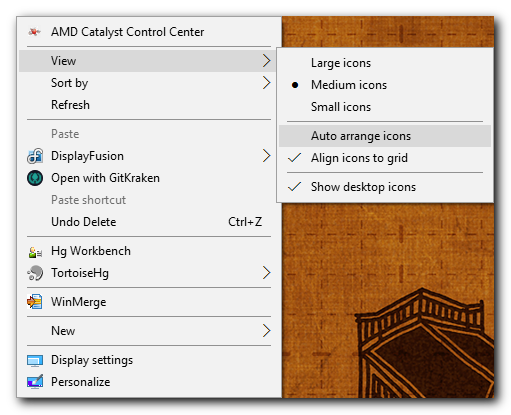
It's been a while since I used XP so I don't remember exactly, but essentially just right click the desktop and uncheck the "auto-sort" desktop icons option.

This screenshot is from Windows 10, but it should be similar to this:

Auto Arrange Icons.png

hornet

  • Charter Member
  • Joined in 2005
  • ***
  • Posts: 29
Re: windows xp how do I lock the desktop icon locations?
« Reply #3 on: November 16, 2016, 09:58 PM »
Try this:

http://www.snapfiles.com/get/rdil.html

H.

Shades

  • Member
  • Joined in 2006
  • **
  • Posts: 2,954
Re: windows xp how do I lock the desktop icon locations?
« Reply #4 on: November 17, 2016, 12:23 AM »
DesktopOk  with that tool you arrange your desktop how you like and store it under a name. Re-arrange the desktop and select the name of the profile you just created and all icons are back to their preferred locations. You can even make several profiles. Very handy and freeware.
The easy path is usually downhill...

Curt

  • Supporting Member
  • Joined in 2006
  • **
  • Posts: 7,565
Re: windows xp how do I lock the desktop icon locations?
« Reply #5 on: November 17, 2016, 08:16 AM »
+1 for ^ DesktopOK mentioned by Shades.  Iam pleased to see the OK company still is active; I had forgotten about it, except for Q-Dir. DesktopOK was even updated just two weeks ago!  :up:

>> DesktopOK 4.44 "Save and restore the desktop icon positions" http://www.softwareok.com/?seite=Freeware/DesktopOK <<

holt

  • Member
  • Joined in 2015
  • **
  • Posts: 398
Re: windows xp how do I lock the desktop icon locations?
« Reply #6 on: November 28, 2016, 12:33 AM »
DesktopOk  with that tool you arrange your desktop how you like and store it under a name. Re-arrange the desktop and select the name of the profile you just created and all icons are back to their preferred locations. You can even make several profiles. Very handy and freeware.
Thank you so much!  8)

Steven Avery

  • Supporting Member
  • Joined in 2006
  • **
  • Posts: 1,039
Re: windows xp how do I lock the desktop icon locations?
« Reply #7 on: December 01, 2016, 03:32 PM »
I like this DesktopOK program a lot too, used it for a number of years.

Problem is .. just the last week it started to glitch out. Running Windows 10 and Desktop 4.02.

When it places a Save it shows in DesktopOK, but does not seem to really happen. Maybe a quirky permissions problem.

Steven

Original address: https://www.donationcoder.com/forum/index.php?topic=43203.0