DonationCoder.com forum
 
Read-only archive. This is a static copy of the DonationCoder.com forum. Reading and searching work as before; logging in, posting and private messages do not.
Archive of 2026-10-21 · About this archive · Main site

Author Topic: Too Many Entries in System Settings  (Read 10,913 times)

Mattes57

  • Supporting Member
  • Joined in 2012
  • **
  • Posts: 23
Too Many Entries in System Settings
« on: October 24, 2016, 02:54 PM »
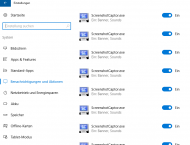
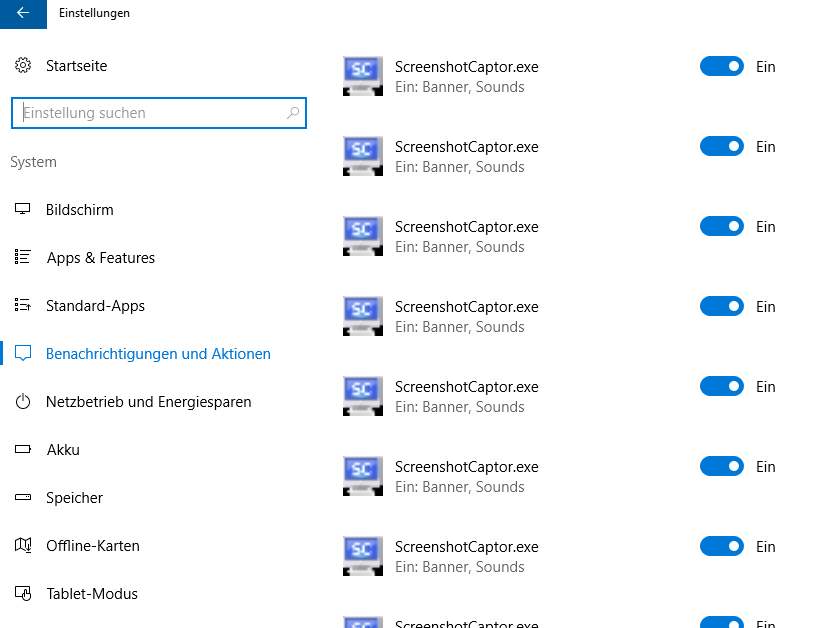
I just found that Screenshot Captor has many entries in the "Notifications" tab of system settings (Win 10-64 Home; SSC is used as portable App)
How can I remove these, and how can I avoid new entries ?

Screenshot - 24.10.2016 , 16_45_10.png

ralfs

  • Charter Member
  • Joined in 2005
  • ***
  • Posts: 81
Re: Too Many Entries in System Settings
« Reply #1 on: October 25, 2016, 04:50 PM »
Maybe you've started each screenshotcaptor.exe-version from another directory?

You can clean up the cache for the trayicons with regedit (https://www.deskmodder.de/wiki/index.php/Infobereich_Symbole_Icons_entfernen_Windows_10#Infobereichssymbole_manuell_l.C3.B6schen_lassen)

HKEY_CURRENT_USER\Software\Classes\Local Settings\Software\Microsoft\Windows\CurrentVersion\TrayNotify

Delete the two entries:
    IconSteams
    PastIconStream

Or you can use a cleaning tool like "Notification Area Cleaner" (http://www.itsamples.com/notification-area-cleaner.html)

Not tried by myself because no need.
Ralf

Mattes57

  • Supporting Member
  • Joined in 2012
  • **
  • Posts: 23
Re: Too Many Entries in System Settings
« Reply #2 on: October 25, 2016, 06:12 PM »
Thanks for your answer. However, neither didn't help.

And, SSC was always run from the same directory.

Pls. note, that the SSC entries are only shown in the system settings. They are not appearing in the Taskbar themselves.

wraith808

  • Supporting Member
  • Joined in 2006
  • **
  • Posts: 11,205
    • Participated in NANY Challenge Fourteen Times
    • Coding Snacks
    • Writer
    • Hardware Hacker
Re: Too Many Entries in System Settings
« Reply #3 on: October 25, 2016, 09:07 PM »
I thought I'd posted to this thread- but I noticed the same behavior.  I just clicked all of the little switches, and no new ones have appeared.  Not a solution to the underlying problem- Mouser would probably have to look at that.

mouser

  • First Author
  • Administrator
  • Joined in 2005
  • *****
  • Posts: 40,931
    • Gathering Badge
    • Plugin Coding Medal
    • Participated in NANY Challenge Seventeen Times
    • Cody Award
    • Coding Snacks
    • Volunteers/Staff
Re: Too Many Entries in System Settings
« Reply #4 on: October 25, 2016, 09:07 PM »
how strange.. anyone have any idea what would cause that?

Sleye165

  • Charter Member
  • Joined in 2006
  • ***
  • Posts: 4
Re: Too Many Entries in System Settings
« Reply #5 on: April 26, 2017, 03:27 PM »
I recently updated Windows 10 to the new Creators version, and as I was going through settings to see what changes had been made.  I noticed the same thing with my system, as shown in the original post.  I was wondering if there has been any updates about how to remove the numerous entries? 

I don't mind having one entry in the notification area, but it appears as if each time we remove an old version and install a new version of Screenshot Captor the entry for "notifications and actions" is duplicated.  I'm guessing that there may be something missing from the uninstall program that isn't removing the program completely (something like leaving behind certain reg key entries).  I may be restating the obvious issue, if so I apologize.  Just wondering if there has been any new developments with this issue.

mouser

  • First Author
  • Administrator
  • Joined in 2005
  • *****
  • Posts: 40,931
    • Gathering Badge
    • Plugin Coding Medal
    • Participated in NANY Challenge Seventeen Times
    • Cody Award
    • Coding Snacks
    • Volunteers/Staff
Re: Too Many Entries in System Settings
« Reply #6 on: April 26, 2017, 06:44 PM »
Quote
I'm guessing that there may be something missing from the uninstall program that isn't removing the program completely
Based on the original post, even when SC is being used PORTABLY, without any installer, the poster was having this same problem.
So it would seem to be an issue that only effects rare people, and has nothing to do with the installer.  But what is causing it is a mystery?
Are you always installing it and running it from the same place?

mouser

  • First Author
  • Administrator
  • Joined in 2005
  • *****
  • Posts: 40,931
    • Gathering Badge
    • Plugin Coding Medal
    • Participated in NANY Challenge Seventeen Times
    • Cody Award
    • Coding Snacks
    • Volunteers/Staff
Re: Too Many Entries in System Settings
« Reply #7 on: April 26, 2017, 06:46 PM »
Maybe this will help?
https://www.sevenforums.com/tutorials/13102-notification-area-icons-reset.html

mouser

  • First Author
  • Administrator
  • Joined in 2005
  • *****
  • Posts: 40,931
    • Gathering Badge
    • Plugin Coding Medal
    • Participated in NANY Challenge Seventeen Times
    • Cody Award
    • Coding Snacks
    • Volunteers/Staff
Re: Too Many Entries in System Settings
« Reply #8 on: May 22, 2017, 07:26 PM »
There seems to be a big long thread here, but it's hard for me to find a real explanation or solution:
https://answers.microsoft.com/en-us/windows/forum/windows_10-other_settings/remove-an-uninstalled-app-from-the-notification/6cb57f86-23fd-4261-8922-e49f344095e5?auth=1

Its happening to so many programs I can only assume that eventually Microsoft will fix their system to not have this problem.. But it would be nice to understand the nature of it before then..

dlbr128

  • Participant
  • Joined in 2017
  • *
  • Posts: 1
Re: Too Many Entries in System Settings
« Reply #9 on: May 23, 2017, 08:18 AM »
There seems to be a big long thread here, but it's hard for me to find a real explanation or solution:
https://answers.microsoft.com/en-us/windows/forum/windows_10-other_settings/remove-an-uninstalled-app-from-the-notification/6cb57f86-23fd-4261-8922-e49f344095e5?auth=1

I've found a solution by StephenHaxby in this thread:

Quote
Notification settings are saved in an SQLite Database here:

C:\Users\<YOUR USERNAME>\AppData\Local\Microsoft\Windows\Notifications\wpndatabase.db

You can view the contents with any SQLite Database reader/query, I used this:

http://sqlitebrowser.org/

Just search the 'NotificationHandler' table for the notification you want to delete (select * from NotificationHandler), in my case it was 'Symantec.ToastUI' and it was at 'RecordId' 72.
Then just delete everything conected to this Handler:

delete from HandlerSettings where HandlerID = 72

delete from Notification where HandlerId = 72

delete from WNSPushChannel where HandlerId = 72

delete from NotificationHandler where RecordId = 72

Save the DB (if you are using the app above) and re-open the Notifications Settings App.
Your unwanted/uninstalled app should now be gone.

Well... It was for me...

As said may times in this thread, you should be deleting registry entries...

mouser

  • First Author
  • Administrator
  • Joined in 2005
  • *****
  • Posts: 40,931
    • Gathering Badge
    • Plugin Coding Medal
    • Participated in NANY Challenge Seventeen Times
    • Cody Award
    • Coding Snacks
    • Volunteers/Staff
Re: Too Many Entries in System Settings
« Reply #10 on: May 23, 2017, 02:01 PM »
Quote
As said may times in this thread, you should be deleting registry entries...

The thing is that SC is not creating these entries (and they aren't being created in the regsitry) -- Windows 10 is automatically creating them for reasons that do not seem clear -- and it's not clear why it's happening to some folks and not others.  It seems to be affecting lots of different programs..  If anyone can figure out exactly what is happening please do let me know!

Original address: https://www.donationcoder.com/forum/index.php?topic=43144.0