DonationCoder.com forum
 
Read-only archive. This is a static copy of the DonationCoder.com forum. Reading and searching work as before; logging in, posting and private messages do not.
Archive of 2026-10-21 · About this archive · Main site

Author Topic: bookmark comments/descriptions  (Read 5,100 times)

Andastre

  • Supporting Member
  • Joined in 2015
  • **
  • Posts: 6
bookmark comments/descriptions
« on: October 21, 2016, 12:47 PM »
Have been searching for a tool to remove all comments from bookmarks. Have a lot of them and many have quite an amount of comment. I use my bookmarks with a filename that covers it. Is there any tool that can remove all depscriptions/comments from all my bookmarks (palemoon/firefox)? I checked Linkman and Linkstash but couldn't find it in there.

Any help appreciated.

Curt

  • Supporting Member
  • Joined in 2006
  • **
  • Posts: 7,565
Re: bookmark comments/descriptions
« Reply #1 on: October 21, 2016, 10:05 PM »
^ maybe post it as an idea for our volunteering coders:

From the "Idea"-thread:

Quote from: IDEA
If you want to post an idea, READ THIS FIRST! - DonationCoder.com

When you start a topic, please put "IDEA: " at the beginning of the subject line. Before posting, read more about what kind of requests to post etc. here: https://www.donationcoder.com/forum/index.php?topic=165.0

4wd

  • Pedantic Old Bastard
  • Supporting Member
  • Joined in 2006
  • **
  • Posts: 5,652
    • Coding Snacks
Re: bookmark comments/descriptions
« Reply #2 on: October 22, 2016, 01:12 AM »
  1. Export to bookmarks.html
  2. Load into a text editor capable of RegEx replacement (eg. Notepad2-mod)
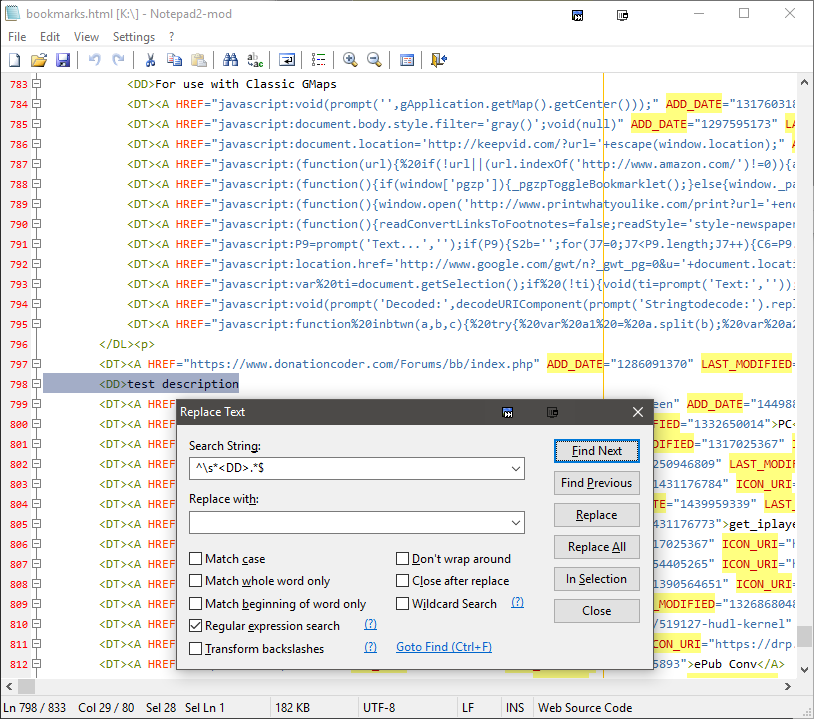
  3. Search and Replace as follows (adjust as required):
    2016-10-22 12_09_05.png
  4. Import back into Firefox/Pale Moon
"I will not follow where the path may lead, but I will go where there is no path, and I will leave a trail." - Muriel Strode, 1903

Original address: https://www.donationcoder.com/forum/index.php?topic=43139.0