DonationCoder.com forum
 
Read-only archive. This is a static copy of the DonationCoder.com forum. Reading and searching work as before; logging in, posting and private messages do not.
Archive of 2026-10-21 · About this archive · Main site

Author Topic: Data Disk recovery software  (Read 7,780 times)

Contro

  • Supporting Member
  • Joined in 2007
  • **
  • Posts: 3,947
Data Disk recovery software
« on: October 11, 2016, 08:04 AM »
I have an external seagate hard disk of  2 TB

Some days ago the unit don't go well and was not possible to read data.
I have used several utilities to check the disk with no errors and considerable usage of time.

I decided to format the unit and recover data after that

Now I can access the unit.

What are the best tools for this purpose ?

I remember testdisk and photorec to recover photos or images from flash drives.


Best Regards

Please only tested programs you have use in the past with good results.
I need the program to run under windows 8.1 or windows 7

« Last Edit: October 11, 2016, 08:10 AM by Contro »

tomos

  • Charter Member
  • Joined in 2006
  • ***
  • Posts: 11,970
    • Gathering Badge
    • Participated in NANY Challenge Once
Re: Data Disk recovery software
« Reply #1 on: October 11, 2016, 09:11 AM »
Recuva is good in my experience for image/video files:
haven't tried it with other file formats.
Tom

Contro

  • Supporting Member
  • Joined in 2007
  • **
  • Posts: 3,947
Re: Data Disk recovery software
« Reply #2 on: October 11, 2016, 09:52 AM »
Recuva is good in my experience for image/video files:
haven't tried it with other file formats.
I tried photorec for images too.
The disk to recover is a data disk.
Most of the content are multimedia files. But include some pdf, docx, etc.
:-*

tomos

  • Charter Member
  • Joined in 2006
  • ***
  • Posts: 11,970
    • Gathering Badge
    • Participated in NANY Challenge Once
Re: Data Disk recovery software
« Reply #3 on: October 11, 2016, 10:14 AM »
If the disk is not working well though, what you want is to be able to copy the contents as quickly as possible.
I'm not sure that these recovery programmes are a good idea if the disk is in poor condition:

would creating a sector by sector image of the whole drive be a good idea first ?
Then you can mess around all you like with different recovery programmes, if the HD dies, you have a copy.

Disclaimer: I have not made a sector by sector image of a drive. I think it should have everything on it though (see if other people confirm that).
Tom

4wd

  • Pedantic Old Bastard
  • Supporting Member
  • Joined in 2006
  • **
  • Posts: 5,652
    • Coding Snacks
Re: Data Disk recovery software
« Reply #4 on: October 11, 2016, 10:23 AM »
would creating a sector by sector image of the whole drive be a good idea first ?
Then you can mess around all you like with different recovery programmes, if the HD dies, you have a copy.

If you make a sector level copy you don't need the original HDD to recover from, just mount the image (or plug in the HDD you made the clone to) and perform the recovery on that - no need to stress the original HDD any further.

Try Recuva first, if it can't see them then try PhotoRec which is probably the best freeware data recovery tool out there atm - PhotoRec is not restricted to just images.
"I will not follow where the path may lead, but I will go where there is no path, and I will leave a trail." - Muriel Strode, 1903

michaelkenward

  • Broken monitor
  • Participant
  • Joined in 2011
  • *
  • Posts: 42
Re: Data Disk recovery software
« Reply #5 on: October 11, 2016, 11:40 AM »
Nothing flashy, it just works:

EaseUS Data Recovery Software to Recover Lost Files Back

Never pay list price. Sign up for the email and get the (every) weekend discounts.
MK

Contro

  • Supporting Member
  • Joined in 2007
  • **
  • Posts: 3,947
Re: Data Disk recovery software
« Reply #6 on: October 11, 2016, 01:24 PM »
If the disk is not working well though, what you want is to be able to copy the contents as quickly as possible.
I'm not sure that these recovery programmes are a good idea if the disk is in poor condition:

would creating a sector by sector image of the whole drive be a good idea first ?
Then you can mess around all you like with different recovery programmes, if the HD dies, you have a copy.

Disclaimer: I have not made a sector by sector image of a drive. I think it should have everything on it though (see if other people confirm that).
Recuva Pro does
I think the disk is in good health. Is under guarantee too. I don't know what happen.
I have lost two hard disk by little moves during work and now I fear everything.
It's time to think about a NAS....

Contro

  • Supporting Member
  • Joined in 2007
  • **
  • Posts: 3,947
Re: Data Disk recovery software
« Reply #7 on: October 11, 2016, 01:26 PM »
would creating a sector by sector image of the whole drive be a good idea first ?
Then you can mess around all you like with different recovery programmes, if the HD dies, you have a copy.

If you make a sector level copy you don't need the original HDD to recover from, just mount the image (or plug in the HDD you made the clone to) and perform the recovery on that - no need to stress the original HDD any further.

Try Recuva first, if it can't see them then try PhotoRec which is probably the best freeware data recovery tool out there atm - PhotoRec is not restricted to just images.
May be a good idea.
Just because Recuva is not free. And the free version only repair some gigabytes. 2 GB I think.

The disk is 2 TB

4wd

  • Pedantic Old Bastard
  • Supporting Member
  • Joined in 2006
  • **
  • Posts: 5,652
    • Coding Snacks
Re: Data Disk recovery software
« Reply #8 on: October 12, 2016, 12:36 AM »
would creating a sector by sector image of the whole drive be a good idea first ?
Then you can mess around all you like with different recovery programmes, if the HD dies, you have a copy.

If you make a sector level copy you don't need the original HDD to recover from, just mount the image (or plug in the HDD you made the clone to) and perform the recovery on that - no need to stress the original HDD any further.

Try Recuva first, if it can't see them then try PhotoRec which is probably the best freeware data recovery tool out there atm - PhotoRec is not restricted to just images.
May be a good idea.
Just because Recuva is not free. And the free version only repair some gigabytes. 2 GB I think.

The disk is 2 TB

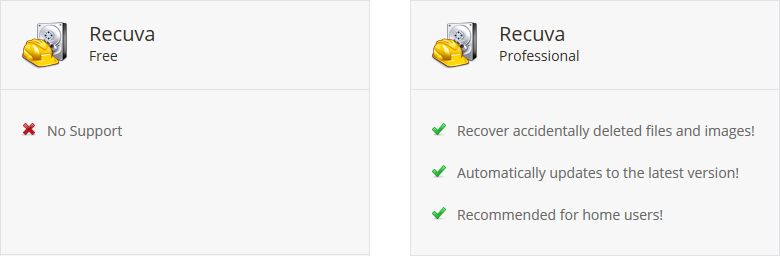
The difference between Recuva Free and Pro is you don't get support with the free version and I think the Pro version offers to create a VHD before doing anything, something you can do for free with other tools.

2016-10-12 11_27_15.png

The free version of EASUS is limited to 2GB of data recovery.
"I will not follow where the path may lead, but I will go where there is no path, and I will leave a trail." - Muriel Strode, 1903

Original address: https://www.donationcoder.com/forum/index.php?topic=43115.0