
2 days 19 hours yadda yadda to get Paste As File free.
[free] Paste As File giveaway
« on: September 30, 2016, 12:23 PM »

 Topic: [free] Paste As File giveaway (Read 10,781 times)


SharewareOnSale
249B-A300-92B3-C41E


Amazing that this functionality is still not yet built-in
...

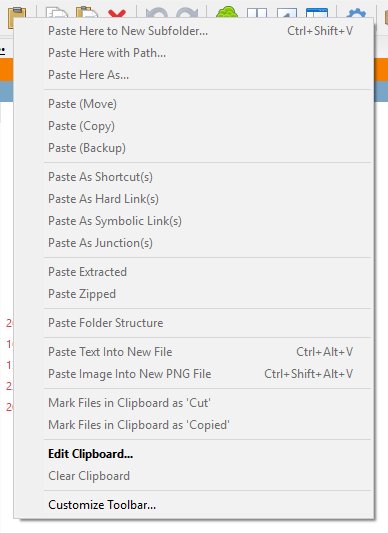
For years I have been accustomed to what (for me) seems to be an ergonomic no-brainer - being able to paste from the Clipboard directly into a folder, and a file is automatically created to hold the contents, either as a .txt (text) file and extension or as a .png (image) file and extension - depending on the contents of the Clipboard being pasted at the time.
I only very occasionally have need to use this functionality.


For years I have been accustomed to what (for me) seems to be an ergonomic no-brainer - being able to paste from the Clipboard directly into a folder, and a file is automatically created to hold the contents, either as a .txt (text) file and extension or as a .png (image) file and extension - depending on the contents of the Clipboard being pasted at the time.
I only very occasionally have need to use this functionality.

Sep 30, 2016 at 10:11 am
I’ve been a constant user of PasteAsFIle since 2012 (when it still was freeware) and ALWAYS make it one of the first applications I install on my Windows machines. When I truly understood what it is and, correspondingly, what it is not, I found it to be a really convenient, almost indispensable addition to Windows Explorer. So did Martin Brinkman: http://www.ghacks.net/2012/08/29/pasteasfile-save-windows-clipboard-entries-to-files-in-windows-explorer/
For me, the single most useful feature is PAF’s ability to “accurately” reproduce most HTML pages. For example, I want to preserve two reviews preceding my own and put them in the same folder in which today’s freebie’s installer is saved. With PAF, I can simply highlight/select the desired text and images (in this case, Dennis Nelson’s and Melvin Sync’s avatars) and copy same to my clipboard. The result can then be pasted in any folder in a host of formats, including HTML — with all text, images, hyper-links and formatting preserved, usually extremely accurately if not perfectly.
I find PAF indispensable for “clipping” articles from the dozens of online magazines, blogs, newspapers, etc., that I read daily. If you follow the recommendation of the publisher and also choose to install Nirsofer’s >NirCMD<, you make this process even easier.
I find the documentation and help resources are more than adequate in getting the most from this really cool application.
My only complaint is that (perhaps since I also have another clipboard utility, Ditto, running in the background) PasteAsFile will sometimes paste HTML as coded text, rather than the web-display I intended. However, simply re-pasting the contents of the clipboard usually clears the glitch.
I highly recommend giving this neat, little application a thorough workout.
A couple of times I have purchased a key for Paste As File. So obviouslly I think it's good. Some guy named jmjsquared thinks the same:
ClipTX 0.10 - Clipboard to file
-------------------------------
ClipTX appends (plain) text from the clipboard to one of several predefined target files. ClipTX only acts on hotkey or mouse click (no automatic collection). The "Quick save" function (hotkey or click on system tray icon) saves the clipboard text to the default target file.
 cliptx0b.zip
(33.2 KB - downloaded 332 times.)
cliptx0b.zip
(33.2 KB - downloaded 332 times.)Original address: https://www.donationcoder.com/forum/index.php?topic=43068.0