Hello,
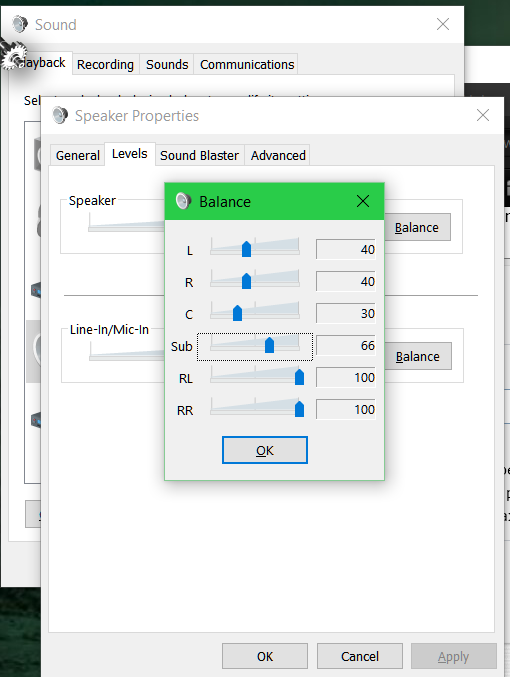
I have a Logitech THX 5.2 channel external sond card. I like to fade the front and center channels while leaving the rear channels at full volume. This makes for the best balance in my room at the spot where I sit. On some videos, dialog is muddled or sent to the audio background in that config, and I need to bring all channels to 100% to understand. That's the easy part, since all I have to do is crank the volume dial on the card, and all channels are maxed. When I want to return to my preferred config, with different channels set to different levels, this involves bringing up Windows volume control, navigating to "Levels," then "Balance," where I can manipulate the sliders individually. It's not huge, but it's annoying. I'd like a way to store and retrieve my preferred config(s) without jumping through the hoops in Windows volume control. Anyone interested in figuring this out? Thanks, Stephen Earle
I have a Logitech THX 5.2 channel external sond card. I like to fade the front and center channels while leaving the rear channels at full volume. This makes for the best balance in my room at the spot where I sit. On some videos, dialog is muddled or sent to the audio background in that config, and I need to bring all channels to 100% to understand. That's the easy part, since all I have to do is crank the volume dial on the card, and all channels are maxed. When I want to return to my preferred config, with different channels set to different levels, this involves bringing up Windows volume control, navigating to "Levels," then "Balance," where I can manipulate the sliders individually. It's not huge, but it's annoying. I'd like a way to store and retrieve my preferred config(s) without jumping through the hoops in Windows volume control. Anyone interested in figuring this out? Thanks, Stephen Earle