DonationCoder.com forum
 
Read-only archive. This is a static copy of the DonationCoder.com forum. Reading and searching work as before; logging in, posting and private messages do not.
Archive of 2026-10-21 · About this archive · Main site

Author Topic: Utility to track boots and uptime.  (Read 10,280 times)

xtabber

  • Supporting Member
  • Joined in 2007
  • **
  • Posts: 618
Utility to track boots and uptime.
« on: July 04, 2016, 10:25 PM »
To help diagnose a system (Windows 7 Pro x64) that has been rebooting by itself on what appears to be a fairly regular basis, I'm looking for a utility to keep a log of the date and time for each time it boots up.  Ideally, it would also keep track of the time elapsed between successive boots.

What I'm trying to find out is whether there is a pattern in the reboots or whether they happen completely at random.

4wd

  • Pedantic Old Bastard
  • Supporting Member
  • Joined in 2006
  • **
  • Posts: 5,652
    • Coding Snacks
Re: Utility to track boots and uptime.
« Reply #1 on: July 04, 2016, 11:30 PM »
You can use Eventlog:

https://www.donationcoder.com/forum/index.php?topic=36589.msg343147#msg343147
"I will not follow where the path may lead, but I will go where there is no path, and I will leave a trail." - Muriel Strode, 1903

xtabber

  • Supporting Member
  • Joined in 2007
  • **
  • Posts: 618
Re: Utility to track boots and uptime.
« Reply #2 on: July 05, 2016, 02:48 PM »
I was hoping to avoid playing with logs at the command line, but your linked post got me thinking and after a little searching online, I found a solution that does what I need, and then some.

As so often the case, it comes from Nir Sofer:  MyEventViewer

Thanks for setting me in the right direction.

phitsc

  • Honorary Member
  • Joined in 2008
  • **
  • Posts: 1,198
    • Participated in NANY Challenge Seven Times
    • Plugin Coding Medal
Re: Utility to track boots and uptime.
« Reply #3 on: July 05, 2016, 07:45 PM »
In our family it's really simple: everyone has a pair and everyone gets up at seven o'clock. No utility needed. :Thmbsup:

Stoic Joker

  • Honorary Member
  • Joined in 2008
  • **
  • Posts: 6,652
    • Cody Award
    • Participated in NANY Challenge Five Times
Re: Utility to track boots and uptime.
« Reply #4 on: July 06, 2016, 11:14 AM »
Give this a shot: http://techibee.com/tools/say-hello-to-uptime2-exe-alternative-for-uptime-exe/1728

It's an updated version of the original MS uptime (command line) utility that will quickly list out all of the boot and shutdown events.

4wd

  • Pedantic Old Bastard
  • Supporting Member
  • Joined in 2006
  • **
  • Posts: 5,652
    • Coding Snacks
Re: Utility to track boots and uptime.
« Reply #5 on: July 06, 2016, 12:05 PM »
I was hoping to avoid playing with logs at the command line, ...

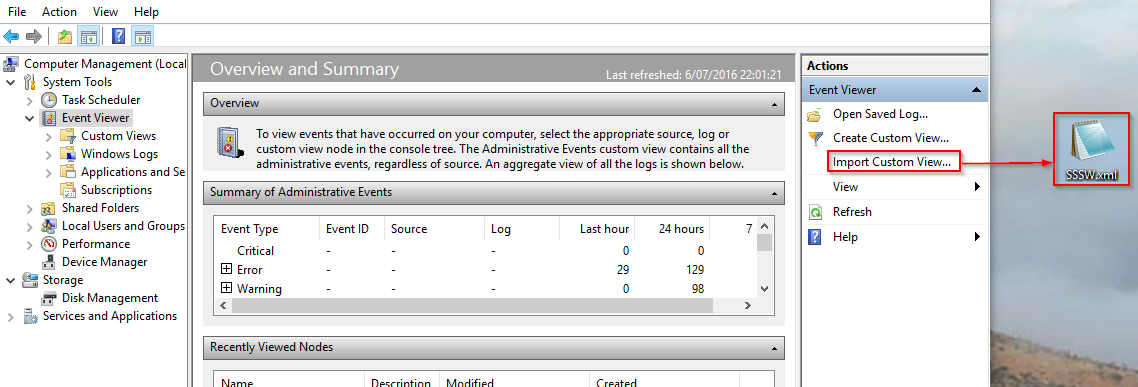
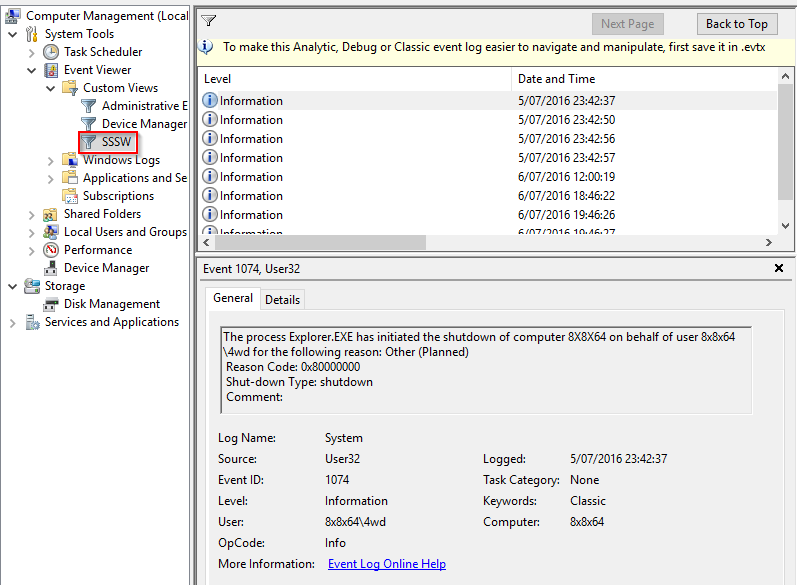
Didn't need to, there's a filter attached to that post that you can import into the Windows Event Log Viewer that filters all power events.

2016-07-06 22_02_08.png

2016-07-06 22_04_24.png
"I will not follow where the path may lead, but I will go where there is no path, and I will leave a trail." - Muriel Strode, 1903

app103

  • That scary taskbar girl
  • Global Moderator
  • Joined in 2006
  • *****
  • Posts: 5,888
    • Participated in NANY Challenge Six Times
    • Coding Snacks
    • Gathering Badge
    • Cody Award
    • Volunteers/Staff
Re: Utility to track boots and uptime.
« Reply #6 on: July 10, 2016, 09:40 PM »
How about Whatpulse? (I earn 2 weeks of free premium features if you sign up through my referral link)

Screenshot - 7_10_2016 , 5_23_59 PM.png

Screenshot - 7_10_2016 , 5_28_03 PM.png

Original address: https://www.donationcoder.com/forum/index.php?topic=42797.0