DonationCoder.com forum
 
Read-only archive. This is a static copy of the DonationCoder.com forum. Reading and searching work as before; logging in, posting and private messages do not.
Archive of 2026-10-21 · About this archive · Main site

Author Topic: FARR and Windows apps  (Read 15,884 times)

Attronarch

  • Supporting Member
  • Joined in 2012
  • **
  • Posts: 148
FARR and Windows apps
« on: February 04, 2016, 08:33 PM »
My first idea was to find where the apps are installed and simply point FARR to that location so I can launch what I want, but alas, it is a big hassle to open that folder. And once you revert security setting FARR cannot reach that folder anymore.

Any elegant way for using FARR to run Windows apps?

mouser

  • First Author
  • Administrator
  • Joined in 2005
  • *****
  • Posts: 40,931
    • Gathering Badge
    • Plugin Coding Medal
    • Participated in NANY Challenge Seventeen Times
    • Cody Award
    • Coding Snacks
    • Volunteers/Staff
Re: FARR and Windows apps
« Reply #1 on: February 16, 2016, 02:25 AM »
I apologize for missing this originally. Can you elaborate a little bit on this, or can anyone else provide some guidance about what kinds of apps we are talking about?

Attronarch

  • Supporting Member
  • Joined in 2012
  • **
  • Posts: 148
Re: FARR and Windows apps
« Reply #2 on: February 16, 2016, 08:23 AM »
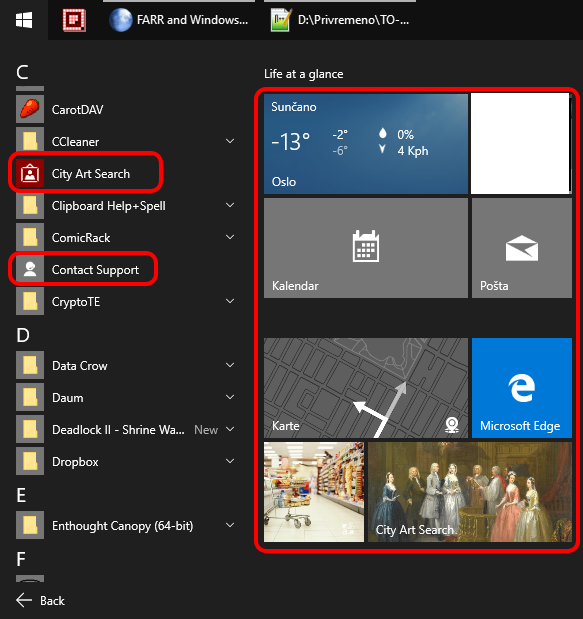
All apps for Win 8/8.1/10 that come from the Windows Store.

On Win 10 they are available from the start menu, mixed with regular programs. See attached screenshot (circled in red).

Example.png

ayryq

  • Supporting Member
  • Joined in 2009
  • **
  • Posts: 292
Re: FARR and Windows apps
« Reply #3 on: March 01, 2016, 01:55 PM »
For what it's worth, I haven't found a way, elegant or otherwise, to get FARR to find or run windows-store "apps." Such as Calculator or Calendar or Mail or Edge (browser) or the ModernUI version of Skype. I ignored this problem in Windows 8 since I ignored these apps, but now that they are better integrated into the desktop I find myself using some of them sometimes.

After going through the linked "hassle" were you able to load them in FARR? Could you make old-style .lnk shortcuts to the windowsapps files?

ayryq

  • Supporting Member
  • Joined in 2009
  • **
  • Posts: 292
Re: FARR and Windows apps
« Reply #4 on: March 01, 2016, 02:37 PM »
Here's a method that works for creating a "real" shortcut to a metro app:

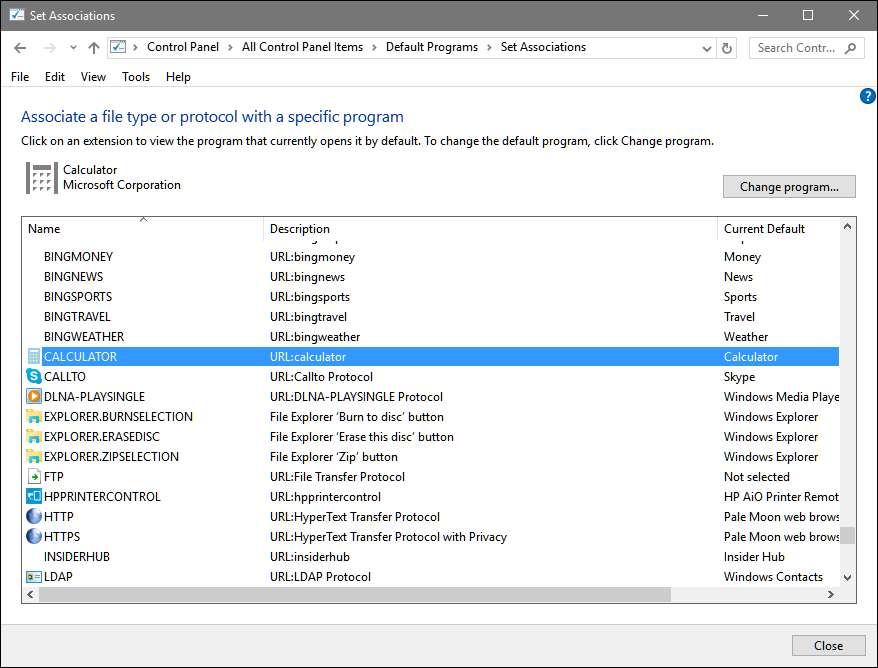
Go to Control Panel\All Control Panel Items\Default Programs\Set Associations


Scroll to the bottom under "protocols" and note that the description column next to each of the metro app shows URL:something.
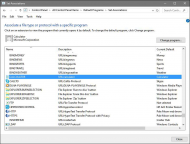
Screenshot - 2016-03-01 , 9_41_45.jpg
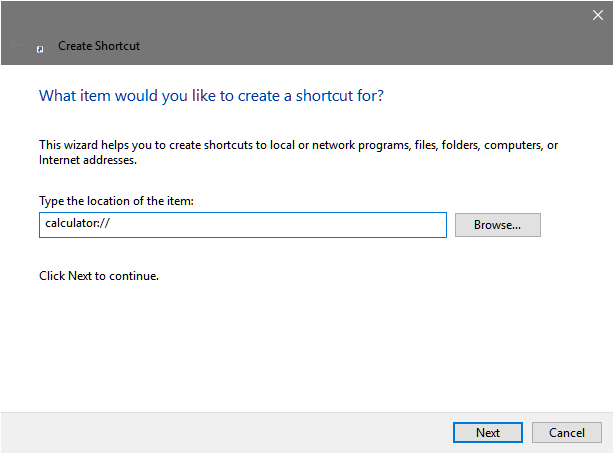
Create a shortcut somewhere FARR can index to "something://" (excluding quotes).
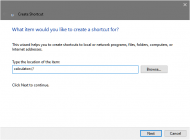
Screenshot - 2016-03-01 , 9_43_36.png
Rename the shortcut (it'll be called "New Internet Shortcut" by default.)

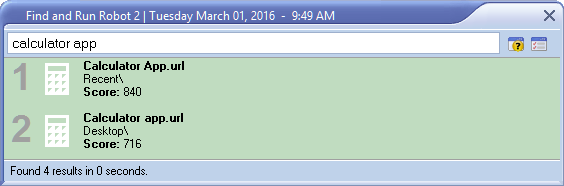
For example, windows 10 calculator shows URL:calculator. I create a new shortcut on my desktop pointing to calculator:// and titled "Calculator App"
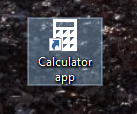
Screenshot - 2016-03-01 , 9_46_39.png
The Calculator icon is used with my title, and the shortcut is found and launched successfully from FARR.
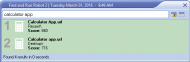
Screenshot - 2016-03-01 , 9_49_24.png
Kind of a farr cry from the index-free ease of normal farr use but if there's a metro app you use frequently it might be worth it.

I got this idea from this link that I found here.

Eric
« Last Edit: March 01, 2016, 02:49 PM by ayryq »

Attronarch

  • Supporting Member
  • Joined in 2012
  • **
  • Posts: 148
Re: FARR and Windows apps
« Reply #5 on: March 02, 2016, 10:14 AM »
Worked like a charm, thank you for sharing.

I had to change all icons since they are white and my FARR background is white, so it annoyed me to see "nothing".

Kind of a farr cry from the index-free...

mouser

  • First Author
  • Administrator
  • Joined in 2005
  • *****
  • Posts: 40,931
    • Gathering Badge
    • Plugin Coding Medal
    • Participated in NANY Challenge Seventeen Times
    • Cody Award
    • Coding Snacks
    • Volunteers/Staff
Re: FARR and Windows apps
« Reply #6 on: March 02, 2016, 12:48 PM »
Nice. I'll try to add automatic support for Windows Apps in FARR soon, but this is a great workaround until then :up:

ayryq

  • Supporting Member
  • Joined in 2009
  • **
  • Posts: 292
Re: FARR and Windows apps
« Reply #7 on: March 02, 2016, 01:01 PM »
I had to change all icons since they are white and my FARR background is white, so it annoyed me to see "nothing".

Yes, you can see above that I went the easy route and changed my FARR background color for my screenshot.

P.S. I found this solution on the Launchy forum. They don't support ModernUI apps either.

P.P.S. I wish every forum I used had the ability to quote just the text I've highlighted. That is seriously handy.

nitrix-ud

  • Charter Member
  • Joined in 2005
  • ***
  • Posts: 560
Re: FARR and Windows apps
« Reply #8 on: August 10, 2016, 08:30 AM »
Quote
Nice. I'll try to add automatic support for Windows Apps in FARR soon, but this is a great workaround until then

Hello Mouser, any advance regarding windows app automatic support ?

nitrix-ud

  • Charter Member
  • Joined in 2005
  • ***
  • Posts: 560
Re: FARR and Windows apps
« Reply #9 on: September 02, 2016, 02:27 PM »
If you run "shell:appsfolder"
or put it as a path in windows explorer (it also works in directory opus)

It opens a special folder with all the windows universal apps and all the desktop apps

You can then easily create shortcuts... just drag-and-drop to a folder or right-click and choose create shortcut to the desktop

Too bad, there is no way to add this special folder to FARR

mouser

  • First Author
  • Administrator
  • Joined in 2005
  • *****
  • Posts: 40,931
    • Gathering Badge
    • Plugin Coding Medal
    • Participated in NANY Challenge Seventeen Times
    • Cody Award
    • Coding Snacks
    • Volunteers/Staff
Re: FARR and Windows apps
« Reply #10 on: September 02, 2016, 02:39 PM »
Sorry for the delay -- i'm still planning on adding this built into farr.

IainB

  • @Slartibartfarst
  • Supporting Member
  • Joined in 2008
  • **
  • Posts: 7,544
Re: FARR and Windows apps
« Reply #11 on: September 02, 2016, 06:14 PM »
If you run "shell:appsfolder"
or put it as a path in windows explorer (it also works in directory opus)
It opens a special folder with all the windows universal apps and all the desktop apps
You can then easily create shortcuts... just drag-and-drop to a folder or right-click and choose create shortcut to the desktop
Too bad, there is no way to add this special folder to FARR
_____________________________________

Is that last statement necessarily true?

If one creates a new folder and names it: Fred.{4234d49b-0245-4df3-B780-3893943456e1}
- then that seems to create a hard link for the the same thing as pasting shell:appsfolder into the WinExplorer address bar.

I got that from reading the link to "hassle" in the OP:
My first idea was to find where the apps are installed and simply point FARR to that location so I can launch what I want, but alas, it is a big hassle to open that folder. And once you revert security setting FARR cannot reach that folder anymore.
Any elegant way for using FARR to run Windows apps?
___________________________
(Quite an interesting article.)

Does that provide the type of lookup table needed for this?

In the same way we got: GodMode.{ED7BA470-8E54-465E-825C-99712043E01C} - from an earlier FARR-related discussion I think it was.
« Last Edit: September 02, 2016, 06:42 PM by IainB »

nitrix-ud

  • Charter Member
  • Joined in 2005
  • ***
  • Posts: 560
Re: FARR and Windows apps
« Reply #12 on: September 06, 2016, 06:33 AM »
Quote
Sorry for the delay -- i'm still planning on adding this built into farr.
That's great!

I hope you will be able to fix the 300 characters limit of the command-line parameter and add the abitility to auto-prefix farr config files...  :Thmbsup:


Quote
If one creates a new folder and names it: Fred.{4234d49b-0245-4df3-B780-3893943456e1}
nice find IainB
it is then possible to add this folder in FARR, but it seems there is no easy way to launch the apps...

IainB

  • @Slartibartfarst
  • Supporting Member
  • Joined in 2008
  • **
  • Posts: 7,544
Re: FARR and Windows apps
« Reply #13 on: September 08, 2016, 07:38 AM »
@nitrix-ud: I thought I recalled this having apparently been solved in a prior discussion, and this seems to be it:
just drag and drop to a new folder
______________________
Quote
@tomos: alt + drag and drop (?) (to create shortcuts)
______________________
Awesome, works perfectly, thanks guys!
I created the Godfolder, (by creating a new folder called "GodMode.{ED7BA470-8E54-465E-825C-99712043E01C}") and then selected ALL the items, Alt Dragged them to a new folder called Shortcuts (in my documents/donationcoder folder) and vioala!
Thanks fellas,
Mark.
______________________

So, the steps are:
  • open up Fred.{4234d49b-0245-4df3-B780-3893943456e1}
  • select ALL
  • alt + drag-and-drop the files thus selected to an empty folder named (say) ViewAllAppsShortcuts, which is in (say) ...my documents\donationcoder folder
  • this will create 268 (I just did it myself, now) shortcuts to those apps
So then I guess (?) you create a FARR alias to use that folder - I haven't done that yet as I am being directed to go shopping for groceries pronto.    :(
« Last Edit: September 08, 2016, 07:45 AM by IainB »

nitrix-ud

  • Charter Member
  • Joined in 2005
  • ***
  • Posts: 560
Re: FARR and Windows apps
« Reply #14 on: September 08, 2016, 08:13 AM »
Thanks IainB

I already got that, but it is not automatic ;) (when you install a new app for instance...)

What I do now:

I use ahk scripts with the app protocol, for instance... Run fb-messenger:// (to launch the facebook app)

I use this method because I can share thoses scripts between my computers... (through dropbox) It's "universal", I mean not computer related

Original address: https://www.donationcoder.com/forum/index.php?topic=42292.0