DonationCoder.com forum
 
Read-only archive. This is a static copy of the DonationCoder.com forum. Reading and searching work as before; logging in, posting and private messages do not.
Archive of 2026-10-21 · About this archive · Main site

Author Topic: Tray Contextmen appears offset  (Read 7,283 times)

BGM

  • Honorary Member
  • Joined in 2008
  • **
  • Posts: 566
    • Participated in NANY Challenge Seven Times
Tray Contextmen appears offset
« on: January 02, 2016, 03:49 PM »
This has been happening to me for a long time now.

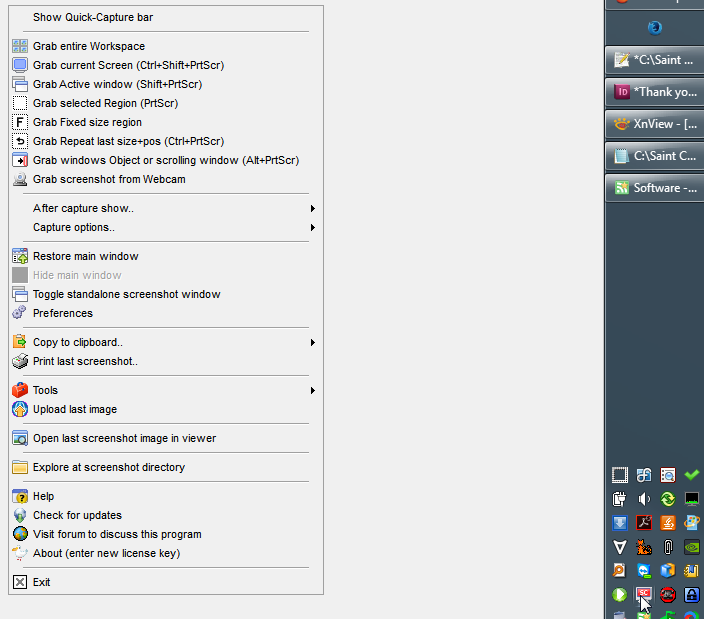
When I right-click on the tray icon to show the tray menu, the menu appears about 300 pixels to the right of where it's supposed to appear.  I have a right-aligned taskbar.

Is there a way to fix this without resetting everything to default?
screenshot_FreeCommander_004.png

BGM

  • Honorary Member
  • Joined in 2008
  • **
  • Posts: 566
    • Participated in NANY Challenge Seven Times
Re: Tray Contextmen appears offset
« Reply #1 on: February 01, 2016, 03:59 PM »
Haha - no clues on how to fix this eh?

mouser

  • First Author
  • Administrator
  • Joined in 2005
  • *****
  • Posts: 40,931
    • Gathering Badge
    • Plugin Coding Medal
    • Participated in NANY Challenge Seventeen Times
    • Cody Award
    • Coding Snacks
    • Volunteers/Staff
Re: Tray Contextmen appears offset
« Reply #2 on: February 02, 2016, 01:31 AM »
I can only tell you that resetting options within Screenshot Captor will not fix this.  Let me check to see if i did anything that might cause this.

BGM

  • Honorary Member
  • Joined in 2008
  • **
  • Posts: 566
    • Participated in NANY Challenge Seven Times
Re: Tray Contextmen appears offset
« Reply #3 on: February 02, 2016, 01:36 AM »
Mouser - it's a weird problem.  I have not figured out how to fix it either; but its the only program that does this.  I'm thinking I might try a complete uninstall and reinstall with completely fresh settings?  That sounds like work to me, though.

mouser

  • First Author
  • Administrator
  • Joined in 2005
  • *****
  • Posts: 40,931
    • Gathering Badge
    • Plugin Coding Medal
    • Participated in NANY Challenge Seventeen Times
    • Cody Award
    • Coding Snacks
    • Volunteers/Staff
Re: Tray Contextmen appears offset
« Reply #4 on: February 02, 2016, 01:39 AM »
Quote
I'm thinking I might try a complete uninstall and reinstall with completely fresh settings?  That sounds like work to me, though.

no point.

if you really want to test, you could download the PORTABLE version of sc, and just unzip that in a folder somewhere and run that version instead of your main installed one, and confirm the problem still happens with the portable version.

BGM

  • Honorary Member
  • Joined in 2008
  • **
  • Posts: 566
    • Participated in NANY Challenge Seven Times
Re: Tray Contextmen appears offset
« Reply #5 on: February 02, 2016, 07:49 PM »
I have an idea what it could be.

I am using my taskbar vertically on the right side of the screen.  If I move the taskbar to the regular bottom location then the menu shows in the right place.  But when I move it back to my vertical position, the menu appears horizontally where it would if the taskbar were on the bottom.  So the menu has the y position of a bottom-most taskbar, but the x position of the right-side taskbar.

Weird.

Original address: https://www.donationcoder.com/forum/index.php?topic=42149.0