DonationCoder.com forum
 
Read-only archive. This is a static copy of the DonationCoder.com forum. Reading and searching work as before; logging in, posting and private messages do not.
Archive of 2026-10-21 · About this archive · Main site

Author Topic: NANY 2016 Release: Move Aside Please  (Read 16,633 times)

anandcoral

  • Honorary Member
  • Joined in 2009
  • **
  • Posts: 802
    • Participated in NANY Challenge Thirteen Times
NANY 2016 Release: Move Aside Please
« on: December 30, 2015, 08:14 PM »
NANY 2016 Entry Information

Application Name Move Aside Please
Version 1.0.0
Short Description Moves a window aside when mouse pointer is placed on it. You can also make the window semi-transparent.
Supported OSes WinXp and above
Web Page https://sites.google.com/site/moveasideplease/
Download Link https://sites.google.com/site/moveasideplease/download


Description
During our work, many times we need to keep a small window of a program always on top of the desktop screen. This program may show network connection, mail status, auto updating messages etc. Now when we are working on some full screen program like editor, browser etc., this small window block the view of the part of the editor or browser.

Instead of closing or removing the small window, I wanted it to move aside from view when I hover the mouse cursor on it. This way I can easily view the blocked part of the editor or browser.

I could not find any such program by Googling, so I made "Move Aside Please".

Features
The window automatically moves up or down, when the mouse cursor hover over it. We can set the window titles which needs to be moved. Instead of moving the window, we can reduce its opacity, i.e. make it semi-transparent.

Screenshots
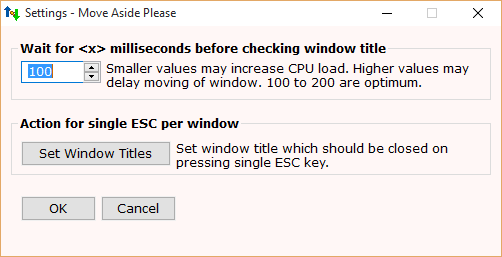
setting.png

Regards,

Anand

Ath

  • Supporting Member
  • Joined in 2006
  • **
  • Posts: 3,649
    • Participated in NANY Challenge Eleven Times
    • Coding Snacks
    • Linux User
    • Hardware Hacker
Re: NANY 2016 Release: Move Aside Please
« Reply #1 on: December 30, 2015, 09:00 PM »
Great, I like it so far :Thmbsup:
/Ton
Ath's software collection, Quote: "A problem well stated is a problem half-solved." (Charles Kettering)

anandcoral

  • Honorary Member
  • Joined in 2009
  • **
  • Posts: 802
    • Participated in NANY Challenge Thirteen Times
Re: NANY 2016 Release: Move Aside Please
« Reply #2 on: January 16, 2016, 06:29 PM »
Thank you Ath and all members who have donated me for Move Aside Please.

I have made Move Aside Please in just last 4 days, so the settings option is a bit primitive. But I am happy that users have liked it and Move Aside Please has be written about in different blogs and download sites, even in non-english sites, within these few days. Thanks all to DC  :)

My next priority is to make the settings more user friendly. Maybe give some more options, if possible.

Regards,

Anand

mouser

  • First Author
  • Administrator
  • Joined in 2005
  • *****
  • Posts: 40,931
    • Gathering Badge
    • Plugin Coding Medal
    • Participated in NANY Challenge Seventeen Times
    • Cody Award
    • Coding Snacks
    • Volunteers/Staff
Re: NANY 2016 Release: Move Aside Please
« Reply #3 on: January 18, 2016, 09:33 PM »
Reviewed here today:
http://www.ilovefreesoftware.com/17/windows/auto-move-window-mouse-cursor-moves.html

anandcoral

  • Honorary Member
  • Joined in 2009
  • **
  • Posts: 802
    • Participated in NANY Challenge Thirteen Times
Re: NANY 2016 Release: Move Aside Please
« Reply #4 on: January 19, 2016, 04:26 PM »
Thanks mouser.

All websites are reviewing Move Aside Please so fast that I have to keep on hold the fixing of settings window. Everyone is mentioning that the 'settings' is clumsy or ini like etc., and I want them to settle down before I take up the fix.

IainB

  • @Slartibartfarst
  • Supporting Member
  • Joined in 2008
  • **
  • Posts: 7,544
Re: NANY 2016 Release: Move Aside Please
« Reply #5 on: January 20, 2016, 03:21 AM »
This might be of interest. It is something similar that I cribbed together from someone else's existing script(s) a while back. I've used it for a few years. It's a toggle to be activated for the in-focus window you are working on. After activation, moving the mouse to the edge of the in-focus window then makes it momentarily fully transparent (invisible), so that you can look at any windows underneath it. Moving the mouse back to where the in-focus window was then returns that window to full opacity.
It could probably be of more use if the focus could also be changed so you could (say) copy text from a layer exposed below, and then return to the  in-focus screen you started with to (say) paste the text - but that's probably a bit hairy, if not redundant - given Alt-Tab.

Code: ( autohotkey)
<+^U::	; Ctrl+LeftShift+Ctrl+U loads PeekUnder subroutine - TOGGLE FUNCTION
	Gosub, PeekUnder     ; Peek under a window by making it transparent
        return
;   somewhere later in the script...
PeekUnder:    ;Triggered by LeftShift+RightShift+P
MsgBox,64,PeekUnder,- is now active. Toggle On/Off with Shift+Ctrl+U,2
OnExit Cleanup
LWin & LButton::
if HideWindow =       ; Not set => Activate now
{
   MouseGetPos,,,HideWindow  ; Window ID under mouse
   SetTimer TransWindow, 150
}
Else {                       ; Already set => Stop, Restore
   SetTimer TransWindow, Off
   IfWinNotExist ahk_id %HideWindow%, Return
   WinActivate ahk_id %HideWindow%
   WinSet Transparent, 255, ahk_id %HideWindow%
   HideWindow =
}
Return

TransWindow:
   CoordMode Mouse, Relative
   MouseGetPos X, Y, Window
   WinGetPos,,,X1, Y1, ahk_id %HideWindow%
   If ( Window = HideWindow && X > 4 && Y > 4 && X < X1-5 && Y < Y1-5 )
        WinSet Transparent, 255, ahk_id %HideWindow%
   Else WinSet Transparent,   1, ahk_id %HideWindow%
Return

Cleanup:
   MsgBox,64,PeekUnder,Deactivated,2
   IfWinExist ahk_id %HideWindow%
   {
      WinActivate ahk_id %HideWindow%
      WinSet Transparent, 255, ahk_id %HideWindow%
   }
ExitApp
;#############################################################################
« Last Edit: January 20, 2016, 03:29 AM by IainB »

anandcoral

  • Honorary Member
  • Joined in 2009
  • **
  • Posts: 802
    • Participated in NANY Challenge Thirteen Times
Re: NANY 2016 Release: Move Aside Please
« Reply #6 on: January 20, 2016, 03:46 PM »
This might be of interest. It is something similar that I cribbed together from someone else's existing script(s) a while back. I've used it for a few years.
Yes, even Park Cursor Aside can be achieved by similar code. Actually I make this type of raw codes and use them as and when I need something that I can not find from net. Afterwards when I feel that it may help other too, I try to convert it in a proper app and put in NANY.

Regards,

Anand

Original address: https://www.donationcoder.com/forum/index.php?topic=42131.0