NANY 2016 Entry Information
| Application Name | sTray |
| Supported OSes | Windows XP/7/8 (Probably works, but not tested on, Windows Vista/10) |
| Web Page | Website |
| Download Link | Download |
| Author | Jody Holmes (Skwire Empire) |
Description
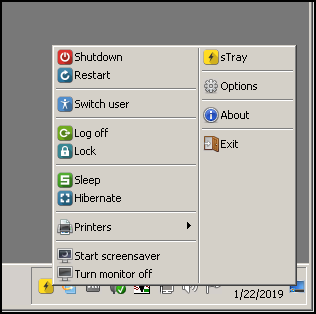
Tiny, tray-based utility that gives you a completely configurable menu for quick access to:
- Shutdown
- Restart
- Switch user
- Log off
- Lock
- Sleep
- Hibernate
- Start screensaver
- Turn monitor off
- Switch default printer
I use Microsoft’s Remote Desktop (RDP) a lot for the various computers and VMs that I deal with. RDP works great but has one drawback and that is, for whatever reason Microsoft has, the normal shutdown and reboot commands are missing from the Start Menu when you’re working on a computer remotely. Yes, you can use the shutdown command via the commandline or you can click the taskbar and press Alt-F4, etc, but not everybody is comfortable using the commandline or remembers that hotkey. Hence, this simple utility.
Screenshots
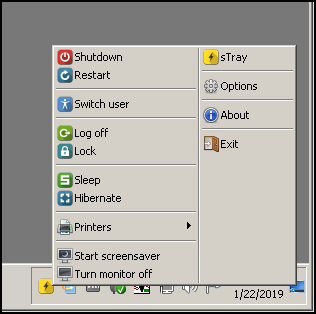
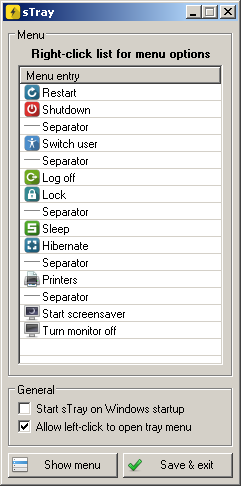
Usage
Installation
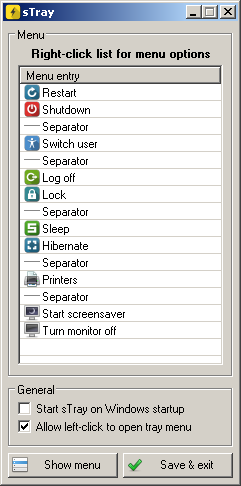
Download the zip file and extract its contents into a new folder. Run sTray.exe to start the application and right-click the tray icon to see the menu. Under the Options menu, you can have it add a shortcut to your startup folder.
Uninstallation
Exit the application and delete the folder you unzipped it to. The application doesn't write any of its settings to the registry.



 )
)