


If push comes to shove...you could remove its driver and disable the device in the Windows Device Manager. That means though that you will not be able to use the trackpad at all. Be sure to carry a working computer mouse with you the whole time when you decide to go drastic like this.I am not sure if I found it but it only allows uninstall, not disable. Synaptics PS/2 Port TouchPad. "Sample rate 100 reports/second" can be modified. I can't uninstall if I'm not sure that's all that will be affected.
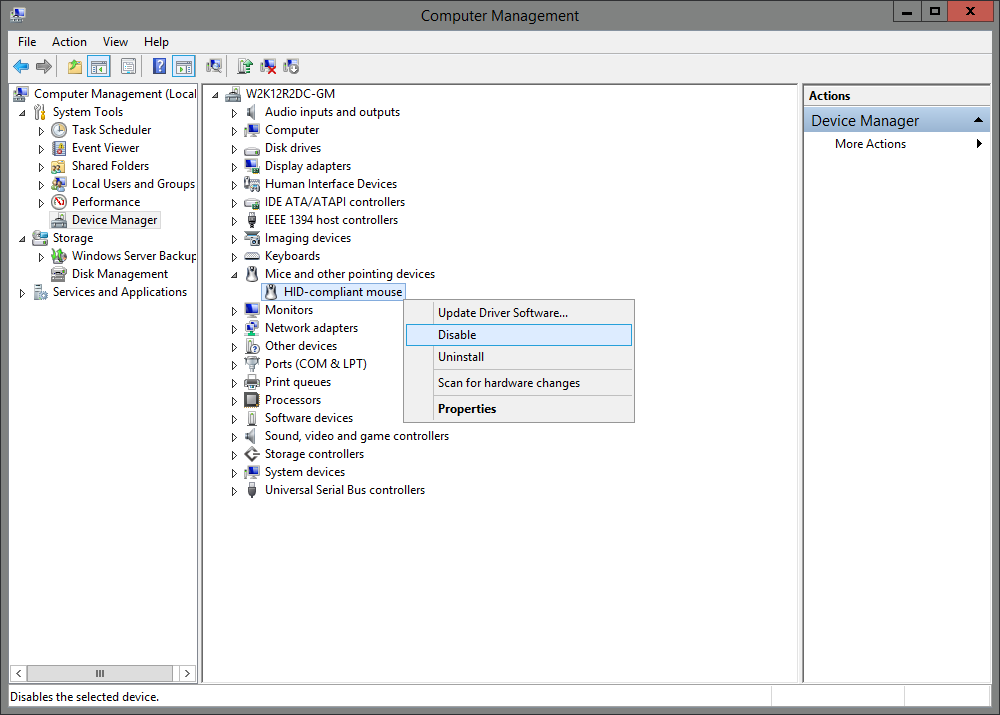
The image above is taken from Windows Server 2012, but Windows XP has a similar window. The link leads you to instructions (from Microsoft itself) on how to access this window in Windows XP. The section you need is called: Device Manager.
In there you can update drivers, remove drivers (Windows XP will try to re-install the next time you reboot) or disable the device (Windows XP won't try to re-install drivers).
But if you want to be absolutely sure, the main board in the laptop provides power to the device and you can disconnect that link. When you do that Windows won't even see the device anymore and you are sure not to be bothered anymore by the track pad. At all.
If you like the last option the most, you will need to find a way to open your laptop in a proper manner, so you can assemble it again. A brisk search revealed this document (pdf) that shows how to properly disassemble your Gateway laptop. Do the steps in reverse to assemble the laptop back into a working state. That manual might also give you an idea about properly mounting the plate that keeps falling off.

 But, whatever works for you...works for you.


