DonationCoder.com forum
 
Read-only archive. This is a static copy of the DonationCoder.com forum. Reading and searching work as before; logging in, posting and private messages do not.
Archive of 2026-10-21 · About this archive · Main site

Author Topic: CHS suddenly stopped working  (Read 6,987 times)

Attronarch

  • Supporting Member
  • Joined in 2012
  • **
  • Posts: 148
CHS suddenly stopped working
« on: October 26, 2015, 08:33 AM »
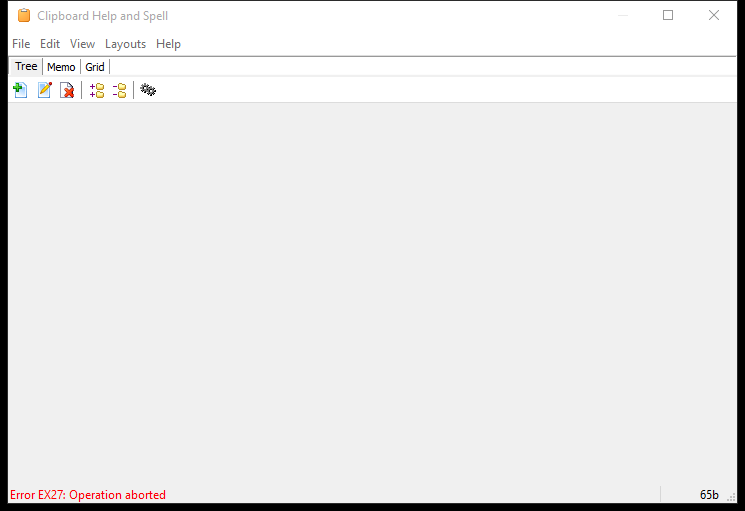
CHS suddenly stopped working, with weird errors (can't access index table). This is how main windows looks like:
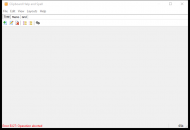
CHS 001.png

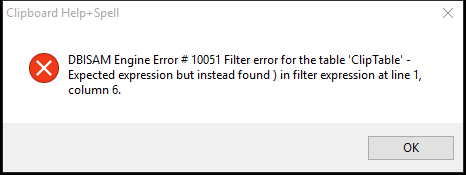
When I try to verify, optimize, etc, I get following:
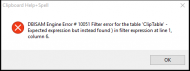
CHS 002.png

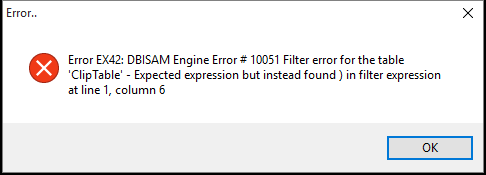
When I try to restore from backup, I get following:
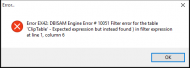
CHS 003.png

Tried re-installing, didn't help.

mouser

  • First Author
  • Administrator
  • Joined in 2005
  • *****
  • Posts: 40,931
    • Gathering Badge
    • Plugin Coding Medal
    • Participated in NANY Challenge Seventeen Times
    • Cody Award
    • Coding Snacks
    • Volunteers/Staff
Re: CHS suddenly stopped working
« Reply #1 on: October 26, 2015, 10:28 AM »
I just woke up so my brain is not functioning perfectly yet, but let's start with the basics:
  1. Exit CHS.
  2. Find your CHS database folder -- by default this will be under documents\DonationCoder\ClipboardHelpAndSpell\Database
  3. Backup this folder (zip it and copy it somewhere, etc), so that we can try to recover it later.
  4. Then delete the contents (or move contents) of the folder, so that it is empty.
  5. Restart CHS.

See if that lets CHS resume working on an empty clip database.  Assuming so we can then try to figure out what went wrong and try to get your database back next.

Attronarch

  • Supporting Member
  • Joined in 2012
  • **
  • Posts: 148
Re: CHS suddenly stopped working
« Reply #2 on: October 26, 2015, 10:36 AM »
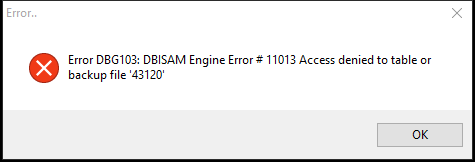
Got following:

CHS 004.png

BTW, I'm on Win10 (64 bit).

mouser

  • First Author
  • Administrator
  • Joined in 2005
  • *****
  • Posts: 40,931
    • Gathering Badge
    • Plugin Coding Medal
    • Participated in NANY Challenge Seventeen Times
    • Cody Award
    • Coding Snacks
    • Volunteers/Staff
Re: CHS suddenly stopped working
« Reply #3 on: October 26, 2015, 11:01 AM »
What security software are you running? Can you try turning it off or adding an exception for CHS -- it's almost sounding like the problem is a security program blocking proper access to database files, something that we have seen before.
The other related thing to try, assuming you can get into CHS options is on the Tweaks tab, changing the "Temporary DB file location" and restarting.

mouser

  • First Author
  • Administrator
  • Joined in 2005
  • *****
  • Posts: 40,931
    • Gathering Badge
    • Plugin Coding Medal
    • Participated in NANY Challenge Seventeen Times
    • Cody Award
    • Coding Snacks
    • Volunteers/Staff
Re: CHS suddenly stopped working
« Reply #4 on: October 26, 2015, 11:03 AM »
Was CHS working for you before all this? Any idea what could have happened that made this start happening?
If you are seeing that error after you removed all database files, it's hard to see how it just started happening out of nowhere when it was previously working..

Attronarch

  • Supporting Member
  • Joined in 2012
  • **
  • Posts: 148
Re: CHS suddenly stopped working
« Reply #5 on: October 26, 2015, 12:33 PM »
Turning off Avira didn't help, but changing "Temporary DB file location" to Database "temp" sub-directory seems to have solved all problems.

CHS was working fine, and I had it on Win 10 since it was released. My problems started when I moved to Japan, last week, but I think that is just a coincidence. Maybe some Win10 update broke it.

mouser

  • First Author
  • Administrator
  • Joined in 2005
  • *****
  • Posts: 40,931
    • Gathering Badge
    • Plugin Coding Medal
    • Participated in NANY Challenge Seventeen Times
    • Cody Award
    • Coding Snacks
    • Volunteers/Staff
Re: CHS suddenly stopped working
« Reply #6 on: October 26, 2015, 12:43 PM »
Great  :Thmbsup:

Quote
changing "Temporary DB file location" to Database "temp" sub-directory seems to have solved all problems.
great to know.  that does suggest it's some sort of file access problem -- either related to a security program or a built-in windows 10 restriction.
I wonder if i should make that setting the default.

so now that it's working again, if you had old clips you want back you should be able to exit CHS, and restore your old Database directory and restart.

Original address: https://www.donationcoder.com/forum/index.php?topic=41820.0