DonationCoder.com forum
 
Read-only archive. This is a static copy of the DonationCoder.com forum. Reading and searching work as before; logging in, posting and private messages do not.
Archive of 2026-10-21 · About this archive · Main site

Author Topic: macro to edit a .txt file?  (Read 18,772 times)

bit

  • Supporting Member
  • Joined in 2013
  • **
  • Posts: 686
macro to edit a .txt file?
« on: September 28, 2015, 06:27 AM »
I could sure use a simple program snack or 'macro' that allows me to delete numbers 0 thru 9, and the quote marks, in a .txt file, with just a few clicks.  :-*

Ath

  • Supporting Member
  • Joined in 2006
  • **
  • Posts: 3,649
    • Participated in NANY Challenge Eleven Times
    • Coding Snacks
    • Linux User
    • Hardware Hacker
Re: macro to edit a .txt file?
« Reply #1 on: September 28, 2015, 06:48 AM »
There are dozens ways of doing that, I've supplied one in my last NANY: NANY 2015 Entry: SedTester
/Ton
Ath's software collection, Quote: "A problem well stated is a problem half-solved." (Charles Kettering)

AbteriX

  • Member #520
  • Charter Honorary Member
  • Joined in 2005
  • ***
  • Posts: 1,150
Re: macro to edit a .txt file?
« Reply #2 on: September 28, 2015, 08:06 AM »
Or utilize PowerShell, it's already there.

FROM: PoShTest.txt
Quote
"Virtualisierte Medien"

"Virtualisierte Medien" sind bei der Verwendung der Hyper-V-Virtualisierung ein wichtiger
Computern. Vieles der Hyper-V-Technologie ist zwar in Windows 8 neu, aber virtualisierte

Hyper-V unter Windows Server 2012

Bei Hyper-V unter Windows 8 und unter Windows Server 2012 handelt es sich im Prinzip um
Computern. Virtuelle Computer lassen sich leicht von Windows Server 2012 auf Windows 8


TO: PoShTestOUT1.txt
Quote
Virtualisierte Medien

Virtualisierte Medien sind bei der Verwendung der Hyper-V-Virtualisierung ein wichtiger
Computern. Vieles der Hyper-V-Technologie ist zwar in Windows  neu, aber virtualisierte


Hyper-V unter Windows Server

Bei Hyper-V unter Windows  und unter Windows Server  handelt es sich im Prinzip um
Computern. Virtuelle Computer lassen sich leicht von Windows Server  auf Windows


USE:

# With PS-default "Unicode Encoding" output:
C:\Temp> Get-Content .\PoShTest.txt | ForEach-Object{ $_ -replace'\d|"'} > PoShTestOUT1.txt


# Like "-Encoding ASCII" but with localized Umlauts or accent support
C:\Temp> Get-Content .\PoShTest.txt | ForEach{ $_ -replace'\d|"'} | Out-File -Encoding Default PoShTestOUT2.txt


EDIT: remove digit-surrounding spaces also:
C:\Temp> Get-Content .\PoShTest.txt | ForEach{ $_ -replace' ?\d+ ?|"'} | Out-File -Encoding Default PoShTestOUT2.txt
' ?\d+ ?|"' Means: space-or-not ( ?) + one-or-more digits (\d+) + space-or-not ( ?)     OR    an single double-quote sign (")


Code
PowerShell Out-File Help excerpt:
  -Encoding <String>
      Specifies the type of character encoding used in the file. Valid values are "Unicode", "UTF7", "UTF8", 
      "UTF32", "ASCII", "BigEndianUnicode", "Default", and "OEM". "Unicode" is the default.
      "Default" uses the encoding of the system's current ANSI code page.


Shorter:
C:\Temp> gc .\PoShTest.txt|%{$_ -replace'\d|"'}|out-file -enc default PoShTestOUT2.txt
Greetings, Stefan.
« Last Edit: October 01, 2015, 10:33 AM by AbteriX »

bit

  • Supporting Member
  • Joined in 2013
  • **
  • Posts: 686
Re: macro to edit a .txt file?
« Reply #3 on: September 29, 2015, 03:40 AM »
^With apology, I tried Sed and even viewed a nice yt 'how to' about it, but it seems a little too technical for me.
Tnx just the same.

bit

  • Supporting Member
  • Joined in 2013
  • **
  • Posts: 686
Re: macro to edit a .txt file?
« Reply #4 on: September 29, 2015, 12:23 PM »
I thought of a possible alternate method to eliminate numbers, but it won't work so far.
My desired application is to use TextAssist v.4.0 (i.e. TA) for text-to-speech playback on text that has every line consecutively numbered.
TA allows the use of specialized 'speech dictionaries' (suffix '.tad') in which you can set it up to substitute words in speech.
For instance, a hypothetical 'block.tad' speech dictionary may be selected, and the word 'cube' in print, can be set up to be spoken as 'block'.
Thus; "I found a cube," in print, would be spoken, "I found a block."
So I tried creating a 'no numbers.tad' speech dictionary, and entered numbers 0 through 9, with no spoken equivalent, the idea being to induce TA to say nothing when encountering numbers.

But some entries seem to be hard-wired, and the attempt failed.
I've tried to find where these hard-wired entries are located in a TA program file, without success.
If I could open and edit the hard-wired entry list, perhaps a separate copy of TA might be set up, with a backup original copy preserved.

So it was a thought, but I have no idea how it might be done.

Ath

  • Supporting Member
  • Joined in 2006
  • **
  • Posts: 3,649
    • Participated in NANY Challenge Eleven Times
    • Coding Snacks
    • Linux User
    • Hardware Hacker
Re: macro to edit a .txt file?
« Reply #5 on: September 29, 2015, 03:17 PM »
Well, I didn't say sed was easy ;D

You'd get the desired result by using this command-line:
Code: (text)
sed -r -e 's/[0-9"]//g' input-file >output-file
Or optionally add the -i parameter and remove the '>output-file' part to do a destructive, in-place, replacement in multiple input-files but not keeping the original file(s).
/Ton
Ath's software collection, Quote: "A problem well stated is a problem half-solved." (Charles Kettering)

bit

  • Supporting Member
  • Joined in 2013
  • **
  • Posts: 686
Re: macro to edit a .txt file?
« Reply #6 on: September 29, 2015, 11:48 PM »
Well, I didn't say sed was easy ;D

You'd get the desired result by using this command-line:
Code: (text)
sed -r -e 's/[0-9"]//g' input-file >output-file
Or optionally add the -i parameter and remove the '>output-file' part to do a destructive, in-place, replacement in multiple input-files but not keeping the original file(s).
I clicked on 'Select', and copy & paste highlighted string into top window of SedTester, then pasted sample text in which each line is consecutively numbered into first large window.
Second large window says:
sed: -e expression #1, char 26: Unterminated 's' command
Error 1

I tried individually checking each check box, but no success yet.
Tnx. Over to you?

Ath

  • Supporting Member
  • Joined in 2006
  • **
  • Posts: 3,649
    • Participated in NANY Challenge Eleven Times
    • Coding Snacks
    • Linux User
    • Hardware Hacker
Re: macro to edit a .txt file?
« Reply #7 on: September 30, 2015, 06:24 AM »
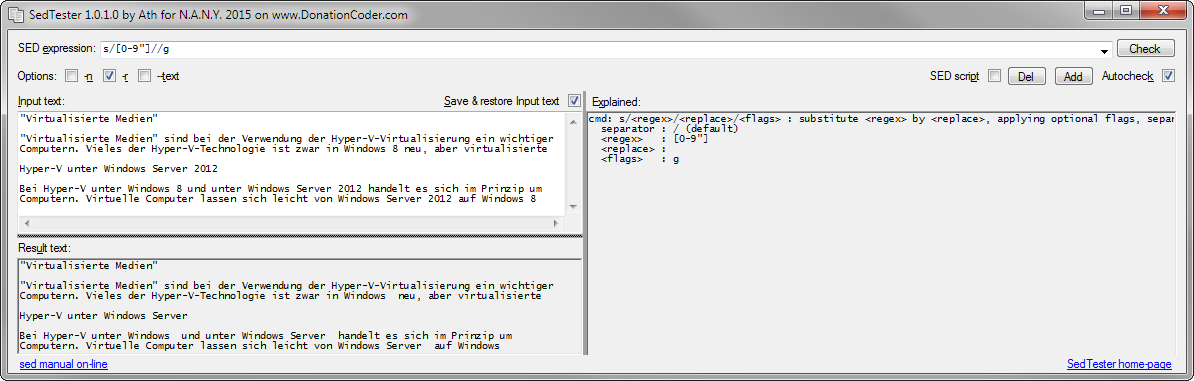
I was referring to a Linux or DOS (with sed added) command-line, not to SedTester.

In SedTester you'd have to only paste the quoted part in the SED expression field: s/[0-9"]//g
and check the -r checkbox
Like this (I pasted the Input text from AbteriX' post):

Screenshot - 30-09-2015 , 08_21_53.png
/Ton
Ath's software collection, Quote: "A problem well stated is a problem half-solved." (Charles Kettering)

bit

  • Supporting Member
  • Joined in 2013
  • **
  • Posts: 686
Re: macro to edit a .txt file?
« Reply #8 on: September 30, 2015, 06:50 AM »
I was referring to a Linux or DOS (with sed added) command-line, not to SedTester.

In SedTester you'd have to only paste the quoted part in the SED expression field: s/[0-9"]//g
and check the -r checkbox
Like this (I pasted the Input text from AbteriX' post):

[attachment 1 not found]
Success! Wow, that's powerful!
PS - I see you also check-boxed 'Autocheck'; and when I did that, it worked.  :Thmbsup:
PS - For some text, the unwanted numbers look like this:
1:1: (plus desired text)
1:2:
1:3:

With s/[0-9"]//g only, it leaves this:
: : (plus desired text)
: :
: :

If I add : to the script, like this: s/[0-9":]//g
it also removes all the colons [:]

Some text sources list unwanted numbers in [square brackets], and although SedTester still removes the numbers, the square brackets cannot be removed with SedTester.
However, a simple text 'search & replace' for the brackets or colons easily removes them all.

PS - Is there a way to increase the text body size limit to, say, 50 pages of text?
I froze up SedTester with a 13 page text file size.
« Last Edit: October 01, 2015, 12:46 PM by bit »

4wd

  • Pedantic Old Bastard
  • Supporting Member
  • Joined in 2006
  • **
  • Posts: 5,652
    • Coding Snacks
Re: macro to edit a .txt file?
« Reply #9 on: September 30, 2015, 07:28 AM »
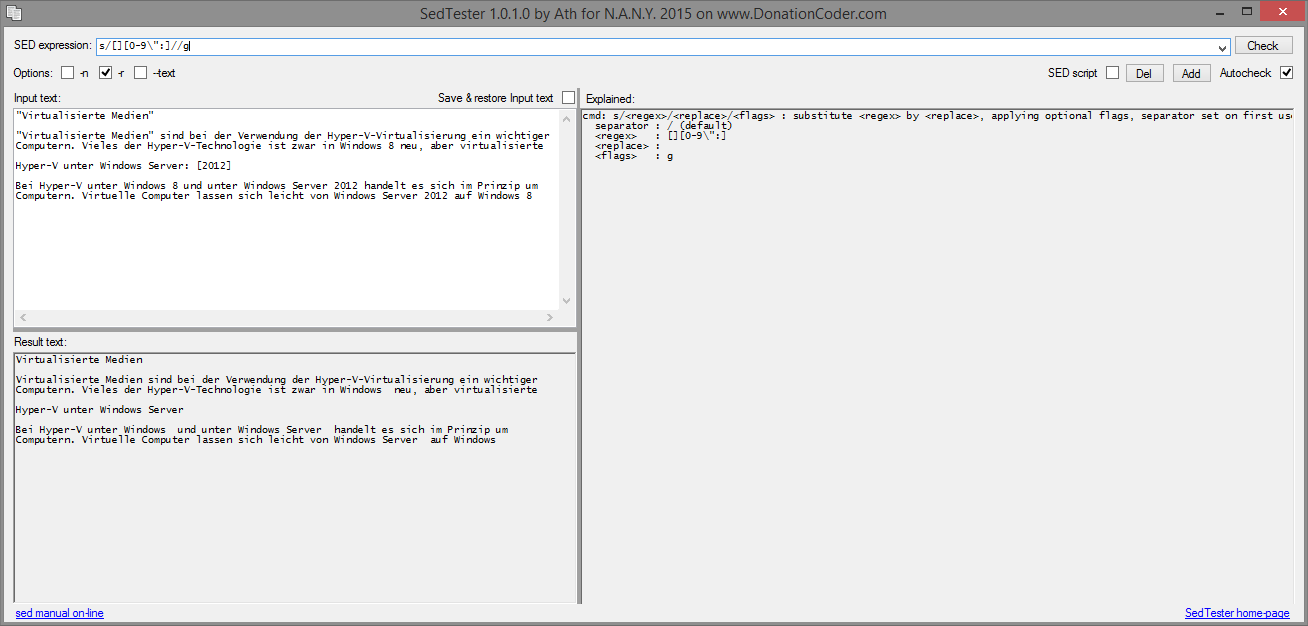
Some text sources list unwanted numbers in [square brackets], and although SedTester still removes the numbers, the square brackets cannot be removed with SedTester.

s/[][0-9\":]//g

Place the closing square bracket immediately after the opening square bracket, it'll be read as a character, and so will the following opening square bracket.

You also need to escape the quote (\") to have them removed.

2015-09-30 17_28_03.png

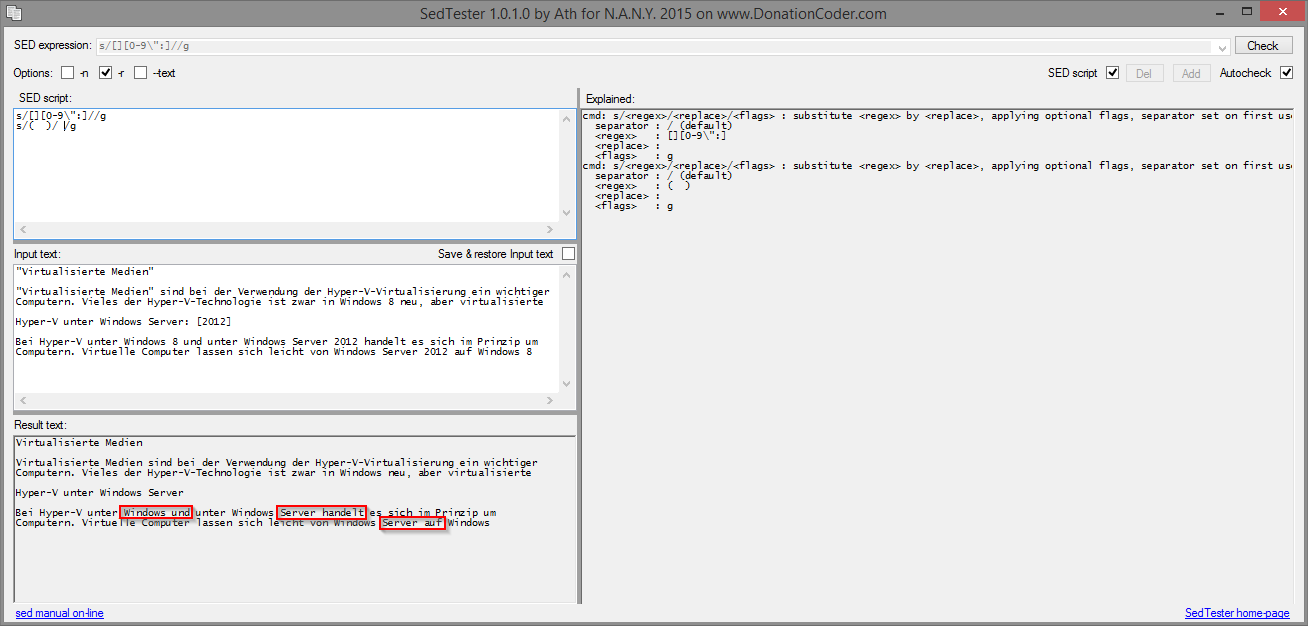
You could also remove double spaces created by character removal (see last two lines in example) by using a SED Script:

s/[][0-9\":]//g
s/(  )/ /g


2015-09-30 17_36_56.png

But that may screw up any space formatted tables.
"I will not follow where the path may lead, but I will go where there is no path, and I will leave a trail." - Muriel Strode, 1903
« Last Edit: September 30, 2015, 07:42 AM by 4wd »

Ath

  • Supporting Member
  • Joined in 2006
  • **
  • Posts: 3,649
    • Participated in NANY Challenge Eleven Times
    • Coding Snacks
    • Linux User
    • Hardware Hacker
Re: macro to edit a .txt file?
« Reply #10 on: September 30, 2015, 08:26 AM »
You also need to escape the quote (\") to have them removed.
Yeah, I didn't look close enough during testing, sorry.
/Ton
Ath's software collection, Quote: "A problem well stated is a problem half-solved." (Charles Kettering)

Ath

  • Supporting Member
  • Joined in 2006
  • **
  • Posts: 3,649
    • Participated in NANY Challenge Eleven Times
    • Coding Snacks
    • Linux User
    • Hardware Hacker
Re: macro to edit a .txt file?
« Reply #11 on: September 30, 2015, 08:40 PM »
PS - Is there a way to increase the text body size limit to, say, 50 pages of text?
I froze up SedTester with a 13 page text file size.
Well, I didn't test it witth that kind of sizes, as it is intended as a tool for testing and 'explaining' sed expressions.
But it does send the input text to a temp-file and hands that to the external sed.exe, redirecting the output back into SedTester. That last action could cause issues, so I'll investigate that, and fix where needed.
/Ton
Ath's software collection, Quote: "A problem well stated is a problem half-solved." (Charles Kettering)

bit

  • Supporting Member
  • Joined in 2013
  • **
  • Posts: 686
Re: macro to edit a .txt file?
« Reply #12 on: September 30, 2015, 08:55 PM »
I got it to convert/process chapter #1, then successfully added #2, #3, & #4, and then it hung when I tried to add #5, with chapter #6 & #7 still to go.
This was with about one page per chapter, so it's pretty short.
SedTester does a great job of removing numbers & characters, esp. with the extra script comments by you and 4x4 on how to remove those other brackets.
If there was some way to increase its capacity, it would be even more useful.

My eyes aren't what they were, and I like to convert digital English language text to number-free format for audio playback with TextAssist, which also displays the text on playback, giving me built-in 'subtitles' to look at in case I didn't hear something spoken clearly enough to recognize it.
I can also play back numbered text, but it's a little tedious sometimes hearing spoken numbers with every line.  :Thmbsup:
« Last Edit: September 30, 2015, 09:00 PM by bit »

Target

  • Honorary Member
  • Joined in 2006
  • **
  • Posts: 1,840
    • Coding Snacks
Re: macro to edit a .txt file?
« Reply #13 on: September 30, 2015, 11:25 PM »
I'm a bit surprised no ones mentioned wild gem - it doesn't do batches (as far as I can see) but I had a bit of a game this morning and it handled a 40K line text file no prob's (if I could remember even a little bit of the regex syntax I'm sure this would be a very handy tool)

FWIW it's portable and green!!
Alcohol is photoshop, bottled
Askhole - someone who ask for advice, then ignores it
"Look wise, say nothing, and grunt. Speech was given to conceal thought" - Sir William Osler

4wd

  • Pedantic Old Bastard
  • Supporting Member
  • Joined in 2006
  • **
  • Posts: 5,652
    • Coding Snacks
Re: macro to edit a .txt file?
« Reply #14 on: October 01, 2015, 01:47 AM »
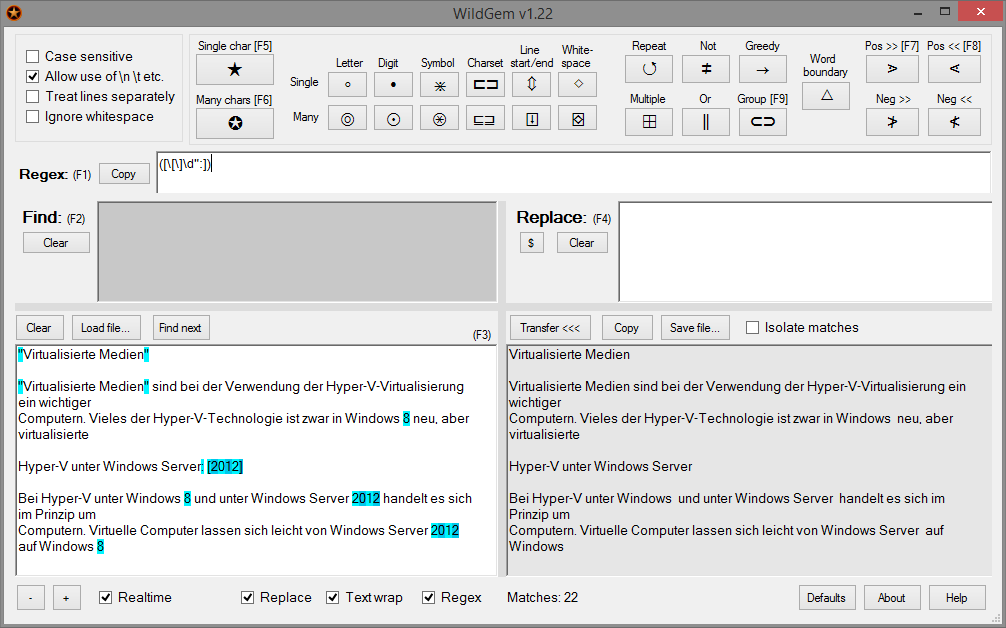
WildGem

2015-10-01 11_46_22.png

Or if you want to do a global search and replace over multiple files there's Find & Replace or PSPad, both free.
"I will not follow where the path may lead, but I will go where there is no path, and I will leave a trail." - Muriel Strode, 1903
« Last Edit: October 01, 2015, 02:55 AM by 4wd »

bit

  • Supporting Member
  • Joined in 2013
  • **
  • Posts: 686
Re: macro to edit a .txt file?
« Reply #15 on: October 01, 2015, 04:49 AM »
WildGem

[attachment 1 not found]

Or if you want to do a global search and replace over multiple files there's Find & Replace or PSPad, both free.
Way cool.
How would I tell WG to find numbers 0 thru 9 and colon [:] all in one shot and make them disappear?
I can get it to do one number at a time so far, and it seems to have no file size or page limits.

Target

  • Honorary Member
  • Joined in 2006
  • **
  • Posts: 1,840
    • Coding Snacks
Re: macro to edit a .txt file?
« Reply #16 on: October 01, 2015, 05:52 AM »
see 4WD's screeny, otherwise you can select all numbers (digits) using the multiple digit button (look across the top).  I was able to fumble the " in by appending with a pipe in the regex field (eg append |" to the multi digit regex)
Alcohol is photoshop, bottled
Askhole - someone who ask for advice, then ignores it
"Look wise, say nothing, and grunt. Speech was given to conceal thought" - Sir William Osler

4wd

  • Pedantic Old Bastard
  • Supporting Member
  • Joined in 2006
  • **
  • Posts: 5,652
    • Coding Snacks
Re: macro to edit a .txt file?
« Reply #17 on: October 01, 2015, 06:45 AM »
How would I tell WG to find numbers 0 thru 9 and colon [:] all in one shot and make them disappear?

([\[\]\d":]) - match [, ], digits, ", or :
"I will not follow where the path may lead, but I will go where there is no path, and I will leave a trail." - Muriel Strode, 1903

bit

  • Supporting Member
  • Joined in 2013
  • **
  • Posts: 686
Re: macro to edit a .txt file?
« Reply #18 on: October 01, 2015, 12:37 PM »
How would I tell WG to find numbers 0 thru 9 and colon [:] all in one shot and make them disappear?

([\[\]\d":]) - match [, ], digits, ", or :
Good gosh, that's exactly the string you had already put in your screen shot, right in front of me.
Amazing; nothing happens as I type in the string character by character until the last entry, then shoom!, it gives you exactly what you want in one big transformation.  :Thmbsup:

4wd

  • Pedantic Old Bastard
  • Supporting Member
  • Joined in 2006
  • **
  • Posts: 5,652
    • Coding Snacks
Re: macro to edit a .txt file?
« Reply #19 on: October 01, 2015, 10:43 PM »
That's because until you enter the ) the capture group hasn't been completed.
"I will not follow where the path may lead, but I will go where there is no path, and I will leave a trail." - Muriel Strode, 1903

Original address: https://www.donationcoder.com/forum/index.php?topic=41669.0