Note: "GOTYE" = "Game of the Year Edition".
We had been given some gift vouchers to spend at a high street IT chain store, so we went to their store to buy a computer game, and came away with my daughter's choice, which was Fallout 3.
It installed the Steam delivery system and required GFWL (Games For Windows Live) to be installed and running as well.
After a bit of mucking about recovering our relatively unused GFWL signon ID/Password, Steam, the game, and GFWL were installed and ran fine on a Samsung-S3 (Series 3) laptop with standard Windows 10 update.
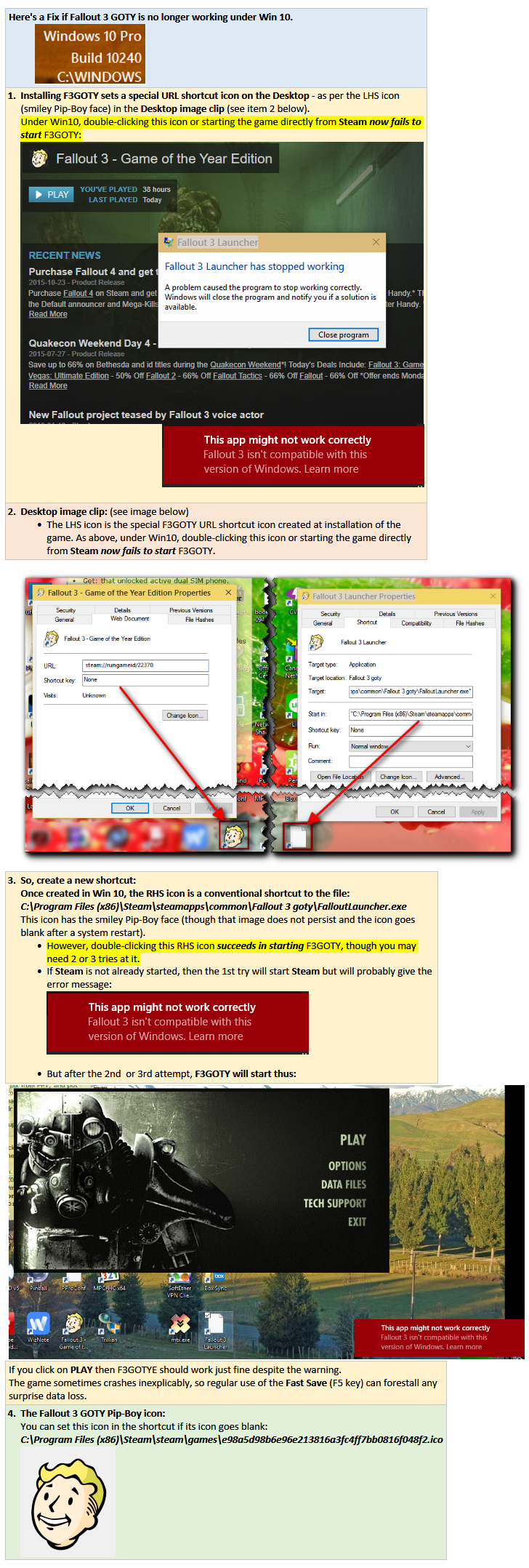
A couple of days later I installed the thing (Steam, the game, and GFWL) on a Toshiba Satellite L855D laptop with Windows 10 Pro. It all seemed to install OK, but it wouldn't run - kept coming up with the same nondescript error at startup:
____________________
Fallout 3 Launcher
Fallout 3 Launcher has stopped working
A problem caused the program to stop working correctly.
Windows will close the program and notify you if a solution is available.
[Close program]
____________________
For several hours I scoured the discussion forums, searching for a solution or a workaround.
Not being able to run Fallout 3 on Win8 or Win10 seemed to be a common problem.
There were two very useful posts at steamcommunity.com:
However, after several hours of playing Sherlock Holmes and repeatedly reinstalling the thing on the Toshiba-L855D, using different tweaks here and there, I still couldn't get Fallout 3 to run. So near, and yet so far! Very frustrating.
I checked and compared, and found that game installation folders/files and Steam components were identical on both laptops, but I had noticed that, on both laptops, GFWL Client had been set to run at Windows startup, and, out of interest tonight I compared the GFWL files as installed on each laptop, and noticed a difference:
One subfolder was different: C:\Program Files (x86)\Microsoft Games for Windows - LIVE\Redist\DirectX
- on the ToshibaL855D, there were only two files in that folder, and though the same two were in the corresponding folder on the Samsung-S3, on the latter the folder held a few more files, so I copied them across to the ToshibaL855D folder, leaving it with these in all:
I then ran DXSETUP.exe, after which I stopped and restarted the GFWL Client, logged in to GFWL, and then started the Fallout 3 game after searching for the link using the Start menu: "Fallout 3 - Game of the Year Edition".
It seems to work OK now, though I have only now started playing it.
I suspect it will have been worth all the trouble, but I thought I'd post my notes about it here, in case they might be of help/use to others with similar Fallout 3 problems under Win10.
We had been given some gift vouchers to spend at a high street IT chain store, so we went to their store to buy a computer game, and came away with my daughter's choice, which was Fallout 3.
It installed the Steam delivery system and required GFWL (Games For Windows Live) to be installed and running as well.
After a bit of mucking about recovering our relatively unused GFWL signon ID/Password, Steam, the game, and GFWL were installed and ran fine on a Samsung-S3 (Series 3) laptop with standard Windows 10 update.
A couple of days later I installed the thing (Steam, the game, and GFWL) on a Toshiba Satellite L855D laptop with Windows 10 Pro. It all seemed to install OK, but it wouldn't run - kept coming up with the same nondescript error at startup:
____________________
Fallout 3 Launcher
Fallout 3 Launcher has stopped working
A problem caused the program to stop working correctly.
Windows will close the program and notify you if a solution is available.
[Close program]
____________________
For several hours I scoured the discussion forums, searching for a solution or a workaround.
Not being able to run Fallout 3 on Win8 or Win10 seemed to be a common problem.
There were two very useful posts at steamcommunity.com:
However, after several hours of playing Sherlock Holmes and repeatedly reinstalling the thing on the Toshiba-L855D, using different tweaks here and there, I still couldn't get Fallout 3 to run. So near, and yet so far! Very frustrating.
I checked and compared, and found that game installation folders/files and Steam components were identical on both laptops, but I had noticed that, on both laptops, GFWL Client had been set to run at Windows startup, and, out of interest tonight I compared the GFWL files as installed on each laptop, and noticed a difference:
One subfolder was different: C:\Program Files (x86)\Microsoft Games for Windows - LIVE\Redist\DirectX
- on the ToshibaL855D, there were only two files in that folder, and though the same two were in the corresponding folder on the Samsung-S3, on the latter the folder held a few more files, so I copied them across to the ToshibaL855D folder, leaving it with these in all:
- APR2007_xinput_x86.cab
Aug2009_d3dx10_42_x86.cab
Aug2009_d3dx9_42_x86.cab
DSETUP.dll
dsetup32.dll
dxdllreg_x86.cab
DXSETUP.exe
dxupdate.cab
I then ran DXSETUP.exe, after which I stopped and restarted the GFWL Client, logged in to GFWL, and then started the Fallout 3 game after searching for the link using the Start menu: "Fallout 3 - Game of the Year Edition".
It seems to work OK now, though I have only now started playing it.
I suspect it will have been worth all the trouble, but I thought I'd post my notes about it here, in case they might be of help/use to others with similar Fallout 3 problems under Win10.