DonationCoder.com forum
 
Read-only archive. This is a static copy of the DonationCoder.com forum. Reading and searching work as before; logging in, posting and private messages do not.
Archive of 2026-10-21 · About this archive · Main site

Author Topic: TextOverlayTool  (Read 25,174 times)

wraith808

  • Supporting Member
  • Joined in 2006
  • **
  • Posts: 11,205
    • Participated in NANY Challenge Fourteen Times
    • Coding Snacks
    • Writer
    • Hardware Hacker
TextOverlayTool
« on: September 15, 2015, 03:21 AM »
In this post, CodeTrucker mentioned that he was looking for a White-on-Black or Transparent Menu-Less Text Displayer.  Many people came up with some creative solutions using existing software, but it came to me that this was a logical extension of my Reference Overlay Tool, and shouldn't be too hard to code.

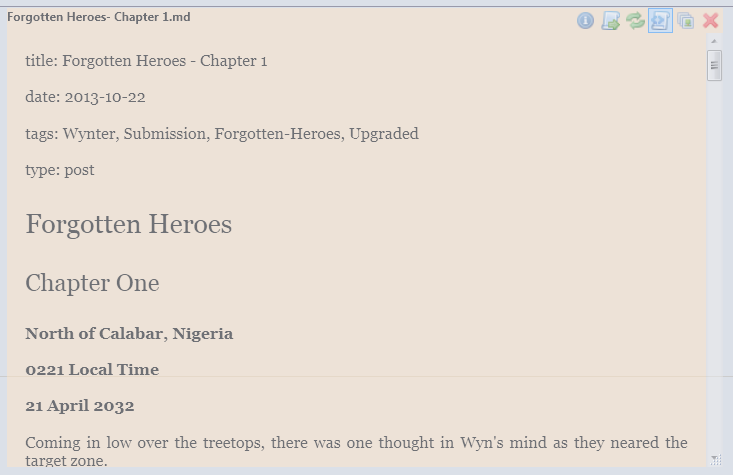
I was right and wrong- dealing with the varieties of text turned out to be a lot more intricate than dealing with a couple of set image formats.  But it's done, and I present Text Overlay Tool.
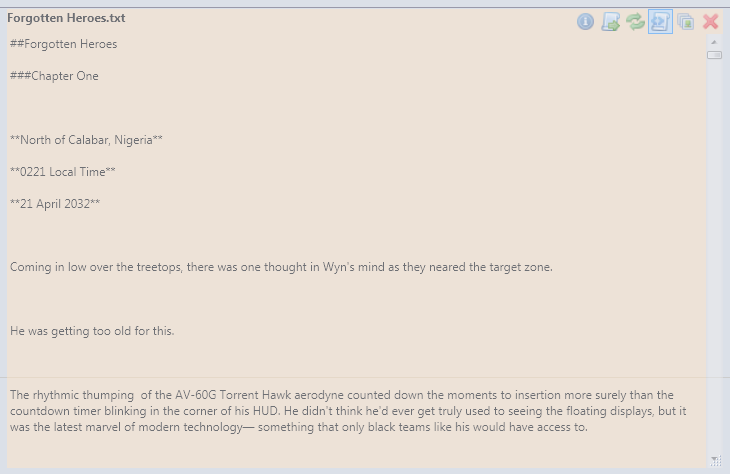
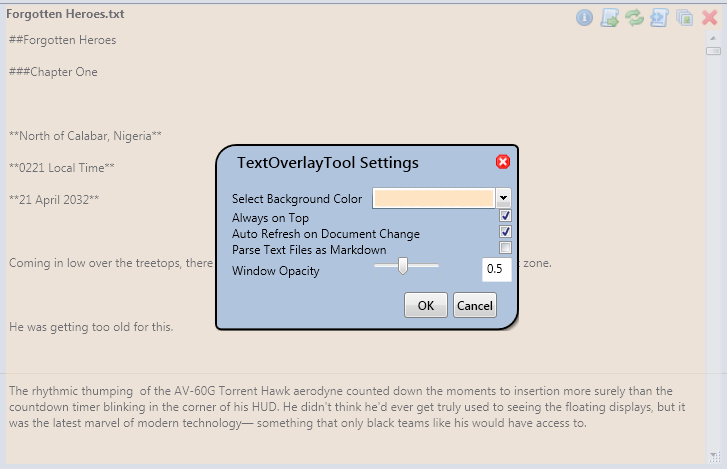
textoverlaytool1.pngtextoverlaytool2.png
textoverlaytool3.pngtextoverlaytool4.png

I now have a functional release- download it here.  And comment on the project below!

Installation

With .NET 4.5 installed, unzip application to location and run.

Feature Map

Implemented

  • Opens Text or Markdown files (if the file is formatted in markdown, it displays the markdown format)
  • Allows the preview to be refreshed manually
  • Specify an opacity of the window
  • Allow the changing of the background of the window
  • Can export to HTML or PDF (determines which one you want by filename used)
  • Borderless, movable, resizable minimal interface
  • Window background can be set.
  • Can be set to always on top
  • Watches chosen file for changes, and updates on the fly.

Planned

  • Global Hotkey to enable control no matter where the cursor is
  • The ability to change the font style and color.

mouser

  • First Author
  • Administrator
  • Joined in 2005
  • *****
  • Posts: 40,931
    • Gathering Badge
    • Plugin Coding Medal
    • Participated in NANY Challenge Seventeen Times
    • Cody Award
    • Coding Snacks
    • Volunteers/Staff
Re: TextOverlayTool
« Reply #1 on: September 15, 2015, 03:38 AM »
Awesome  :up:

With some improvements this might be a good app for your NANY 2016 entry.
« Last Edit: September 15, 2015, 05:18 AM by mouser »

wyrwolf

  • It is what it is.
  • Supporting Member
  • Joined in 2006
  • **
  • Posts: 38
Re: TextOverlayTool
« Reply #2 on: September 15, 2015, 11:28 PM »
I'm thinking it might solve my problem of needing a constant reminder of Keys/Commands while playing a game. Thanks
It is what it is.

wyrwolf

  • It is what it is.
  • Supporting Member
  • Joined in 2006
  • **
  • Posts: 38
Re: TextOverlayTool
« Reply #3 on: September 18, 2015, 09:47 PM »
Is there a way to drag-and-drop for text files?
Actually, I guess I need detailed instruction manual <sigh> - so far, all I've been able to figure out is to run it, then use the markup open (switching type to Text) to open an existing text file (oh, the info button and Settings work) - which will suffice...
but I was figuring I'd be able to type text directly in.
It shows up in the context menu, but it doesn't accept the text file
Obviously I'm not catching on... lol
It DOES look like it'll be just the thing for me as a cheat sheet for gaming
It is what it is.

relipse

  • I love Jesus. Coding in PHP primarily.
  • Charter Honorary Member
  • Joined in 2005
  • ***
  • Posts: 131
    • Participated in NANY Challenge Seven Times
Re: TextOverlayTool
« Reply #4 on: December 27, 2015, 08:05 AM »
is there a way to make the noteopad editable? it would be nice to have a little transparent note sometimes.
Ex C++Builder coder, current PHP coder, and noob Qt Coder

wraith808

  • Supporting Member
  • Joined in 2006
  • **
  • Posts: 11,205
    • Participated in NANY Challenge Fourteen Times
    • Coding Snacks
    • Writer
    • Hardware Hacker
Re: TextOverlayTool
« Reply #5 on: December 31, 2015, 10:00 PM »
is there a way to make the noteopad editable? it would be nice to have a little transparent note sometimes.


I thought about it a bit... and yes, it would be possible, but not really the direction I had in mind for the tool.

Original address: https://www.donationcoder.com/forum/index.php?topic=41597.0