An updated version of the script in this
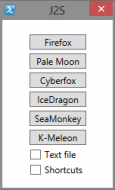
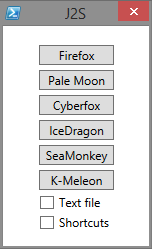
post, now handles Firefox, Pale Moon, IceDragon, Cyberfox, SeaMonkey, and K-Meleon (and more if you add the relevant code).
UPDATED: Generates text file URI list and/or folder with shortcuts.
 Requirements:
Powershell v3+
<#
.SYNOPSIS
   Reads Firefox compatible JSON session file and creates URI shortcuts in a folder on the Desktop.
.DESCRIPTION
   See above.
.PARAMETER <paramName>
   None
.EXAMPLE
   C:\> powershell.exe -sta -noprofile -executionpolicy bypass -File ".\JSON2Shortcut.ps1"
#>

Function Create-File {
  $file = ("Tabs-" + "{0:yyyy}" -f (Get-Date)) + ("{0:MM}" -f (Get-Date)) + ("{0:dd}" -f (Get-Date)) `
            + ('{0:hh}' -f (Get-Date)) + ('{0:mm}' -f (Get-Date)) + ('{0:ss}' -f (Get-Date)) + '.txt'
  $desktop = [Environment]::GetFolderPath("Desktop")

# Our new file path
  $tFile = $desktop + '\' + $file
# Create the file
  New-Item -Path $tFile -ItemType File | Out-Null
  Return $tFile
}

Function Create-Folder {
# Create a folder on the Desktop based on current date/time
  $folder = ("Tabs-" + "{0:yyyy}" -f (Get-Date)) + ("{0:MM}" -f (Get-Date)) + ("{0:dd}" -f (Get-Date)) `
            + ('{0:hh}' -f (Get-Date)) + ('{0:mm}' -f (Get-Date)) + ('{0:ss}' -f (Get-Date))
  $desktop = [Environment]::GetFolderPath("Desktop")

  New-Item -Path $desktop -Name $folder -ItemType Directory | Out-Null

# Our new folder path
  Return $desktop + '\' + $folder
}

# Cycles through the Tab entries in Firefox compatible JSON files, (eg. Cyberfox, Pale Moon, IceDragon)
Function Cycle-TabsFf {
  Param(
    [string]$tPath="",
    [string]$uriFile=""
  )
# Cycle through the Tabs object only getting the Entries for non-Hidden ones
  for($i=0; $i -lt $opentabs.windows.tabs.Count; $i++) {
    if (!$opentabs.windows.tabs.hidden[$i]) {
      if ($Cb_Shortcut.IsChecked) {
        Create-Shortcut $tPath $opentabs.windows.tabs[$i].entries[-1].title.Trim() $opentabs.windows.tabs[$i].entries[-1].url
      }
      if ($Cb_File.IsChecked) {
        Out-File -Encoding utf8 -FilePath $uriFile -InputObject $opentabs.windows.tabs[$i].entries[-1].url -Append
      }
    }
  }
}

# Cycles through the Tab entries in K-Meleon compatible JSON files
Function Cycle-TabsKm {
  Param(
    [string]$tPath="",
    [string]$uriFile=""
  )
  $opentabs.sessions[-1].windows.tabs.Count
# Cycle through the Tabs
  for($i=0; $i -lt $opentabs.sessions[-1].windows.tabs.Count; $i++) {
    if ($Cb_Shortcut.IsChecked) {
      Create-Shortcut $tPath $opentabs.sessions[-1].windows.tabs[$i].entries[-1].title.Trim() $opentabs.sessions[-1].windows.tabs[$i].entries[-1].url
    }
    if ($Cb_File.IsChecked) {
      Out-File -Encoding utf8 -FilePath $uriFile -InputObject $opentabs.sessions[-1].windows.tabs[$i].entries[-1].url -Append
    }
  }
}

Function Create-Shortcut {
  Param(
    [string]$Path,
    [string]$Title,
    [string]$url
  )
  if ($Title.Length -gt 15) { $Title = $Title.Substring(0, 15) }
  $Title = $Path + '\' + $Title + '_' + (Get-Random -Maximum 1000) + '.url'

# Create a Shortcut with Windows PowerShell using Windows Scripting interface
  $WScriptShell = New-Object -ComObject WScript.Shell
  $Shortcut = $WScriptShell.CreateShortcut($Title)
  $Shortcut.TargetPath = $url
  $Shortcut.Save()
}

Function Remove-InvalidFileNameChars {
  param(
    [Parameter(Mandatory=$true,
      Position=0,
      ValueFromPipeline=$true,
      ValueFromPipelineByPropertyName=$true)]
    [String]$Name
  )

  $invalidChars = [IO.Path]::GetInvalidFileNameChars() -join ''
  $re = "[{0}]" -f [RegEx]::Escape($invalidChars)
  return ($Name -replace $re)
}

Function Read-JSON {
  Param(
    [string]$file
  )
  if (!(Test-Path -Path $file)) { Exit }
  $global:opentabs = (Get-Content $file) -join "`n" | ConvertFrom-Json
}

Function Load-Dialog {
  Param(
    [Parameter(Mandatory=$True,Position=1)]
    [string]$XamlPath
  )

  [xml]$Global:xmlWPF = Get-Content -Path $XamlPath

  #Add WPF and Windows Forms assemblies
  try{
    Add-Type -AssemblyName PresentationCore,PresentationFramework,WindowsBase,system.windows.forms
  } catch {
    Throw "Failed to load Windows Presentation Framework assemblies."
  }

  #Create the XAML reader using a new XML node reader
  $Global:xamGUI = [Windows.Markup.XamlReader]::Load((new-object System.Xml.XmlNodeReader $xmlWPF))

  #Create hooks to each named object in the XAML
  $xmlWPF.SelectNodes("//*[@Name]") | %{
    Set-Variable -Name ($_.Name) -Value $xamGUI.FindName($_.Name) -Scope Global
  }
}

# Check Powershell version, ConvertFrom-JSON requires v3+
If($PSVersionTable.PSVersion.Major -lt 3) {
  (new-object -ComObject wscript.shell).Popup("Script requires Powershell V3",0,"OK")
  Exit
}

# Read JSON2Shortcut.ini file for paths of JSON files for various browsers
Get-Content "JSON2Shortcut.ini" | foreach-object -begin {$h=@{}} -process { $k = [regex]::split($_,'='); `
  if(($k[0].CompareTo("") -ne 0) -and ($k[0].StartsWith("[") -ne $True)) { $h.Add($k[0], $k[1]) } }
# $h.Get_Item("Firefox")


#Required to load the XAML form and create the PowerShell Variables
Load-Dialog -XamlPath '.\JSON2Shortcut.xaml'

#Events
$Bt_Firefox.add_Click({
  Read-Firefox $h.Get_Item("Firefox")
  if ($Cb_Shortcut.IsChecked -or $Cb_File.IsChecked) {
    if ($Cb_Shortcut.IsChecked) {$scPath = Create-Folder}
    if ($Cb_File.IsChecked) {$scFile = Create-File}
    Cycle-TabsFf $scPath $scFile
  }
})

$Bt_Palemoon.add_Click({
  Read-JSON $h.Get_Item("Palemoon")
  if ($Cb_Shortcut.IsChecked -or $Cb_File.IsChecked) {
    if ($Cb_Shortcut.IsChecked) {$scPath = Create-Folder}
    if ($Cb_File.IsChecked) {$scFile = Create-File}
    Cycle-TabsFf $scPath $scFile
  }
})

$Bt_Cyberfox.add_Click({
  Read-JSON $h.Get_Item("Cyberfox")
  if ($Cb_Shortcut.IsChecked -or $Cb_File.IsChecked) {
    if ($Cb_Shortcut.IsChecked) {$scPath = Create-Folder}
    if ($Cb_File.IsChecked) {$scFile = Create-File}
    Cycle-TabsFf $scPath $scFile
  }
})

$Bt_IceDragon.add_Click({
  Read-JSON $h.Get_Item("IceDragon")
  if ($Cb_Shortcut.IsChecked -or $Cb_File.IsChecked) {
    if ($Cb_Shortcut.IsChecked) {$scPath = Create-Folder}
    if ($Cb_File.IsChecked) {$scFile = Create-File}
    Cycle-TabsFf $scPath $scFile
  }
})

$Bt_SeaMonkey.add_Click({
  Read-JSON $h.Get_Item("SeaMonkey")
  if ($Cb_Shortcut.IsChecked -or $Cb_File.IsChecked) {
    if ($Cb_Shortcut.IsChecked) {$scPath = Create-Folder}
    if ($Cb_File.IsChecked) {$scFile = Create-File}
    Cycle-TabsFf $scPath $scFile
  }
})

$Bt_KMeleon.add_Click({
  Read-JSON $h.Get_Item("Kmeleon")
  if ($Cb_Shortcut.IsChecked -or $Cb_File.IsChecked) {
    if ($Cb_Shortcut.IsChecked) {$scPath = Create-Folder}
    if ($Cb_File.IsChecked) {$scFile = Create-File}
    Cycle-TabsKm $scPath $scFile
  }
})

#Launch the window
$xamGUI.ShowDialog() | out-null
Installation/Execution:- Extract all files in the archive to a folder
- Edit JSON2Shortcut.ini so that it has the correct paths for each browser, (you can use full paths or wildcards as long as it can hit the right file)
- Double-click the shortcut icon to run
DISCLAIMER: Works for me.


 JSON2Shortcut.7z