DonationCoder.com forum
 
Read-only archive. This is a static copy of the DonationCoder.com forum. Reading and searching work as before; logging in, posting and private messages do not.
Archive of 2026-10-21 · About this archive · Main site

Author Topic: [IDEA/REQUEST]Copy files from multiple folders and can paste to single Folder  (Read 12,205 times)

paarkhi

  • Supporting Member
  • Joined in 2009
  • **
  • Posts: 90
The request is to make a small utility which can gather files from multiple folders (sources) and can copy to single/multiple folder. There's a paid app for it but no freeware/Donationware and just to explain it better I'm pasting a reference of it. THE OLDER FREE VERSION OF SAME APP DOESN'T WORK ANYMORE on Windows 8.1/ Windows 10 (64bit)
Quote
http://www.conceptworld.com/Copywhiz

Copywhiz was formerly known as 'Piky Basket'.

Copywhiz enhances your file copy experience in Windows. It offers more flexibility when copying files by letting you choose which type of files to copy & which to ignore - Selective File Copy.

You will love to see how easy & fast it is to 1) pick only required files from several folders in a shot, 2) compress only selected files from multiple folders 3) collect files from multiple folders and paste at once 4) and lot more smiley.

This is very useful for sharing only particular set of files with someone, backing up only changed files, automating manual time-consuming file copying tasks etc.
People are interested in it and have made queries for it's alternative in the past on DonationCoder, Some thread links
https://www.donationcoder.com/forum/index.php?topic=39052.0
https://www.donationcoder.com/forum/index.php?action=dlattach;topic=7536.0;attach=18015;image

@Skwire

mouser

  • First Author
  • Administrator
  • Joined in 2005
  • *****
  • Posts: 40,931
    • Gathering Badge
    • Plugin Coding Medal
    • Participated in NANY Challenge Seventeen Times
    • Cody Award
    • Coding Snacks
    • Volunteers/Staff
Hi paarkhi! Great to see you.

I agree this is a useful utility idea -- there needs to be a good free tool for this.
« Last Edit: August 15, 2015, 02:53 PM by mouser »

4wd

  • Pedantic Old Bastard
  • Supporting Member
  • Joined in 2006
  • **
  • Posts: 5,652
    • Coding Snacks
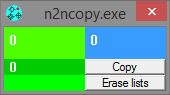
n2nCopy

Drop the files/folders you want to copy on the left side of the window, drop the destination folder on the right, hit copy (or move).

Double-click the window to get the options.

2015-08-15 21_33_13.png
"I will not follow where the path may lead, but I will go where there is no path, and I will leave a trail." - Muriel Strode, 1903

paarkhi

  • Supporting Member
  • Joined in 2009
  • **
  • Posts: 90
Hi paarkhi! Great to see you.

I agree this is a useful utility idea -- there needs to be a good free tool for this.
Same here Sir, I hope everything is fine at your end. Actually I hope @Skwire finds time to do it :)
« Last Edit: August 15, 2015, 02:54 PM by paarkhi »

paarkhi

  • Supporting Member
  • Joined in 2009
  • **
  • Posts: 90
n2nCopy

Drop the files/folders you want to copy on the left side of the window, drop the destination folder on the right, hit copy (or move).

Double-click the window to get the options.
(see attachment in previous post)
Thanks for suggesting the utility but it'd be good if someone here can make something with a context menu entry and little bit polished/refined interface. It'd be useful for everyone

conceptworld

  • Member
  • Joined in 2005
  • **
  • Posts: 181

Hello,

Just launched Copywhiz 5! (Earlier known as Piky Basket). Official announcement and discount coupon code on this page: www.donationcoder.com/forum/index.php?topic=42452.msg397227#msg397227

Regards,
Gautam Jain
« Last Edit: March 24, 2016, 02:21 PM by conceptworld »

wjamoe

  • Supporting Member
  • Joined in 2010
  • **
  • Posts: 99
    • Participated in NANY Challenge Once
    • Plugin Coding Medal
paarkhi,

did you look at  http://www.dropitproject.com/ freeware including au3 source
from their site:
----
When you need to organize files, DropIt can eliminate much of the drudgery of searching and manually opening folders and moving files around.

Drop a group of different files and folders on the floating DropIt image and it sorts them to defined destination folders, compresses or extracts them, opens them with associated programs or performs other defined actions.

You can define how to filter your files (by name, directory, size, date, properties, content, regular expressions) and associate one of the 20 available actions to perform (Move, Copy, Compress, Extract, Rename, Delete, Split, Join, Encrypt, Decrypt, Open With, Upload, Send by Mail, Create Gallery, Create List, Create Playlist, Create Shortcut, Copy to Clipboard, Change Properties and Ignore). You can also organize your associations in profiles and automatically scan monitored folders at a defined time interval to process included files.
---
instead of the big icon, you can also integrate with SendTo in context menu (see Options).

(please note there are some interworking problems with programs like gridmove and smallwindows)


Original address: https://www.donationcoder.com/forum/index.php?topic=41437.0