UPDATED:- Displays error message from NET command
- Can skip mappings by setting map# to empty string in .ini
- Clears an error message if no password was entered but then is entered (didn't before)
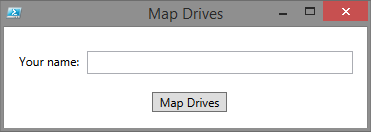
OK, a little Powershell implementation that's
specific to the original request:
MapDrive: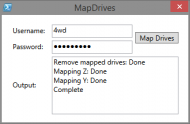
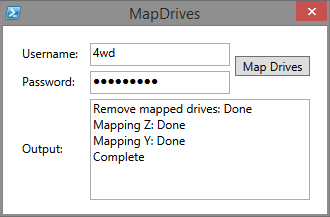
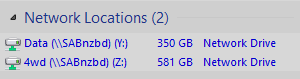
Result:
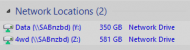
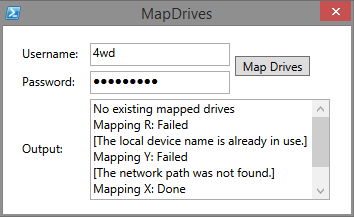
If there's an error:
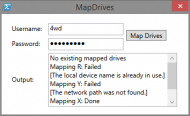 INSTALLATION:
Extract the archive to a folder.
Edit the
MapDrives.ini for your drive mappings, the format is:
map#=<drive letter with : eg. E:>
unc#=\\server\path
Where # = zero based numbering for each pair of map/unc items
eg.
map0=
unc0=
map1=
unc1=
map2=
unc2=
etc, etc
See the included
MapDrives.ini for an example.
NOTE: The first occurance of map/unc is special in that the username is added to the UNC path for the complete path, ie.
If the Username used for logging on is
fred and the .ini contains:
map0=Y:
unc0=\\server01\users
Then drive
Y: will be mapped to
\\server01\users\fredIf you don't want this function, leave the
map# parameter empty in the
.ini file - leaving it empty will cause the script to skip that mapping entry, eg.
map0=
unc0=\\server01\usersIt relies on the net.exe command for the drive mappings so Admin privileges might be required, (don't know - I only have single user Admin systems).
EXECUTION:Double-click the included shortcut icon.
NOTE: It will remove ALL current drive mappings before creating the new ones.DISCLAIMER: It works for me.
MapDrives.ps1If($PSVersionTable.PSVersion.Major -lt 3) {
(new-object -ComObject wscript.shell).Popup("Script requires Powershell V3",0,"OK")
Exit
}
# Read MapDrives.ini file
Get-Content "MapDrives.ini" | foreach-object -begin {$h=@{}} -process { $k = [regex]::split($_,'='); `
if(($k[0].CompareTo("") -ne 0) -and ($k[0].StartsWith("[") -ne $True)) { $h.Add($k[0], $k[1]) } }
Function Load-Dialog {
Param(
[Parameter(Mandatory=$True,Position=1)]
[string]$XamlPath
)
[xml]$Global:xmlWPF = Get-Content -Path $XamlPath
#Add WPF and Windows Forms assemblies
try{
Add-Type -AssemblyName PresentationCore,PresentationFramework,WindowsBase,system.windows.forms
} catch {
Throw "Failed to load Windows Presentation Framework assemblies."
}
#Create the XAML reader using a new XML node reader
$Global:xamGUI = [Windows.Markup.XamlReader]::Load((new-object System.Xml.XmlNodeReader $xmlWPF))
#Create hooks to each named object in the XAML
$xmlWPF.SelectNodes("//*[@Name]") | %{
Set-Variable -Name ($_.Name) -Value $xamGUI.FindName($_.Name) -Scope Global
}
}
Function Remove-Maps {
# Get all currently mapped drives
$maps = (New-Object -Com WScript.Network).EnumNetworkDrives()
$maps.Count()
if ($maps.Count() -gt 0) {
$Tb_Output.Text = "Remove mapped drives: "
# Remove all current mappings
for ($i = 0; $i -lt $maps.Count() - 1; $i = $i + 2) {
(New-Object -Com WScript.Network).RemoveNetworkDrive($maps.Item($i))
}
$Tb_Output.AppendText("Done`r")
} else {
$Tb_Output.Text = "No existing mapped drives`r"
}
}
Function Map-Drives {
for ($i = 0; $i -lt [Math]::Truncate($h.Count / 2); $i++) {
$t1 = "map" + $i
$t2 = "unc" + $i
if ($h.Get_Item($t1) -ne "") {
if ($i -eq 0) {
$root = $h.Get_Item($t2) + "\" + $user
} else {
$root = $h.Get_Item($t2)
}
$Tb_Output.AppendText("Mapping " + $h.Get_Item($t1))
$cmd = "use " + $h.Get_Item($t1) + " " + $root + " " + $pass + " /user:" + $user
$errfile = $env:TEMP + "\MapDrive.txt"
$result = Start-Process -FilePath "net.exe" -ArgumentList $cmd -Wait -PassThru -WindowStyle Hidden -RedirectStandardError $errfile
if ($result.ExitCode -ne 0) {
Write-Host $result.StandardError
Write-Host $result.StandardOutput
$Tb_Output.AppendText(" Failed`r")
$errtxt = Get-Content -Path $errfile
$Tb_Output.AppendText("[" + $errtxt[2] + "]`r")
Remove-Item $errfile -Force
} else {
$Tb_Output.AppendText(" Done`r")
}
}
}
}
#Required to load the XAML form and create the PowerShell Variables
Load-Dialog -XamlPath '.\MapDrives.xaml'
#EVENT Handlers
$Bt_Map.add_Click({
$Tb_Output.Clear()
$global:user = ""
$global:pass = ""
if ($Tb_Username.Text -ne "") { $user = $Tb_Username.Text }
if ($Pb_Password.Password -ne "") { $pass = $Pb_Password.Password }
if (($user.Length -ne 0) -and ($pass.Length -ne 0)) {
Remove-Maps
Start-Sleep -Milliseconds 500
Map-Drives
$Tb_Output.AppendText("Complete`r")
} else {
$Tb_Output.Text = ("Missing Username or Password`r")
}
})
$Tb_Username.Add_TextChanged({
$Tb_Output.Clear()
})
$Pb_Password.Add_KeyDown({
$Tb_Output.Clear()
})
#Launch the window
$xamGUI.ShowDialog() | out-null
MapDrives.ini[General]
map0=R:
unc0=\\10.0.50.1\users
map1=Y:
unc1=\\10.0.50.1\Data
map2=X:
unc2=\\10.1.51.12\itsme
map3=
unc3=\\server01\clients
MapDrives.xaml (the interface definition)
<Window
  xmlns="http://schemas.microsoft.com/winfx/2006/xaml/presentation"
  xmlns:x="http://schemas.microsoft.com/winfx/2006/xaml"
  Title="MapDrives" Height="217" Width="354" ResizeMode="NoResize">
  <Grid>
    <TextBox Name="Tb_Username" HorizontalAlignment="Left" Height="23" Margin="87,17,0,0" VerticalAlignment="Top" Width="140" ToolTip="Enter your username" MaxLines="1"/>
    <Label Name="Lb_Username" Content="Username:" Margin="14,14,0,0" VerticalAlignment="Top" HorizontalAlignment="Left" Width="68"/>
    <Label Name="Lb_password" Content="Password:" HorizontalAlignment="Left" Margin="14,42,0,0" VerticalAlignment="Top" Width="68"/>
    <PasswordBox Name="Pb_Password" ToolTip="Enter your password" HorizontalAlignment="Left" Margin="87,45,0,0" VerticalAlignment="Top" Width="140" Height="23"/>
    <Button Name="Bt_Map" Content="Map Drives" HorizontalAlignment="Left" Margin="232,30,0,0" VerticalAlignment="Top" Width="75"/>
    <TextBox Name="Tb_Output" HorizontalAlignment="Left" Height="101" Margin="87,73,0,0" VerticalAlignment="Top" Width="240" IsReadOnly="True" IsUndoEnabled="False" MaxLines="20" TextWrapping="Wrap" VerticalScrollBarVisibility="Auto"/>
    <Label Name="Lb_Output" Content="Output:" HorizontalAlignment="Left" Margin="14,109,0,0" VerticalAlignment="Top" Width="68"/>
  </Grid>
</Window>


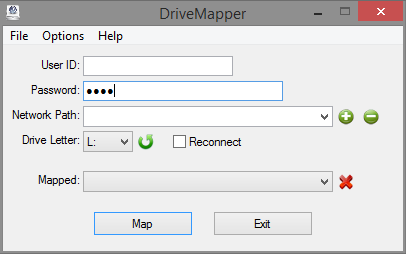

 MapDrives.7z