DonationCoder.com forum
 
Read-only archive. This is a static copy of the DonationCoder.com forum. Reading and searching work as before; logging in, posting and private messages do not.
Archive of 2026-10-21 · About this archive · Main site

Author Topic: MouseImp Pro Live!- useful mousetool  (Read 14,841 times)

masu

  • Member
  • Joined in 2006
  • **
  • Posts: 401
MouseImp Pro Live!- useful mousetool
« on: June 25, 2006, 10:27 AM »
Quote
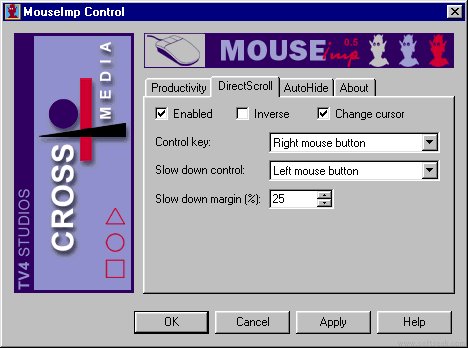
MouseImp is a handy tool that helps you to use your conventional mouse more efficiently. The AutoShrink feature increases your available workspace by removing toolbars from the screen so that only caption bars remain. To access a toolbar, just point to its caption, and it will be restored immediately. The Direct Scroll feature makes it easier to scroll through windows. Instead of using a scroll bar, you can activate MouseImp and scroll by moving the mouse up or down anywhere in the window.

MouseImp also gives you the ability to shrink windows temporarily.

personally I like this much more than the MS 4-wheel Hardware mouse


http://www.mouseimp.com/
Find+Run Robot 2.90.01
Windows 7

jgpaiva

  • Artificial Idiocy
  • Global Moderator
  • Joined in 2006
  • *****
  • Posts: 4,727
    • Cody Award
    • Participated in NANY Challenge Once
    • Coding Snacks
    • Portugal Inhabitant
    • Linux User
Re: MouseImp Pro Live!- useful mousetool
« Reply #1 on: June 25, 2006, 11:11 AM »
I've tried it just now, and found it can be very good. By removing the scroll bars, we get more screen space, and the program works in a similar way as adobe's acrobat, which i find very intuitive (grab and drag the page itself). This can also be inverted, and it works just like the scrollbars do.

Now, for the bad part: i can't use the right mouse button, that would interfeer with opera's mouse gestures (NOT GOOD! ;) ). And if i select the left mouse button as trigger, i won't be able to select text to copy and such without pressing the disable key. So, i think this program misses one small feature: an activation area. It'd be very useful if i was able to have it scroll the windows only when the mouse was on the right 10% of the window or such.

nudone

  • Cody's Creator
  • Columnist
  • Joined in 2005
  • ***
  • Posts: 4,119
    • Cody Award
Re: MouseImp Pro Live!- useful mousetool
« Reply #2 on: June 25, 2006, 12:37 PM »
i used to love mouseimp pro - then i sort of just forgot about it.

mouser

  • First Author
  • Administrator
  • Joined in 2005
  • *****
  • Posts: 40,931
    • Gathering Badge
    • Plugin Coding Medal
    • Participated in NANY Challenge Seventeen Times
    • Cody Award
    • Coding Snacks
    • Volunteers/Staff
Re: MouseImp Pro Live!- useful mousetool
« Reply #3 on: June 25, 2006, 02:13 PM »
interesting.. screenshots: http://www.mouseimp.com/screen-shots/

sri

  • Honorary Member
  • Joined in 2006
  • **
  • Posts: 689
Re: MouseImp Pro Live!- useful mousetool
« Reply #4 on: August 21, 2007, 09:00 AM »
I installed this and have it running but can't figure out how to use it or what it does?

'Direct Scroll' is enabled, but how do I activate it?

Similarly, how do I activate or start 'Auto Shrink' feature?

masu

  • Member
  • Joined in 2006
  • **
  • Posts: 401
Re: MouseImp Pro Live!- useful mousetool
« Reply #5 on: October 31, 2007, 08:22 PM »
thanks for the hint.
I like the horizontal scrolling function of mouseimp pro, because my mouse has no tilt wheel function
Find+Run Robot 2.90.01
Windows 7

lanux128

  • Global Moderator
  • Joined in 2005
  • *****
  • Posts: 6,277
    • Coding Snacks
    • Volunteers/Staff
    • Gathering Badge
    • Participated in NANY Challenge Once
    • Linux User
Re: MouseImp Pro Live!- useful mousetool
« Reply #6 on: November 01, 2007, 01:49 AM »
quite a nifty tool.. also mentioned here..


• MouseIMP Pro...Shareware Gone Freeware

J-Mac

  • Supporting Member
  • Joined in 2007
  • **
  • Posts: 2,918
Re: MouseImp Pro Live!- useful mousetool
« Reply #7 on: November 01, 2007, 06:07 AM »
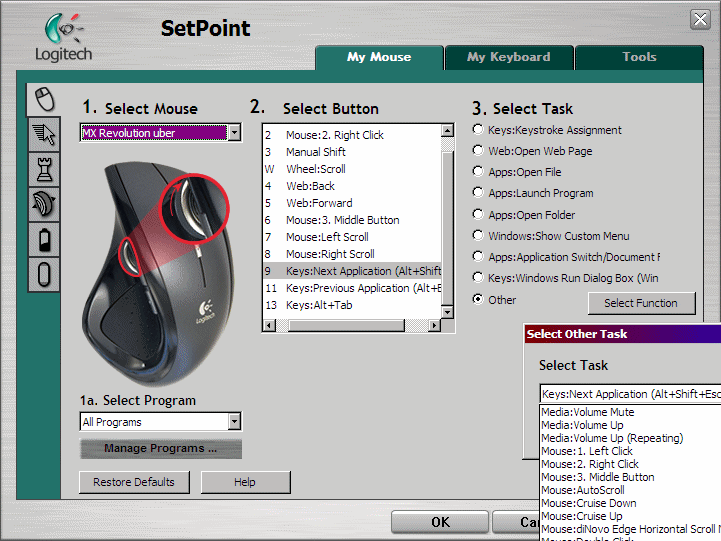
Looks pretty cool!  But I'm using a Logitech MX Revolution wireless mouse with quite a few buttons and wheels, and running UberSetPoint - a user-developed Modification of Logitech's SetPoint mouse software That offers almost unlimited functions with this mouse.  I don't think - from a quick look - that MouseImp could possibly accommodate all these buttons and scrollers on this mouse.

I'd love to try some of its features, but I'm pretty sure I would lose a lot of other functionality using this mouse.  :(

The AutoShrink feature looks like the Window Shade feature offered in some applications, where it appears that the window "rolls up" into the titlebar like a shade when the mouse isn't over it.

Jim
"I am getting so tired of slitting the throats of people who say that I am a violent psychopath."

lanux128

  • Global Moderator
  • Joined in 2005
  • *****
  • Posts: 6,277
    • Coding Snacks
    • Volunteers/Staff
    • Gathering Badge
    • Participated in NANY Challenge Once
    • Linux User
Re: MouseImp Pro Live!- useful mousetool
« Reply #8 on: November 01, 2007, 07:03 AM »
J-Mac: uberOptions looks more feature-rich, why not add a screenshot plus a link to the website.. :)

CGA

  • Charter Member
  • Joined in 2005
  • ***
  • Posts: 33
Re: MouseImp Pro Live!- useful mousetool
« Reply #9 on: November 01, 2007, 05:09 PM »

J-Mac

  • Supporting Member
  • Joined in 2007
  • **
  • Posts: 2,918
Re: MouseImp Pro Live!- useful mousetool
« Reply #10 on: November 01, 2007, 08:06 PM »
Sorry folks - didn't see the request by lanux128 till now.  Looks like CGA posted the link, but here's a screenshot from that site:

[attach=#]
"I am getting so tired of slitting the throats of people who say that I am a violent psychopath."

lanux128

  • Global Moderator
  • Joined in 2005
  • *****
  • Posts: 6,277
    • Coding Snacks
    • Volunteers/Staff
    • Gathering Badge
    • Participated in NANY Challenge Once
    • Linux User
Re: MouseImp Pro Live!- useful mousetool
« Reply #11 on: November 02, 2007, 02:32 AM »
good job, CGA! now i know where to download when i get my multi-button mouse, eventually.. ;)

Original address: https://www.donationcoder.com/forum/index.php?topic=4129.0