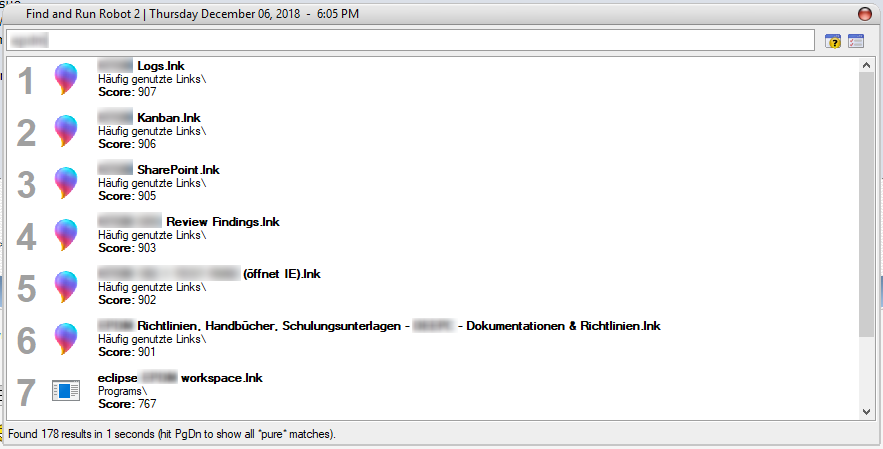
There was an old issue about missing icons, but now seems issue is back (maybe it was fixed only for Windows 7 that time?). I'll describe it again in short here, see old thread for more information.
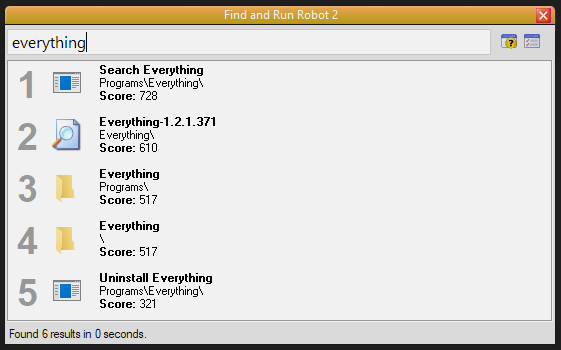
Some links for 64-bit applications doesn't show icon on Windows 8. This issue only affects 64-bit applications on Windows 8. It doesn't appears on Windows 7 nor for 32-bit applications. Not all links are affected, but some of them. Options "Shortcut Lnk Resolution" changes nothing here. Only applications in "C:\Program Files" are affected, not in "C:\Program Files (x86)".
Known affected 64-bit applications:
- Opera Browser
- 3DMark
- TortoiseSVN, TortoiseMerge, TortoiseIDiff
- Everything
- 3DMark
- SecureFX, SecureCRT
- 7-Zip (old version, can't reproduce with new version)
- dupeGuru
- COMODO Internet Security (icon is correct, path is not correct)
- Far Manager 3 x64
- Intel® Rapid Storage Technology
- Microsoft Mathematics
- Intel Processor Diagnostic Tool,
- Oracle VM VirtualBox,
- FastCopy
Lets look inside "bad" lnk file:
lnk_parser_cmd.exe "C:\ProgramData\Start Menu\Programs\TortoiseSVN\TortoiseMerge.lnk"
Target is "C:\Program Files\TortoiseSVN\bin\TortoiseMerge.exe". The issue is in this lines:
This means that link refers to a file in FOLDERID_ProgramFiles folder, this constant is {905e63b6-c1bf-494e-b29c-65b732d3d21a} or CSIDL_PROGRAM_FILES = 0x0026 (decimal: 38).
But this constant has a different meaning in 32-bit and 64-bit applications. If you resolve link from 64-bit application it will lead to "%SystemDrive%\Program Files", but if you resolve it from 32-bit application it will lead to "%SystemDrive%\Program Files (x86)".
That's why FARR (32-bit) searches icon in "C:\Program Files (x86)\TortoiseSVN\bin\TortoiseMerge.exe" - not existent path. So, technically this is an issue with incorrect links, but it is very common, and it will be perfect if we can make a workaround.
Thank you!
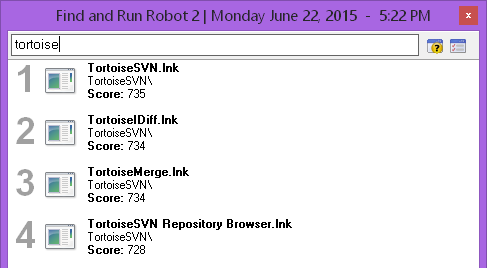
Some links for 64-bit applications doesn't show icon on Windows 8. This issue only affects 64-bit applications on Windows 8. It doesn't appears on Windows 7 nor for 32-bit applications. Not all links are affected, but some of them. Options "Shortcut Lnk Resolution" changes nothing here. Only applications in "C:\Program Files" are affected, not in "C:\Program Files (x86)".
Known affected 64-bit applications:
- Opera Browser
- 3DMark
- TortoiseSVN, TortoiseMerge, TortoiseIDiff
- Everything
- 3DMark
- SecureFX, SecureCRT
- 7-Zip (old version, can't reproduce with new version)
- dupeGuru
- COMODO Internet Security (icon is correct, path is not correct)
- Far Manager 3 x64
- Intel® Rapid Storage Technology
- Microsoft Mathematics
- Intel Processor Diagnostic Tool,
- Oracle VM VirtualBox,
- FastCopy
Lets look inside "bad" lnk file:
lnk_parser_cmd.exe "C:\ProgramData\Start Menu\Programs\TortoiseSVN\TortoiseMerge.lnk"
Code: (generic)
[Filename]:				C:\ProgramData\Start Menu\Programs\TortoiseSVN\TortoiseMerge.lnk

[Header]
Date created:				08/10/2014 (12:10:38.0) [UTC]
Last accessed:				08/23/2014 (15:25:37.234) [UTC]
Last modified:				08/10/2014 (12:10:38.0) [UTC]
File size:				2630400 bytes
File attributes:			0x00000020	(FILE_ATTRIBUTE_ARCHIVE)
Icon index:				0
ShowWindow value:			1		(SW_SHOWNORMAL / SW_NORMAL)
Hot key value:				0x0000		(None)
Link flags:				0x0000008f	(HasLinkTargetIDList, HasLinkInfo, HasName, HasRelativePath, IsUnicode)

[Link Target ID List]
CLSID:					20d04fe0-3aea-1069-a2d8-08002b30309d = My Computer

Drive:					C:\

Last modified:				08/23/2014 (15:25:38.0) [UTC]
Folder attributes:			0x00000011	(FILE_ATTRIBUTE_READONLY, FILE_ATTRIBUTE_DIRECTORY)
Short directory name:			PROGRA~1
Date created:				08/22/2013 (13:36:16.0) [UTC]
Last accessed:				08/23/2014 (15:25:38.0) [UTC]
Long directory name:			Program Files
Argument:				@shell32.dll,-21781

Last modified:				08/23/2014 (15:25:38.0) [UTC]
Folder attributes:			0x00000010	(FILE_ATTRIBUTE_DIRECTORY)
Short directory name:			TORTOI~1
Date created:				08/23/2014 (15:25:38.0) [UTC]
Last accessed:				08/23/2014 (15:25:38.0) [UTC]
Long directory name:			TortoiseSVN

Last modified:				08/23/2014 (15:25:38.0) [UTC]
Folder attributes:			0x00000010	(FILE_ATTRIBUTE_DIRECTORY)
Short directory name:			bin
Date created:				08/23/2014 (15:25:38.0) [UTC]
Last accessed:				08/23/2014 (15:25:38.0) [UTC]
Long directory name:			bin

File size:				2630400 bytes
Last modified:				08/10/2014 (12:10:38.0) [UTC]
File attributes:			0x00000020	(FILE_ATTRIBUTE_ARCHIVE)
8.3 filename:				TORTOI~3.EXE
Date created:				08/10/2014 (12:10:38.0) [UTC]
Last accessed:				08/23/2014 (15:25:38.0) [UTC]
Long filename:				TortoiseMerge.exe

[Link Info]
Location flags:				0x00000001	(VolumeIDAndLocalBasePath)
Drive type:				3		(DRIVE_FIXED)
Drive serial number:			5238-03e0
Volume label (ASCII):			System SSD
Local path (ASCII):			C:\Program Files\TortoiseSVN\bin\TortoiseMerge.exe

[String Data]
Comment (UNICODE):			View Diff's, Merge Diff's, Resolve Conflicted Files and Apply Patches
Relative path (UNICODE):		..\..\..\..\..\..\Program Files\TortoiseSVN\bin\TortoiseMerge.exe

[Known Folder Location]
Known folder GUID:			905e63b6-c1bf-494e-b29c-65b732d3d21a = ProgramFiles
First child segment offset:		185 bytes

[Metadata Property Store]
Property set GUID:			46588ae2-4cbc-4338-bbfc-139326986dce
ID:					4
Value:					0x001f (VT_LPWSTR)	S-1-5-18

[Special Folder Location]
Special folder identifier:		38		(ProgramFiles)
First child segment offset:		185 bytes

[Distributed Link Tracker Properties]
Version:				0
NetBIOS name:				xx
Droid volume identifier:		0318f7dc-7f30-4740-9e53-5ca4943e0b8d
Droid file identifier:			516e9cba-2ad9-11e4-82c8-ac220b4cafe0
Birth droid volume identifier:		0318f7dc-7f30-4740-9e53-5ca4943e0b8d
Birth droid file identifier:		516e9cba-2ad9-11e4-82c8-ac220b4cafe0
MAC address:				xx:xx:xx:xx:xx:xx
UUID timestamp:				08/23/2014 (15:22:39.43) [UTC]
UUID sequence number:			712
Target is "C:\Program Files\TortoiseSVN\bin\TortoiseMerge.exe". The issue is in this lines:
Code: (generic)
...
[Known Folder Location]
Known folder GUID:			905e63b6-c1bf-494e-b29c-65b732d3d21a = ProgramFiles
First child segment offset:		185 bytes
...
[Special Folder Location]
Special folder identifier:		38		(ProgramFiles)
First child segment offset:		185 bytes
...
This means that link refers to a file in FOLDERID_ProgramFiles folder, this constant is {905e63b6-c1bf-494e-b29c-65b732d3d21a} or CSIDL_PROGRAM_FILES = 0x0026 (decimal: 38).
But this constant has a different meaning in 32-bit and 64-bit applications. If you resolve link from 64-bit application it will lead to "%SystemDrive%\Program Files", but if you resolve it from 32-bit application it will lead to "%SystemDrive%\Program Files (x86)".
That's why FARR (32-bit) searches icon in "C:\Program Files (x86)\TortoiseSVN\bin\TortoiseMerge.exe" - not existent path. So, technically this is an issue with incorrect links, but it is very common, and it will be perfect if we can make a workaround.
Thank you!